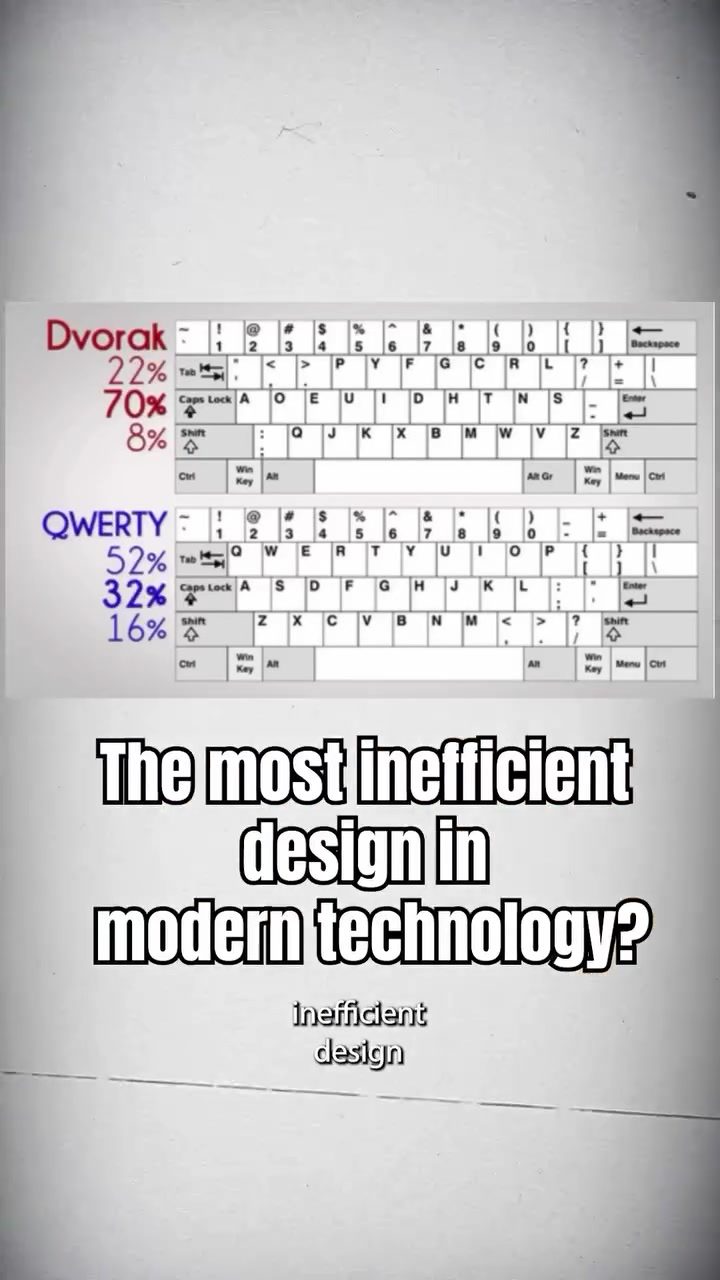
Keyboard Design Inefficiency
Keyboards are ubiquitous in modern technology, yet they harbor a design inefficiency that has persisted for over a century. The QWERTY keyboard layout, which most of us use daily, was originally designed to address a specific mechanical problem in early typewriters. Understanding the history and design of QWERTY keyboards provides insight into why this layout remains so prevalent today.
Why this matters
The QWERTY keyboard layout is deeply ingrained in our daily lives, but its origins and continued use raise intriguing questions. Why did this layout emerge, and why has it persisted despite its inefficiencies? Exploring these questions offers a fascinating look into the evolution of technology and the impact of historical decisions on modern design.
Main discussion
The origins of QWERTY
The story of the QWERTY keyboard begins in the 1870s with the invention of the typewriter. Early typewriters faced a significant problem: when operators typed too quickly, the mechanical arms would jam. To solve this issue, keyboard designer Christopher Sholes rearranged the letters on the keyboard. The goal was to slow down typing speed by placing commonly used letter pairs far apart. This intentional inefficiency prevented mechanical jams and ensured smoother operation.
Some theories suggest that the QWERTY layout already existed and was adapted from telegraph operators' keyboards. However, the primary purpose of the QWERTY design was to address the mechanical constraints of early typewriters. The layout's inefficiencies, such as placing 'E' and 'R' on different fingers and 'T' and 'H' on opposite sides, were deliberate design choices to slow down typing and prevent jams.
The endurance of an inefficient design
When computers became widespread, the mechanical constraints that necessitated the QWERTY layout were no longer relevant. With digital keyboards, there was no need for a design that slowed down typing. In 1936, August Dvorak introduced a scientifically optimized keyboard layout that was 74% more efficient than QWERTY. Despite this advancement, the QWERTY layout remained dominant. By that time, millions of people had already learned and adapted to QWERTY, making it difficult to transition to a new layout.
The persistence of QWERTY can be attributed to several factors. One key reason is the widespread adoption and familiarity with the layout. Changing to a more efficient layout would require significant effort and resources, including retraining users and redesigning software and hardware. Additionally, the entrenched nature of QWERTY in educational systems and professional environments ensures its continued use.
Alternatives to QWERTY
While QWERTY remains the standard, several alternative keyboard layouts have been developed to address its inefficiencies. One notable example is the Dvorak layout, created by August Dvorak. The Dvorak layout is designed to increase typing speed and reduce finger movement, making it more efficient than QWERTY. Other alternatives include the Colemak and Maltron layouts, each offering different advantages in terms of ergonomics and efficiency.
However, the transition to these alternative layouts faces significant challenges. The widespread use of QWERTY means that most software and hardware are designed with it in mind. Changing to a new layout would require a coordinated effort to update these systems, which is a complex and resource-intensive process.
The impact of historical decisions
The persistence of the QWERTY keyboard layout highlights the enduring impact of historical decisions on modern technology. The design choices made to address the mechanical constraints of early typewriters continue to influence our daily interactions with keyboards. This phenomenon illustrates how technological advancements can be constrained by the legacy of past designs and the inertia of widespread adoption.
Practical tips
While the QWERTY layout may be inefficient, there are practical steps you can take to improve your typing experience and efficiency:
Learn touch typing
Mastering touch typing techniques can significantly improve your typing speed and accuracy, regardless of the keyboard layout. Touch typing involves using all your fingers and keeping your eyes on the screen rather than the keyboard. This skill can help you become more efficient with the QWERTY layout or any alternative you choose.
Explore alternative layouts
If you are open to exploring alternative keyboard layouts, consider trying out Dvorak, Colemak, or Maltron. Each of these layouts offers different advantages in terms of efficiency and ergonomics. Transitioning to a new layout requires practice and patience, but it can lead to improved typing performance over time.
Use ergonomic keyboards
Ergonomic keyboards are designed to reduce strain and improve comfort during extended typing sessions. These keyboards often feature split, curved, or adjustable designs that promote a more natural wrist and hand position. Incorporating an ergonomic keyboard into your setup can help mitigate some of the physical discomfort associated with prolonged typing.
Customize your keyboard settings
Many operating systems and devices allow you to customize keyboard settings, such as key repeat delay and rate. Adjusting these settings to suit your preferences can enhance your typing experience and reduce errors. Experiment with different settings to find what works best for you.
Important takeaways
The QWERTY keyboard layout, with its historical roots in early typewriters, remains a ubiquitous and inefficient design in modern technology. Understanding the origins and persistence of QWERTY offers valuable insights into the evolution of technology and the challenges of adopting new designs. While the QWERTY layout may not be the most efficient, exploring alternative layouts and practical tips can help improve your typing experience and efficiency.
By recognizing the impact of historical decisions on modern technology, we can appreciate the complexities of design and the importance of continuous innovation. Whether you stick with QWERTY or explore alternative layouts, embracing these insights can lead to a more efficient and enjoyable typing experience.
Conclusion
Keyboards are a fundamental part of modern technology, and their design has a significant impact on our daily interactions. The QWERTY layout, despite its inefficiencies, continues to dominate due to its historical roots and widespread adoption. By exploring the history and alternatives to QWERTY, we can gain a deeper understanding of how technological designs evolve and the challenges of embracing new innovations. Whether you choose to stick with QWERTY or explore more efficient layouts, taking practical steps to improve your typing experience can make a significant difference in your daily productivity and comfort.
Watch the Reel
Questions readers ask
Why was the QWERTY keyboard layout designed originally?
The QWERTY keyboard layout was designed in the 1870s for mechanical typewriters. The primary goal was to slow down typing speed to prevent jams and tangles caused by the physical limitations of early typewriters.
What are some of the inefficiencies of the QWERTY keyboard layout?
The QWERTY layout is inefficient because it was designed to slow down typing, not to optimize it for speed or comfort. This results in awkward finger movements and less intuitive placement of commonly used keys, which can hinder typing speed and increase the risk of repetitive strain injuries.
Why has the QWERTY keyboard layout persisted despite its inefficiencies?
The QWERTY layout has persisted due to its early adoption and the widespread use of typewriters and computers that utilized this layout. Transitioning to a new layout would require significant adaptation and retraining, making it a challenging change to implement widely.
What impact did the QWERTY layout have on the evolution of keyboard technology?
The QWERTY layout significantly influenced the development of keyboard technology. Many modern keyboards still use this layout, even though it was designed for a different era of technology. This persistence has shaped how we interact with keyboards today, despite the availability of more efficient alternatives.
Why does the QWERTY keyboard layout affect typing speed?
The QWERTY layout affects typing speed by placing frequently used letters in less convenient positions, requiring more complex finger movements. This design can slow down typing and make it more difficult for users to reach their full typing potential.
What are some alternatives to the QWERTY keyboard layout?
There are several alternatives to the QWERTY keyboard layout, such as the Dvorak and Colemak layouts. These layouts are designed to optimize typing speed and comfort by placing commonly used letters in more accessible positions. However, they are less widely used due to the prevalence of QWERTY.
How did the QWERTY layout evolve from typewriters to modern keyboards?
The QWERTY layout transitioned from typewriters to modern keyboards as technology advanced. Early computers adopted the QWERTY layout to maintain compatibility with typewriters, and this layout has been perpetuated through successive generations of technology, becoming the standard for most modern keyboards.
Related deep dives
Similar reads based on topic and creator.



Recent articles
Fresh deep dives from the latest Reels we unpacked.




Comments
Be the first to comment.