Protecting Your WiFi Network: A Deep Dive into Monitoring and Security
WiFi networks have become an integral part of modern life, providing connectivity for a wide range of devices. However, with the convenience of WiFi comes the need for vigilance in protecting your network from potential threats. Monitoring your WiFi network can help ensure its security, and tools like Wifite make this process more accessible and effective.
Why WiFi Security Matters
WiFi networks are ubiquitous in homes, offices, and public spaces. They offer convenience by allowing multiple devices to connect to the internet wirelessly. However, this convenience also makes them attractive targets for hackers. Unsecured or poorly secured WiFi networks can be exploited for various malicious activities, including data theft, unauthorized access, and network disruption.
Understanding the importance of WiFi security is the first step in protecting your network. By monitoring your WiFi network, you can identify potential vulnerabilities and take proactive measures to secure it. This involves using tools that can scan and analyze your network, helping you to understand what devices are connected and how secure your network is.
Understanding WiFi Monitoring with Wifite
Wifite is a powerful WiFi network analysis tool designed to help users monitor and analyze their WiFi networks. It is particularly useful for identifying potential security weaknesses and ensuring that your network is well-protected. Wifite can scan for available WiFi networks and provide detailed information about each one, including signal strength, encryption type, and more.
Features of Wifite
Wifite offers a range of features that make it a valuable tool for WiFi monitoring and security:
- WiFi Scanning: Wifite can scan for available WiFi networks and display a list of detected networks along with their details. This includes information such as the network's SSID, signal strength, and encryption type.
- Network Analysis: The tool provides in-depth analysis of your network, helping you to identify any potential vulnerabilities. This includes identifying unauthorized devices connected to your network and assessing the strength of your WiFi signal.
- Security Assessment: Wifite can assess the security of your WiFi network, providing insights into how well-protected your network is. This includes identifying weak encryption methods and suggesting stronger security measures.
Using Wifite with a Smartphone
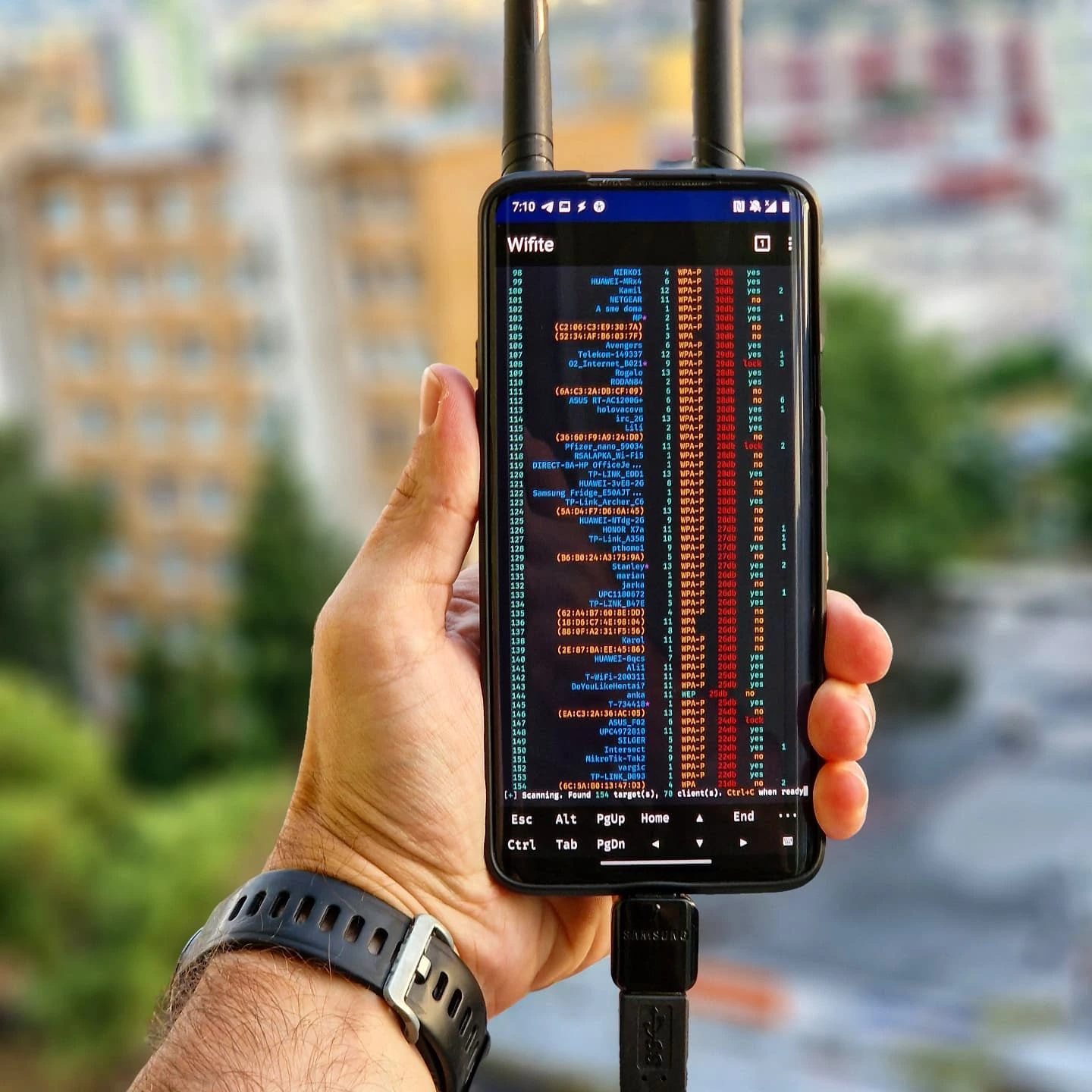
Wifite can be used on a smartphone, making it a portable and convenient tool for WiFi monitoring. The tool's functionality is showcased on a smartphone, with the screen displaying a list of detected WiFi networks and their details. This highlights the tool's ability to scan and display WiFi network information, making it an effective tool for on-the-go monitoring.
Monitoring WiFi Networks
Monitoring your WiFi network is an essential part of ensuring its security. By regularly scanning your network, you can identify potential vulnerabilities and take proactive measures to secure it. Here are some key aspects of WiFi monitoring:
Scan Results
When using Wifite, you can expect to see detailed scan results that provide valuable insights into your WiFi network. These results typically include:
- Number of Targets: The total number of WiFi networks detected by the scan.
- Encryption Type: The type of encryption used by each detected network, such as WPA2, WPA3, or WEP.
- Signal Strength: The strength of the WiFi signal for each detected network, which can help you determine the range and coverage of your network.
External vs. Built-in WiFi Chipset
Using an external WiFi adapter, such as the Alfa adapter, can enhance the scanning capabilities of your WiFi monitoring tool. The Alfa adapter, for example, can detect 154 targets, compared to 125 targets detected by a built-in WiFi chipset. This demonstrates that while using an external adapter can improve scan results, it is not always necessary for effective WiFi monitoring.
Practical Tips for Securing Your WiFi Network
Securing your WiFi network involves several practical steps that can help protect it from unauthorized access and other threats. Here are some tips to enhance your WiFi security:
Use Strong Encryption
Choosing a strong encryption method for your WiFi network is crucial. WPA3 is currently the most secure encryption standard, providing robust protection against various types of attacks. If WPA3 is not available, opt for WPA2, which is also secure. Avoid using older encryption methods like WEP, as they are easily hackable.
Regularly Update Your Router Firmware
Updating your router's firmware ensures that you have the latest security patches and improvements. Manufacturers often release firmware updates to address vulnerabilities and enhance performance, so it's essential to keep your router up-to-date.
Change Default Credentials
Many routers come with default usernames and passwords, which can be easily exploited by hackers. Change these default credentials to strong, unique passwords that are difficult to guess. This helps prevent unauthorized access to your router's settings.
Use a Strong Network Password
Choose a strong, unique password for your WiFi network. This password should be at least 12 characters long and include a mix of uppercase and lowercase letters, numbers, and special characters. A strong password makes it more difficult for hackers to gain access to your network.
Enable Guest Networks
Setting up a guest network can help isolate your main network from unauthorized devices. This allows visitors to connect to the internet without accessing your primary network, reducing the risk of security breaches and ensuring that your devices remain secure.
Monitor Connected Devices
Regularly check the list of devices connected to your WiFi network. Unauthorized devices can indicate a potential security breach, so it's important to monitor and manage connected devices to ensure that only authorized devices are accessing your network.
Use a Firewall
Enabling a firewall on your router can add an extra layer of security by filtering incoming and outgoing network traffic. This helps protect your network from various types of attacks, such as Denial of Service (DoS) and Distributed Denial of Service (DDoS) attacks.
Important Takeaways
Protecting your WiFi network is essential for ensuring the security and integrity of your connected devices. By using tools like Wifite, you can monitor your network effectively and identify potential vulnerabilities. Regular monitoring, using strong encryption, and following best practices for WiFi security can help keep your network secure and protect your data.
Conclusion
WiFi networks are a critical part of modern connectivity, and securing them is paramount. Using tools like Wifite, you can monitor and analyze your WiFi network, ensuring that it is well-protected. Understanding the importance of WiFi security and taking proactive measures to secure your network can help safeguard your data and prevent unauthorized access. By following best practices and using effective monitoring tools, you can maintain a secure and reliable WiFi network.
Watch the Reel
Questions readers ask
What is Wifite and how does it help in securing my WiFi network?
Wifite is an automated tool designed to audit and test the security of WiFi networks. It simplifies the process of identifying vulnerabilities by automating the scanning and penetration techniques, helping you secure your network by pinpointing weak spots in your WiFi setup.
Can Wifite detect all types of WiFi security threats?
Wifite is capable of detecting a wide range of common WiFi security threats, including weak passwords, outdated encryption protocols, and unsecured network configurations. However, its effectiveness depends on the network's complexity and the specific threats present.
How can I use Wifite to monitor my WiFi network?
To use Wifite for monitoring your WiFi network, you need to install it on a compatible system and have a WiFi adapter that supports monitoring mode. Once set up, Wifite can scan your network for connected devices, analyze traffic, and identify potential vulnerabilities.
What should I do if Wifite finds vulnerabilities in my WiFi network?
If Wifite identifies vulnerabilities, you should take immediate action to address them. This may involve updating your router's firmware, changing your network password to a strong, unique one, and enabling advanced encryption methods like WPA3 to enhance your network's security.
Is it necessary to have a specific WiFi adapter to use Wifite?
Yes, to use Wifite effectively for monitoring and analysis, you need a WiFi adapter that supports monitoring mode. This type of adapter allows Wifite to capture and analyze network traffic, which is crucial for identifying potential security issues.
How often should I scan my WiFi network with Wifite?
The frequency of scanning your WiFi network with Wifite depends on your network's usage and the level of security you require. For most users, running a security scan every few months or after making significant changes to the network is a good practice. Regular scanning helps ensure that new vulnerabilities are identified and addressed promptly.
Can Wifite help prevent WiFi hacking attempts?
While Wifite itself does not prevent hacking attempts, it significantly aids in preventing them by identifying and highlighting vulnerabilities that hackers could exploit. By regularly using Wifite to scan and analyze your network, you can proactively address security weaknesses, making it much harder for unauthorized access to occur.
Related deep dives
Similar reads based on topic and creator.




Recent articles
Fresh deep dives from the latest Reels we unpacked.




Comments
Be the first to comment.