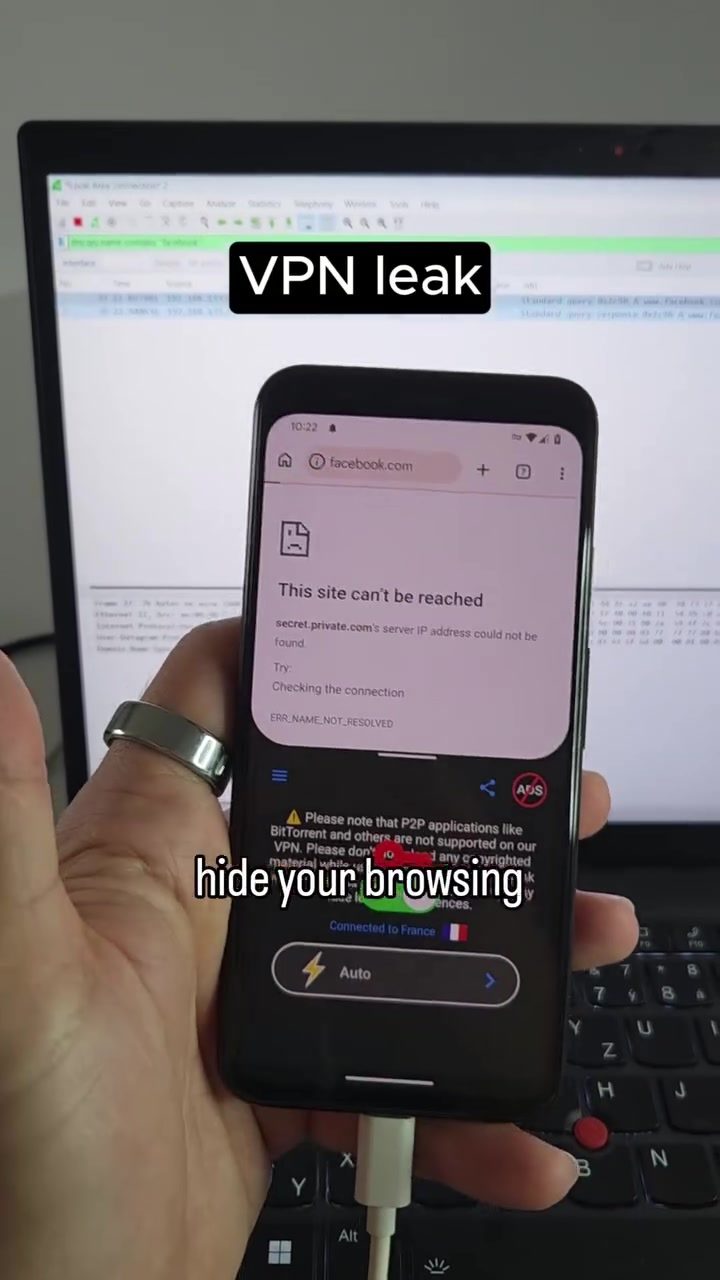
VPN Leaks: How Your Browsing Activity Might Be Exposed
A Virtual Private Network (VPN) is a powerful tool designed to protect your online privacy by encrypting your internet traffic and routing it through a secure server. However, not all VPNs function as intended, and some can inadvertently leak your browsing activity. This risk is particularly relevant for users who rely on VPNs to safeguard their privacy on public Wi-Fi networks.
Why This Matters
When you connect to a VPN, you expect your browsing activity to be hidden from prying eyes. Unfortunately, this isn't always the case. DNS leaks, for instance, can expose the websites you visit, even when using a VPN. DNS leaks occur when your device sends DNS requests outside of the VPN tunnel, allowing your internet service provider (ISP) or network operator to see which websites you are accessing. This can defeat the purpose of using a VPN, as your browsing activity becomes visible to third parties.
What is a DNS Leak?
DNS Leaks Explained
DNS, or Domain Name System, acts as the internet's phone book. When you type a website address into your browser, your device needs to convert that address into an IP address, which is the numerical identifier that computers use to locate each other on the internet. Normally, a correctly configured VPN should handle these DNS requests within the encrypted VPN tunnel. However, if the DNS requests bypass the VPN tunnel, they can be intercepted and monitored by your ISP or other network operators. This is known as a DNS leak, and it can compromise your online privacy.
How DNS Leaks Happen
DNS leaks can occur due to a variety of reasons, including misconfiguration, software bugs, or the use of third-party DNS servers. For example, a VPN app might claim to encrypt all your traffic, but if it doesn't properly route DNS requests through the VPN tunnel, those requests can still be seen by your ISP. This vulnerability is particularly concerning on public Wi-Fi networks, where unsecured connections are common.
Practical Tips to Prevent VPN Leaks
1. Choose a Reputable VPN
Not all VPNs are created equal. Some VPNs have better security practices and configurations than others. Researching and selecting a reputable VPN provider can significantly reduce the risk of DNS leaks. Look for providers that have a strong track record of privacy and security.
2. Install and Configure VPNs Correctly
Even the best VPNs can fail if they are not installed and configured properly. Ensure that you follow the provider's instructions for installation and configuration. Double-check the settings to make sure that DNS requests are being routed through the VPN tunnel.
3. Use a DNS Leak Test Tool
Regularly test your VPN connection for DNS leaks. There are several online tools available that can check for DNS leaks and other vulnerabilities. These tools can help you identify and address any issues with your VPN configuration.
4. Monitor Your Network Traffic
Tools like Wireshark can be used to monitor your network traffic and check for any unusual activity. By regularly monitoring your network, you can detect and address potential leaks before they become a problem.
Important Takeaways
Not All VPNs Are Created Equal
When choosing a VPN, it's crucial to understand that not all providers offer the same level of protection. Some VPNs may have configuration issues or use third-party DNS servers that can lead to leaks. Always opt for a VPN with a proven track record of privacy and security.
DNS Leaks Can Be Prevented
While DNS leaks pose a significant risk to your online privacy, they can be prevented with the right precautions. Regularly testing your VPN, choosing a reputable provider, and properly configuring your VPN settings can help ensure that your browsing activity remains private.
VPNs Still Offer Valuable Protection
Despite the risk of leaks, VPNs remain an essential tool for protecting your online privacy. They can help secure your traffic on untrusted Wi-Fi networks, reduce visibility for ISPs and network operators, and help bypass network restrictions.
Conclusion
If you rely on a VPN to protect your online privacy, it's essential to be aware of the potential for DNS leaks. While these leaks can expose your browsing activity to third parties, taking the right precautions can significantly reduce this risk. By choosing a reputable VPN provider, properly configuring your VPN settings, and regularly testing for leaks, you can ensure that your browsing activity remains private and secure.
Watch the Reel
Questions readers ask
What is a VPN leak and why does it happen?
A VPN leak occurs when your browsing activity is exposed despite using a VPN. This happens due to various issues, such as misconfigurations or software bugs, which cause your internet traffic to bypass the VPN's encrypted tunnel.
How do DNS leaks expose my browsing activity?
DNS leaks happen when your device sends DNS requests outside of the VPN's encrypted tunnel. These requests can reveal the websites you are visiting to your internet service provider or other network operators.
Can VPN leaks happen on all devices, including Android?
Yes, VPN leaks can occur on any device, including Android. It's crucial to use a reliable VPN service and regularly check for leaks using monitoring tools to ensure your browsing activity remains private.
What steps can I take to prevent VPN leaks?
To prevent VPN leaks, choose a reputable VPN service with a strict no-logs policy. Regularly check for leaks using online tools and enable features like a kill switch, which terminates your internet connection if the VPN drops.
How can I check if my VPN is leaking data?
You can check for VPN leaks by using online monitoring tools designed to detect DNS, IP, or WebRTC leaks. These tools can help you identify if your browsing activity is being exposed, allowing you to take corrective action.
Why should I be concerned about VPN traffic monitoring?
VPN traffic monitoring allows ISPs or network operators to watch what websites you visit, which defeats the purpose of using a VPN. This can lead to data exposure and potential trust issues with your VPN service.
What should I do if I suspect my VPN is leaking my browsing activity?
If you suspect your VPN is leaking your browsing activity, first confirm the leak using monitoring tools. If a leak is detected, contact your VPN provider for support or consider switching to a more reliable service that prioritizes user privacy.
Related deep dives
Similar reads based on topic and creator.




Recent articles
Fresh deep dives from the latest Reels we unpacked.




Comments
Be the first to comment.