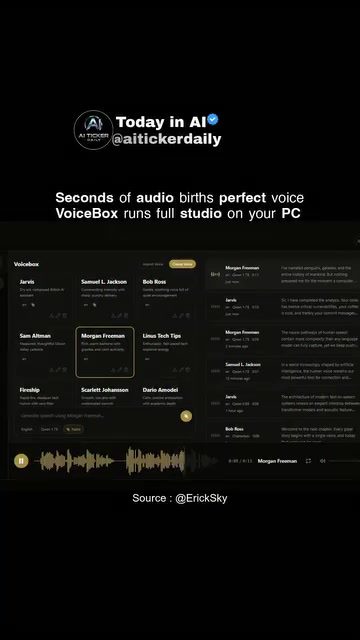
VoiceBox: Revolutionizing Voice Generation and Customization
Voice generation technology has become increasingly sophisticated, and VoiceBox stands at the forefront of this innovation. It's a software tool that allows users to create realistic voiceovers from short audio samples. This game-changer brings a full studio experience to your personal computer, offering multiple text-to-speech (TTS) engines, a variety of languages, and customization options that cater to both individual creators and professional projects.
Why This Matters
The ability to clone and manipulate voices from short audio clips has significant implications for content creation. Whether you're a podcaster, a video creator, or a software developer, having access to high-quality, customizable voice generation can elevate your projects to new heights. VoiceBox offers an all-in-one solution that runs locally on your machine, eliminating the need for complex setups or external services.
Main Discussion
The Power of Voice Cloning
Voice cloning is the process of replicating a person's voice using a short audio sample. VoiceBox excels in this area, allowing users to create realistic voiceovers from just a five-second audio clip. This feature is particularly useful for projects that require multiple voices or specific accents and tones. The software's ability to generate voices from such short samples is a testament to its advanced AI technology.
Multiple TTS Engines and Languages
VoiceBox supports multiple TTS engines, giving users the flexibility to choose the best fit for their needs. Different engines offer unique voice characteristics, making it easier to find the perfect match for your project. Additionally, the software supports a wide range of languages, making it a versatile tool for global content creators.
Customization and Effects
One of the standout features of VoiceBox is its customization options. Users can tweak various voice parameters to achieve the desired tone, pitch, and emotion. This level of control ensures that the generated voices seamlessly integrate into any content, whether it's a podcast, a video game, or an audiobook. The software also offers a variety of effects that can be applied to enhance the audio output, further enriching the listening experience.
DAW-Style Timeline for Podcasts and Multi-Speaker Projects
VoiceBox includes a DAW (Digital Audio Workstation) style timeline, making it an ideal tool for podcasts and multi-speaker projects. The timeline allows for precise editing and synchronization of audio clips, ensuring a professional and polished final product. This feature is particularly valuable for creators who need to manage complex audio projects with multiple speakers and sound effects.
Celebrity Impersonations
In addition to its practical features, VoiceBox offers a fun and creative aspect: celebrity impersonations. The software includes voice options that mimic the voices of well-known figures like Samuel L. Jackson and Morgan Freeman. While these impersonations can add a playful element to projects, it's essential to consider the legal and ethical implications of using celebrity voices. Always verify quality and licensing for your specific use case to avoid any copyright issues.
Practical Tips
Getting Started with VoiceBox
To get started with VoiceBox, follow these steps:
- Download and Install: Begin by downloading the VoiceBox software from the official website. The installation process is straightforward and user-friendly.
- Record or Upload Audio: Record a short audio sample or upload an existing one. The software requires just a few seconds of audio to generate a realistic voice clone.
- Select a TTS Engine: Choose the TTS engine that best fits your project's needs. Experiment with different engines to find the one that offers the right voice characteristics.
- Customize Voice Parameters: Adjust the voice parameters to match the desired tone, pitch, and emotion. Use the customization options to fine-tune the voice to your liking.
- Apply Effects: Enhance the audio output with various effects. The software offers a range of effects that can add depth and richness to the generated voices.
- Use the DAW-Style Timeline: Utilize the DAW-style timeline for precise editing and synchronization of audio clips. This feature is particularly useful for podcasts and multi-speaker projects.
- Export and Share: Once you're satisfied with the final product, export the audio file and share it with your audience.
Best Practices for Voice Cloning
When using VoiceBox for voice cloning, keep the following best practices in mind:
- High-Quality Audio: Ensure that the audio sample you use is of high quality. Clear and crisp audio will yield better results.
- Short Samples: While VoiceBox can generate voices from short audio clips, using longer samples can improve the accuracy and realism of the generated voices.
- Legal Considerations: Always verify the quality and licensing for your use case. Using celebrity voices without proper authorization can lead to legal issues.
- Ethical Use: Be mindful of the ethical implications of voice cloning. Use the technology responsibly and respect the privacy and rights of individuals.
Integrating VoiceBox into Your Workflow
To integrate VoiceBox into your content creation workflow, consider the following tips:
- Plan Your Project: Before using VoiceBox, plan your project and identify where voice generation can add value. This could include voiceovers, character voices, or background narration.
- Experiment with Different Voices: Try out different voices and TTS engines to find the best fit for your project. VoiceBox offers a wide range of options, so take the time to explore.
- Leverage the DAW-Style Timeline: Use the DAW-style timeline to synchronize audio clips and create a seamless listening experience. This feature is especially useful for podcasts and multi-speaker projects.
- Collaborate with Others: If you're working on a collaborative project, share VoiceBox with your team members. The software's customization options and effects can enhance the creative process and lead to better outcomes.
Important Takeaways
VoiceBox is a powerful tool for voice generation and customization, offering a range of features that can elevate your content creation projects. The software's ability to clone voices from short audio samples, support multiple TTS engines and languages, and provide extensive customization options make it a versatile and valuable addition to any creator's toolkit. Whether you're a podcaster, a video creator, or a software developer, VoiceBox can help you achieve professional and polished results.
Conclusion
Voice generation technology has come a long way, and VoiceBox is at the cutting edge of this innovation. Its ability to clone voices, support multiple TTS engines, and offer extensive customization options makes it a valuable tool for content creators. By understanding the features and best practices of VoiceBox, you can integrate this powerful software into your workflow and create high-quality, engaging content.
Watch the Reel
Questions readers ask
What makes VoiceBox unique in the voice cloning software market?
VoiceBox stands out due to its ability to generate highly realistic voiceovers from short audio samples. It offers multiple text-to-speech engines, supports a variety of languages, and provides extensive customization options, making it a versatile tool for both casual users and professionals.
Can VoiceBox clone voices of celebrities like Samuel L. Jackson or Morgan Freeman?
Yes, VoiceBox is capable of replicating the voices of celebrities like Samuel L. Jackson and Morgan Freeman. With its advanced voice cloning technology, users can create voiceovers that closely mimic these distinctive voices, adding a professional touch to their projects.
Does VoiceBox offer free voice cloning tools for beginners?
While specific details about free tools are not provided, VoiceBox is designed to be user-friendly, catering to both beginners and professionals. It's worth exploring the software to see if there are any trial or freemium options available that can help new users get started with voice cloning.
How does the voice cloning software stack compare to other options in the market?
VoiceBox's software stack is robust, featuring multiple text-to-speech engines, multilingual support, and high-level customization. While the exact comparison to other software options is subjective and depends on specific needs, the versatility and realism of VoiceBox's voice cloning capabilities make it a strong contender.
Can VoiceBox generate multiple voice clones from a single audio sample?
VoiceBox is capable of generating multiple voice clones from a single audio sample, allowing users to create various iterations and customize them according to their project needs. However, the exact capabilities and limitations of this feature would need to be explored through direct use of the software.
What languages does VoiceBox support for voice cloning and text-to-speech?
VoiceBox supports a variety of languages, ensuring that users can create voiceovers in multiple languages. This multilingual capability makes it a valuable tool for content creators and professionals who work in global markets or require diverse language support in their projects.
Can VoiceBox handle the voice cloning of multiple voices simultaneously?
VoiceBox offers extensive customization, which may include the ability to handle multiple voices. While the specific capability of managing multiple voices simultaneously is not explicitly detailed, the software's versatility and robust feature set suggest that it can accommodate complex voice cloning tasks.
Related deep dives
Similar reads based on topic and creator.




Recent articles
Fresh deep dives from the latest Reels we unpacked.




Comments
Be the first to comment.