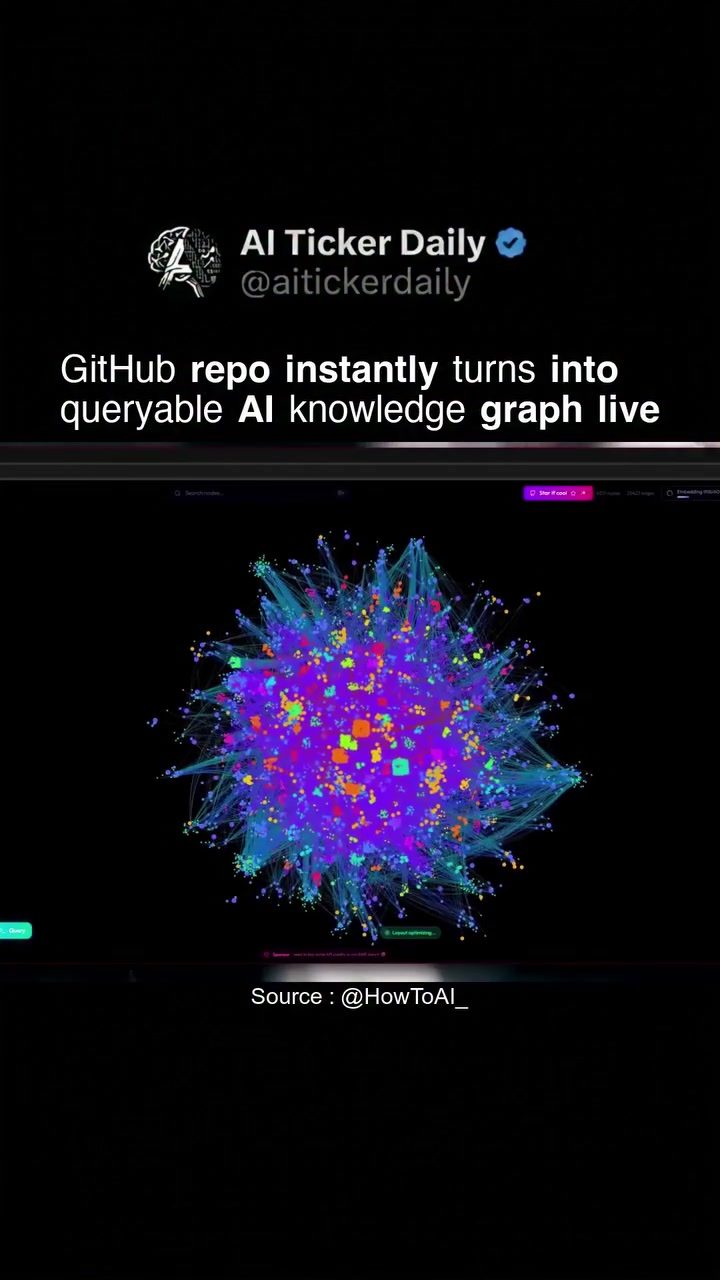
AI Knowledge Graphs for GitHub Repositories
AI knowledge graphs are transforming how developers interact with and analyze code. By converting GitHub repositories into interactive knowledge graphs, developers can visualize and query complex codebases with unprecedented ease.
Context / Why This Matters
The ability to instantly transform a GitHub repository into a queryable AI knowledge graph offers significant advantages for developers. This technology allows for a more intuitive understanding of code structure, making it easier to navigate, maintain, and enhance existing projects. By providing a visual representation of functions, classes, and call relationships, knowledge graphs simplify the process of code analysis and exploration.
Main Discussion
Understanding AI Knowledge Graphs
An AI knowledge graph is a visual representation of data that highlights relationships between different elements. In the context of software development, a knowledge graph can map out the intricate connections between functions, classes, and other code components. This visualization is particularly useful for understanding the architecture of a codebase, especially in large or complex projects.
In the demo, a GitHub repository is instantly converted into a live, interactive knowledge graph. This graph is built using D3.js, a popular JavaScript library for producing dynamic, interactive data visualizations. The graph displays nodes and connections, representing functions, classes, and their relationships. This visual aid makes it easier to grasp the overall structure of the code, identify key components, and understand how they interact.
Querying the Knowledge Graph
One of the standout features of this technology is the ability to query the knowledge graph in plain English using an AI agent. This means developers can ask questions about the codebase in natural language, and the AI will return relevant information. For instance, you might ask, "Show me all instances where function X is called," and the AI will highlight those connections in the graph. This capability eliminates the need for manual code searching and enhances the efficiency of code analysis.
Benefits of AI Knowledge Graphs
- Enhanced Code Understanding: Visualizing code relationships makes it easier to understand the overall architecture and flow of a project. This is particularly useful for new developers joining a project or for maintaining legacy code.
- Efficient Code Navigation: The ability to query the graph in plain English allows developers to quickly find specific code components, reducing the time spent on manual searches.
- Improved Collaboration: Knowledge graphs provide a shared visual reference that can be understood by all team members, fostering better collaboration and communication.
- Code Quality and Maintainability: By providing a clear overview of the codebase, knowledge graphs can help identify areas that need refactoring or optimization, leading to improved code quality and maintainability.
Practical Tips
- Getting Started with AI Knowledge Graphs: To get started, you can paste a GitHub repository URL into the software, and it will instantly generate a live, queryable knowledge graph. This process is straightforward and does not require extensive setup.
- Utilizing the Graph for Analysis: Once the graph is generated, you can explore the relationships between different code components. Use the search interface to query specific elements or ask questions in plain English.
- Integrating Knowledge Graphs into Your Workflow: Incorporate the use of knowledge graphs into your daily development routine. Use them for code reviews, onboarding new team members, or for maintaining complex codebases.
- Leveraging Open Source Tools: The software used in the demo is open source, which means you can access the source code, modify it, and integrate it into your own tools and workflows. This provides flexibility and customization options.
Important Takeaways
- Visualization Enhances Code Understanding: The visual representation of code relationships in a knowledge graph significantly enhances comprehension and navigation of complex codebases.
- Plain Language Queries Save Time: The ability to query the knowledge graph in plain English using an AI agent makes code analysis faster and more efficient.
- Collaboration and Communication: Knowledge graphs serve as a valuable tool for collaboration, providing a shared visual reference that can be understood by all team members.
- Improved Code Quality: By identifying areas that need refactoring, knowledge graphs contribute to better code quality and maintainability.
Conclusion
AI knowledge graphs are a powerful tool for modern software development. By converting GitHub repositories into interactive, queryable knowledge graphs, developers can gain deeper insights into their codebases, navigate complex projects more efficiently, and collaborate more effectively. This technology not only enhances code understanding but also improves the overall development workflow, making it an invaluable addition to any developer's toolkit.
Watch the Reel
Questions readers ask
What is an AI knowledge graph in the context of GitHub repositories?
An AI knowledge graph for GitHub repositories is a visual representation of a codebase that uses AI to map out and highlight relationships between various code elements such as functions, classes, and modules. This interactive graph allows developers to query and understand complex codebases more intuitively.
How does an AI knowledge graph improve code navigation?
By transforming a GitHub repository into an AI knowledge graph, developers can see the structure and relationships within the codebase at a glance. This visualization makes it easier to navigate through code, identify dependencies, and understand how different parts of the code interact with each other, streamlining the process of maintenance and enhancement.
What are the benefits of using an AI knowledge graph for code analysis?
AI knowledge graphs provide a queryable code map that allows developers to explore codebases in real-time. This makes it easier to identify patterns, understand the flow of data, and pinpoint areas that may need refinement or improvement. Additionally, the interactive nature of these graphs facilitates better collaboration among team members.
Can AI knowledge graphs be used for new and existing projects?
Yes, AI knowledge graphs can be utilized for both new and existing projects. For new projects, they provide a foundation for organizing and visualizing code from the outset. For existing projects, they offer a powerful tool for understanding and refactoring legacy code, making it easier to manage and enhance over time.
How do AI knowledge graphs handle large and complex codebases?
AI knowledge graphs excel at managing large and complex codebases by breaking down the code into manageable visual components. This allows developers to focus on specific areas without getting overwhelmed by the entire codebase. The interactive nature of the graph enables developers to zoom in and out, filter views, and drill down into specific details as needed.
What types of relationships can be visualized in an AI knowledge graph?
AI knowledge graphs can visualize a variety of relationships within a codebase, including function calls, class hierarchies, module dependencies, and data flow. By mapping out these relationships, developers gain a clearer understanding of how different parts of the codebase interact, which is crucial for tasks like debugging, refactoring, and integrating new features.
How do queryable code maps enhance developer productivity?
Queryable code maps in AI knowledge graphs allow developers to quickly find specific information within the codebase, such as where a particular function is called or what classes a certain module depends on. This capability reduces the time spent on manual searches and enhances overall productivity by making it easier to locate and understand the relevant parts of the code.
Related deep dives
Similar reads based on topic and creator.




Recent articles
Fresh deep dives from the latest Reels we unpacked.




Comments
Be the first to comment.