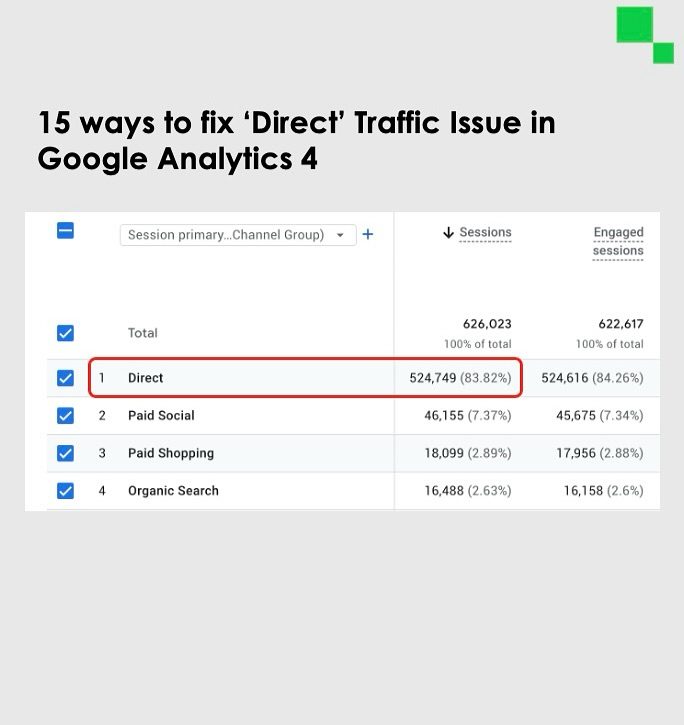
Spiked 'Direct' Traffic in Google Analytics 4: Causes and Solutions
Spiked 'Direct' traffic in Google Analytics 4 (GA4) can be a perplexing issue for digital marketers. This surge in 'Direct' traffic often masks the true sources of website visitors, making it difficult to optimize marketing strategies. Understanding the root causes and implementing effective solutions can help mitigate this issue.
Context / Why this Matters
Accurate traffic attribution is crucial for understanding the effectiveness of marketing campaigns. When 'Direct' traffic spikes, it can distort the data, making it challenging to identify the actual sources of traffic. This affects decision-making processes, as marketers may overlook the performance of specific channels or underestimate the impact of other channels that are actually performing well.
Understanding the Root Causes
1. Internal Traffic
Internal traffic refers to visits from your company's employees, partners, or other internal stakeholders. This traffic can significantly skew your analytics data, making it difficult to discern the true sources of external visitors. Excluding internal traffic is a foundational step in filtering out noise from your analytics data.
2. Phone Calls
Phone calls are a common avenue for lead generation, but they can complicate traffic tracking. If you rely on phone calls for leads, ensure that you have proper tracking mechanisms in place. This helps in understanding the source of calls and attributing them correctly to your marketing efforts.
3. Technical Setup
Complex technical setups, such as "headless" sites, can introduce significant tracking challenges. If you are using these setups, make sure you are familiar with the necessary configurations to track your traffic effectively. Incorrect configurations can lead to inaccurate data, making it difficult to identify the true sources of your traffic.
4. Referrer Stripping
Firewalls and other security measures can strip referrer information, making it difficult to track the origins of your traffic. Always check your firewall settings to ensure they are not interfering with your analytics data. This simple step can prevent a lot of confusion and inaccuracies in your traffic reports.
5. Redirect Issues
Improper redirects, such as JavaScript redirects or improper 301 redirects, can disrupt the tracking process. Using the correct type of redirects ensures that the referral information is preserved, allowing for accurate tracking.
6. Redirect Chains
Long redirect chains can result in lost data, as each hop in the chain increases the likelihood of information being stripped or lost. Keeping redirect chains short is a best practice that helps maintain the integrity of your tracking data.
Why Spiked 'Direct' Traffic Occurs
Ad Blockers
Ad blockers are a significant contributor to spiked 'Direct' traffic. These tools often hide referral information, making it appear as if the traffic is coming directly to the site. While you can't control whether users use ad blockers, being aware of their impact can help you understand the true sources of your traffic.
Untagged Campaign URLs
Improperly tagged campaign URLs can lead to misattributed traffic. When campaign URLs are not properly tagged, GA4 cannot correctly assign the traffic to the corresponding marketing efforts. This results in an increase in 'Direct' traffic, as the system struggles to attribute the source correctly.
Shared Links
Direct messaging platforms like WhatsApp can also contribute to spiked 'Direct' traffic. When users share links through these platforms, GA4 often cannot track the referrer information, leading to an increase in 'Direct' traffic. This can make it challenging to attribute the traffic to the correct source, but being aware of this phenomenon can help you account for it in your analysis.
Practical Tips
Remove rel=noreferrer
When sharing links, be cautious about using the rel=noreferrer attribute. This attribute can strip referrer information, leading to an increase in 'Direct' traffic. Remove it if necessary to ensure that your referrer information is preserved.
Prevent GA Cookies from Being Reset
Frequent resets of GA cookies can disrupt the tracking process, leading to inaccurate data. Implement measures to prevent this from happening, ensuring that your cookies remain consistent and trackable.
Implement Proper 301 Redirects
Always use proper 301 redirects instead of JavaScript or other types of redirects. This practice ensures that the referral information is preserved, allowing for accurate tracking.
Check for Missing Tracking Codes
Ensure that your tracking code is present on all pages. Missing tracking codes can lead to significant gaps in your data, making it difficult to understand the true sources of your traffic.
Important Takeaways
- Internal traffic can significantly skew your analytics data. Exclude it to gain a clearer view of your external visitors.
- Properly track phone calls to understand their impact on your traffic sources.
- Avoid complex setups unless you are confident in their tracking capabilities.
- Check your firewall settings to prevent referrer information from being stripped.
- Use proper 301 redirects and keep redirect chains short to maintain data integrity.
- Be mindful of the impact of ad blockers, shared links, and untagged campaign URLs on your analytics data.
- Implement best practices for tracking, such as removing
rel=noreferrerfrom links and preventing GA cookies from being reset.
Conclusion
Spiked 'Direct' traffic in Google Analytics 4 can be a frustrating issue, but with the right strategies, you can mitigate its impact and gain a clearer understanding of your traffic sources. By addressing the root causes, implementing best practices, and being mindful of potential disruptions, you can ensure that your analytics data remains accurate and actionable. This approach allows you to make informed decisions and optimize your marketing efforts effectively.
Watch the Reel
Questions readers ask
What is 'Direct' traffic in Google Analytics 4 (GA4)?
'Direct' traffic in Google Analytics 4 (GA4) refers to visits to your website that do not have a clear referring source. This can include users who type your URL directly into their browser, bookmark your site, or have your site set as a homepage. However, it can also encompass traffic from unknown or misattributed sources, leading to spikes that complicate data interpretation.
Why does 'Direct' traffic spike in GA4?
Spikes in 'Direct' traffic in GA4 can occur due to several reasons, including misconfigured tracking codes, expired tracking cookies, and users accessing your site from bookmarks or typed-in URLs. Additionally, issues like referrer data being stripped away by certain browsers or security settings can contribute to these spikes.
How can I identify the sources of spiked 'Direct' traffic in GA4?
To identify the sources of spiked 'Direct' traffic in GA4, you can use secondary dimensions such as 'Landing Page', 'Campaign', or 'Event' in your reports. This helps in understanding where the traffic is landing and what actions users are taking. Also, you can utilize custom reports and explore the 'User Explorer' for more granular insights.
What are some common solutions for mitigating 'Direct' traffic spikes in GA4?
To mitigate 'Direct' traffic spikes, ensure your GA4 tracking code is correctly installed and that your referral exclusions list is up-to-date. Additionally, implement UTM parameters for all your campaigns to track them accurately. Regularly review your data for inconsistencies and update your GA4 settings based on your findings.
Can GA4 technical issues cause spiked 'Direct' traffic?
Yes, GA4 technical issues, such as misconfigured tracking settings, improperly implemented tags, or server-side issues, can cause 'Direct' traffic spikes. Regularly auditing your GA4 setup and resolving any technical issues can help maintain accurate traffic attribution and prevent these spikes.
What happens if 'Direct' traffic spikes are not addressed in GA4?
If 'Direct' traffic spikes in GA4 are not addressed, they can lead to inaccurate data interpretation, making it difficult to assess the performance of marketing channels and campaigns. This can result in misguided strategies, wasted resources, and a lack of insight into what drives actual user engagement and conversions.
How can I optimize my GA4 setup to reduce 'Direct' traffic spikes?
To optimize your GA4 setup and reduce 'Direct' traffic spikes, verify that your analytics property is correctly configured and that all traffic sources are properly tagged. Utilize features like 'BigQuery Export' and 'DebugView' to identify and address discrepancies in your data. Additionally, ensure consistent and thorough quality assurance processes to maintain accurate data tracking.
Related deep dives
Similar reads based on topic and creator.




Recent articles
Fresh deep dives from the latest Reels we unpacked.




Comments
Be the first to comment.