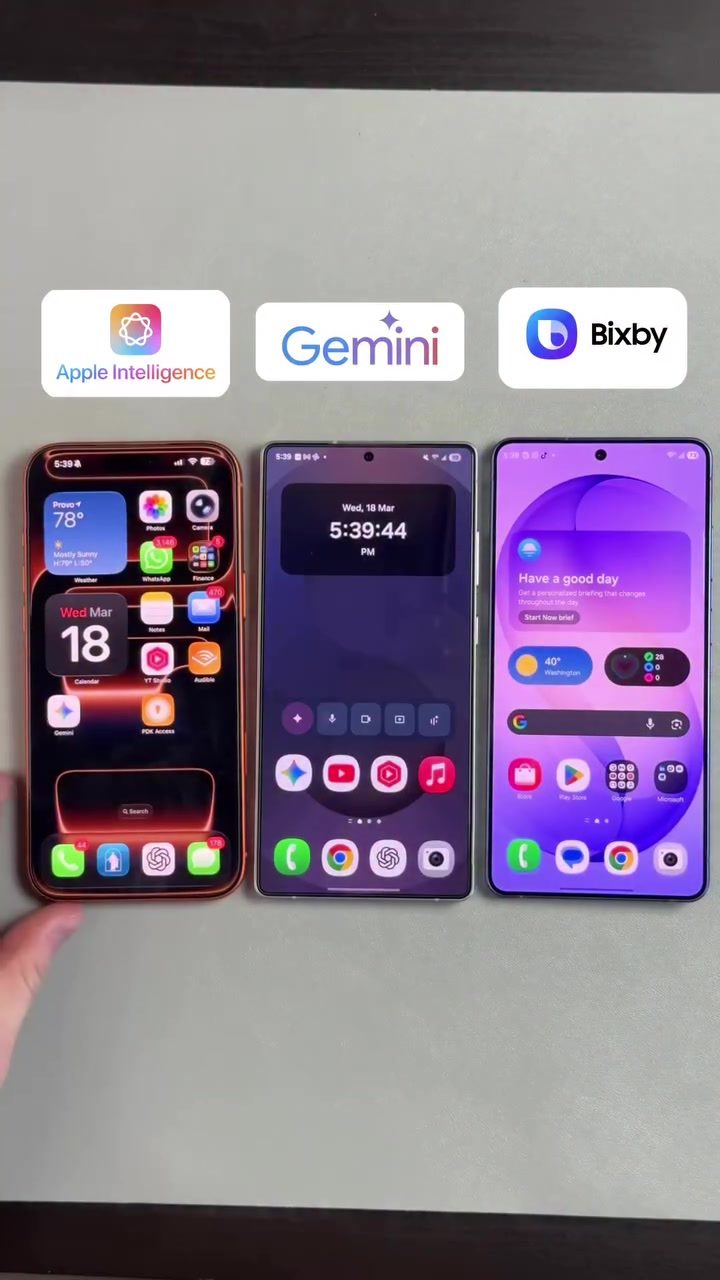
Voice Assistants Face Off: Siri, Gemini, and Bixby
Voice assistants have become an integral part of our daily lives, helping us manage tasks, access information, and even control smart home devices. Among the most popular voice assistants are Apple's Siri, Google's Gemini, and Samsung's Bixby. Each has its own strengths and unique features, but how do they perform when asked to open multiple apps simultaneously? Let's dive into a comparison of these three assistants to see which one comes out on top.
Context: The Importance of Voice Assistants
In today's fast-paced world, voice assistants have become indispensable tools for enhancing productivity and convenience. Whether you're juggling multiple tasks, need quick information, or want to control your smart home, voice assistants can streamline these activities. The ability to open multiple apps at once is a crucial feature that can save time and effort, making it a key aspect to consider when evaluating these assistants.
Siri: Apple's Voice Assistant
Siri, Apple's pioneering voice assistant, is deeply integrated into the iOS ecosystem. Known for its natural language processing capabilities, Siri can understand a wide range of commands and perform tasks across various apps. One of its standout features is its seamless integration with Apple's ecosystem, including iCloud, which allows for easy syncing of notes and other data across devices.
Gemini: Google's Voice Assistant
Gemini, Google's latest voice assistant, builds upon the success of its predecessor, Google Assistant. Gemini is powered by advanced machine learning algorithms, enabling it to understand context and provide more accurate responses. It excels in tasks that require internet searches, such as retrieving information from the web or managing calendar entries. Gemini's integration with Google services like Gmail and Google Calendar makes it a powerful tool for productivity.
Bixby: Samsung's Voice Assistant
Bixby, Samsung's voice assistant, is designed to work seamlessly with Samsung devices. It offers a range of features, including the ability to control smart home devices, manage calendar events, and even take notes. Bixby's strength lies in its integration with Samsung's ecosystem, providing a cohesive experience for users who own multiple Samsung devices.
The Showdown: Opening Multiple Apps
The true test of a voice assistant's capabilities is its ability to handle complex commands efficiently. In this case, the command was to open the YouTube app and the Notes app simultaneously. Here’s how each assistant performed:
Siri's Performance
Siri was the first to be tested. When asked to open the Notes app and then the YouTube app, Siri successfully opened the Notes app but struggled with opening the YouTube app simultaneously. This highlights a potential limitation in Siri's multitasking capabilities, which may be improved in future updates.
Gemini's Performance
Gemini, on the other hand, performed admirably. When prompted to open both apps at the same time, Gemini efficiently executed the command, showcasing its advanced multitasking capabilities. This feature is particularly useful for users who often need to switch between apps quickly.
Bixby's Performance
Bixby faced challenges similar to Siri. When asked to open both apps simultaneously, Bixby provided an error message indicating that the Notes app was not installed or recognized under the specified name. This suggests that Bixby may require more precise naming conventions or specific app installations to perform complex tasks effectively.
Practical Tips for Using Voice Assistants
To get the most out of your voice assistant, consider the following tips:
- Use Clear Commands: Ensure your commands are clear and specific. Voice assistants rely on clear language to execute tasks accurately.
- Leverage Integration: Take advantage of your assistant's integration with other services and apps. For example, using Siri with iCloud for note syncing or Gemini with Google Calendar for event management.
- Update Regularly: Keep your voice assistant and associated apps up to date to ensure you have the latest features and improvements.
- Explore Commands: Experiment with different commands to discover new features and capabilities. Many assistants offer tutorials or help sections that can guide you through advanced commands.
Important Takeaways
- Multitasking Capabilities: Gemini excels in multitasking, making it a strong contender for users who need to manage multiple tasks simultaneously.
- Ecosystem Integration: Each assistant performs best within its respective ecosystem. For iPhone users, Siri offers seamless integration with Apple services. For Samsung users, Bixby provides a cohesive experience with Samsung devices.
- Command Precision: Clear and precise commands are crucial for optimal performance. Users should be specific about app names and desired actions.
Conclusion
Voice assistants have come a long way, offering a range of features that enhance productivity and convenience. While Siri, Gemini, and Bixby each have their strengths, Gemini's ability to handle complex commands and multitasking makes it a standout performer. However, the best assistant ultimately depends on your specific needs and the ecosystem you are invested in. Whether you choose Siri, Gemini, or Bixby, leveraging their unique features can significantly improve your daily tasks and overall user experience.
Watch the Reel
Questions readers ask
Can Siri open multiple apps at once on an iPhone?
Siri can open apps one at a time, but it cannot open multiple apps simultaneously. However, you can use Siri to switch between open apps efficiently. Siri's workflows can be customized using the Shortcuts app to automate tasks of opening and switching between apps.
How does Bixby compare to Siri in opening multiple apps?
Bixby, like Siri, cannot open multiple apps at the same time. However, Bixby does offer a feature called Routines that allows you to automate tasks, including opening apps. This can be useful for opening apps sequentially, but not at the same time.
Does Gemini allow for opening multiple apps simultaneously?
Gemini, as of now, does not support opening multiple apps at once. However, it excels in other areas such as providing quick information and controlling smart home devices. For opening apps, Gemini can help you launch one app at a time and switch between them efficiently.
Are there any custom voice commands to open multiple apps at once?
Currently, none of the voice assistants—Siri, Gemini, or Bixby—support custom voice commands to open multiple apps simultaneously. However, users can create routines or shortcuts that open apps in sequence, which can mimic the effect of opening multiple apps.
Can I use voice assistants to open apps on my iPhone hands-free?
Yes, voice assistants like Siri can open apps on your iPhone hands-free. While Siri cannot open multiple apps at the same time, you can use it to launch one app and then switch to another using voice commands, making it a convenient tool for hands-free app management.
What is the best voice assistant for opening and managing multiple apps?
While none of the voice assistants can open multiple apps simultaneously, Siri and Bixby offer routines and shortcuts that can help manage apps more efficiently. Gemini, though not as strong in this area, is excellent for quick information retrieval and smart home control, and can be used to open one app at a time.
Can I use voice commands to open adventure apps with Siri?
Yes, you can use Siri to open adventure apps. While Siri cannot open multiple apps at once, you can use Siri to launch one adventure app at a time and switch between them effortlessly. Additionally, you can create custom shortcuts in the Shortcuts app to streamline the process of opening and managing adventure apps.
Related deep dives
Similar reads based on topic and creator.


Recent articles
Fresh deep dives from the latest Reels we unpacked.




Comments
Be the first to comment.