Rollercoaster Simulator Software
Rollercoaster simulator software allows users to design, build, and experience virtual rollercoasters, offering a blend of creativity and engineering challenge. These simulators provide a sandbox environment where users can experiment with different track layouts, adjust parameters, and observe the performance of their creations. The technology behind these simulators often incorporates advanced algorithms to ensure realistic physics and dynamics, making the experience immersive and engaging.
Context / Why This Matters
Simulation games, including rollercoaster simulators, offer more than just entertainment. They provide a platform for users to explore principles of physics, engineering, and design. By creating and testing rollercoaster tracks, users can gain insights into how forces like gravity, velocity, and momentum interact. This hands-on approach to learning can be particularly valuable for those interested in STEM fields, as it allows them to apply theoretical knowledge in a practical and engaging way.
Beyond education, rollercoaster simulator software also serves as a tool for professional engineers and designers. These simulators can be used to prototype and test rollercoaster designs, helping to identify potential issues and optimize performance before any physical construction begins. This can lead to more efficient and safer designs, benefiting both the industry and enthusiasts.
Main Discussion
AI-Powered Creation
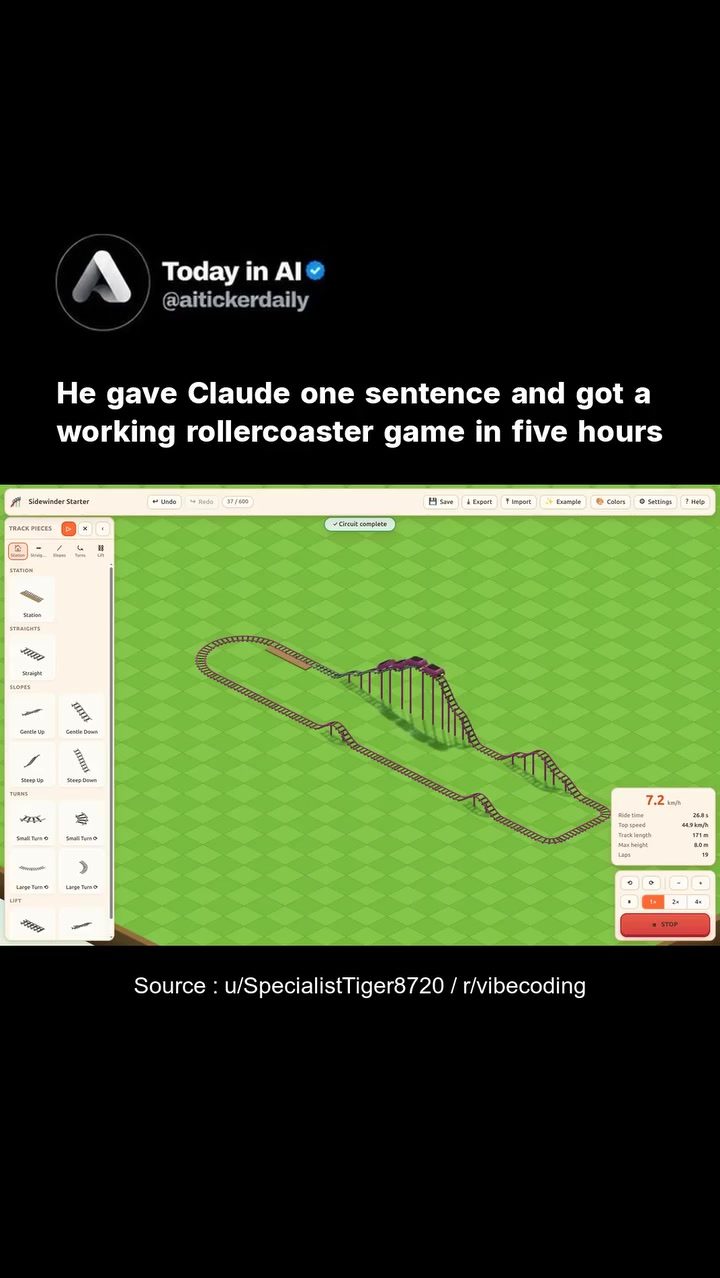
One of the most exciting developments in rollercoaster simulator software is the integration of AI. In recent advancements, a developer demonstrated the creation of a fully functional 3D rollercoaster sandbox game using AI, specifically using Claude Code (Fable 5). The developer provided a single, detailed sentence describing the game's features, including drag-and-drop track building on an isometric grid and cars that ride the finished track. The AI generated over 11,000 lines of code in just five hours, creating a playable game with almost no removed code.
This showcases the potential of AI in game development, where complex tasks can be automated, reducing the time and resources required to bring a concept to life. Users are no longer limited to pre-designed elements; they can now create custom experiences with the help of AI, enhancing the creativity and flexibility of the simulation.
User Interface and Tools
The user interface of a rollercoaster simulator is crucial for an intuitive and enjoyable experience. Typically, these interfaces include a variety of tools and options to help users design their rollercoasters. Common features include:
- Track Pieces: A library of different track segments that users can drag and drop onto the grid. These pieces allow for the creation of loops, drops, and various other elements that define a rollercoaster's layout.
- Edit Tools: Options to undo, redo, export, and import designs. These tools help users refine their creations, experiment with different configurations, and save their work for future use.
- Settings and Customization: Options to adjust parameters such as speed, height, and the color scheme. These settings allow users to fine-tune the rollercoaster's performance and aesthetics.
- Real-Time Statistics: Display of key performance indicators like speed and height. This real-time feedback helps users understand the dynamics of their rollercoaster and make informed adjustments.
Simulating Performance
An essential aspect of rollercoaster simulator software is the ability to simulate the performance of the rollercoaster accurately. This involves calculating various factors, including:
- Speed: The velocity of the rollercoaster cars at different points on the track.
- Height: The elevation changes as the rollercoaster traverses the track. This is crucial for determining the force of gravity acting on the cars.
- G-Force: The force experienced by the rider, which can be calculated based on the rollercoaster's speed and the track's layout. High G-forces can make the ride more thrilling but also more demanding on the rider's body.
- Track Layout: The overall design of the track, which includes elements like loops, corkscrews, and drops. Each of these elements contributes to the overall experience and performance of the rollercoaster.
Practical Tips
- Experiment with Different Track Configurations: Don't be afraid to try out various track layouts and see how they affect the rollercoaster's performance. This can help you understand the impact of different design choices on the ride experience.
- Utilize Real-Time Feedback: Pay close attention to the performance statistics provided by the simulator. These metrics can guide your design decisions and help you optimize the rollercoaster's performance.
- Leverage AI Tools: If available, use any AI-powered features in the simulator to streamline the design process. AI can help generate complex elements and optimize performance, saving you time and effort.
- Save and Iterate: Make use of the export and import features to save your designs and experiment with different configurations. This allows you to refine your rollercoaster over time and achieve the best possible results.
Important Takeaways
- Rollercoaster simulator software offers a unique blend of creativity and engineering, allowing users to design and test virtual rollercoasters.
- AI integration can significantly enhance the capabilities of these simulators, enabling complex designs and efficient development.
- The user interface and tools play a crucial role in the design process, providing the necessary features for creating and refining rollercoaster tracks.
- Real-time performance statistics are essential for understanding and optimizing the rollercoaster's dynamics, making the experience more engaging and educational.
Conclusion
Rollercoaster simulator software provides a rich and engaging platform for users to explore the principles of physics, engineering, and design. Whether you are a student, enthusiast, or professional, these simulators offer a wealth of opportunities to experiment, learn, and innovate. As AI continues to advance, the possibilities for these simulators will only expand, making them an even more valuable tool for both entertainment and education.
Watch the Reel
Questions readers ask
How does AI expedite the development of a 3D rollercoaster game?
AI streamlines game development by automating complex tasks, such as creating realistic 3D models, simulating physics, and designing intricate track layouts. This automation significantly reduces the time required to build a functional game, as demonstrated by the five-hour creation of a 3D rollercoaster game.
What are the key features of a rollercoaster simulator?
A rollercoaster simulator typically offers a sandbox environment where users can design and build virtual rollercoasters. Key features include the ability to adjust track parameters, experiment with different layouts, and observe realistic physics and dynamics in action.
Can AI be used to create other types of simulation games?
Yes, AI can be applied to create a wide range of simulation games beyond rollercoasters. It can help generate realistic environments, simulate complex systems, and automate the creation of various game elements, making it a versatile tool for game developers.
What is the significance of quick game development in the industry?
Quick game development allows developers to test ideas rapidly, iterate on designs, and bring products to market faster. This agility is crucial for staying competitive and responding to trends, as well as for experimenting with innovative concepts.
How does AI contribute to the physics and dynamics in a rollercoaster game?
AI enhances the realism of a rollercoaster game by incorporating advanced algorithms that simulate accurate physics and dynamics. These algorithms ensure that the virtual rollercoasters behave realistically, providing an immersive and engaging experience for users.
Related deep dives
Similar reads based on topic and creator.




Recent articles
Fresh deep dives from the latest Reels we unpacked.




Comments
Be the first to comment.