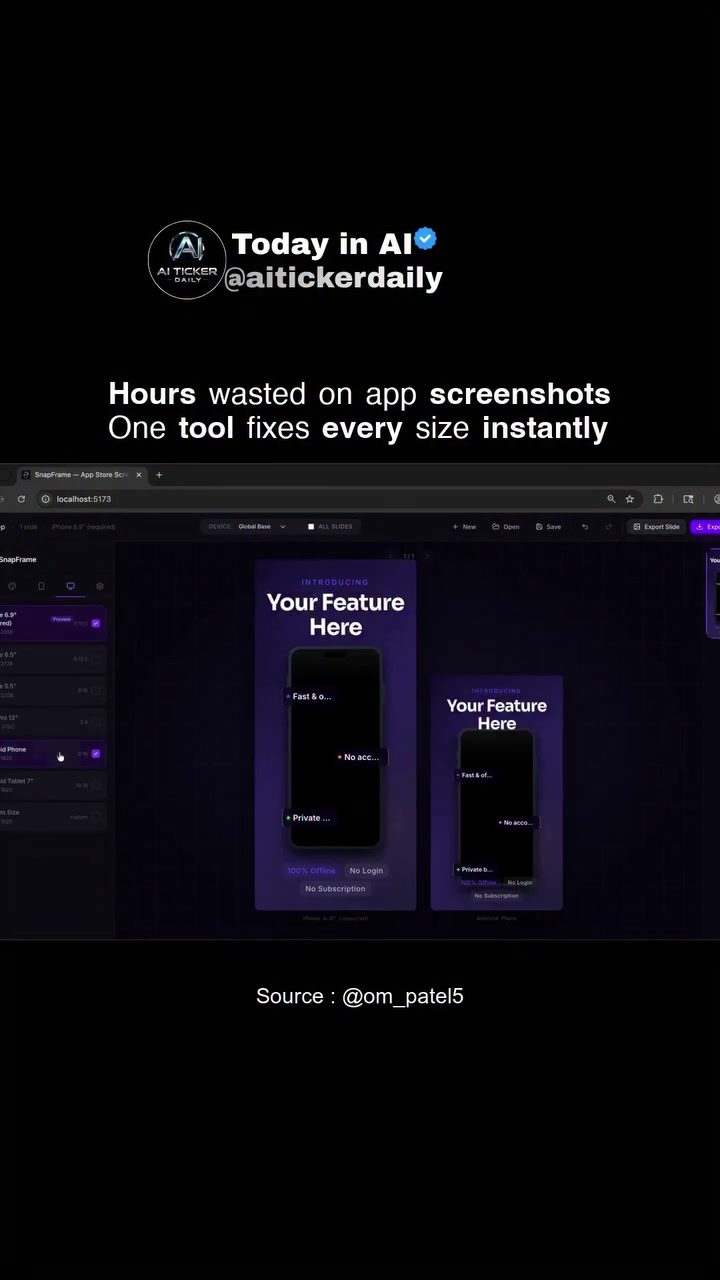
Apps for App Stores: Simplifying Screenshot Management
Handling screenshots for app store listings can be an exercise in frustration. Each platform has its own specific size and format requirements, and ensuring that your screenshots meet these standards is crucial for a polished and professional app store page. Enter the RevPDF, a powerful mobile app designed to streamline this process, making it easy to resize and style screenshots to meet Apple's exacting requirements.
Why This Matters
Managing app store screenshots is an essential yet often overlooked aspect of app development. High-quality, correctly sized screenshots can significantly impact how potential users perceive your app. With the RevPDF, developers and designers can focus more on the creative aspects of their app rather than the technicalities of resizing and formatting screenshots. Moreover, the app's offline functionality and no- login requirement make it a convenient tool for those who prefer simplicity and privacy.
Understanding RevPDF
Core Features
The RevPDF app is packed with features designed to simplify the process of preparing screenshots for app stores. Some of the standout features include:
-
Instant Resizing: One of the primary functions of RevPDF is its ability to resize screenshots instantly. This feature is particularly useful for developers who need to create screenshots for multiple device sizes, including various iPhone and iPad form factors.
-
Offline Access: RevPDF functions entirely offline, ensuring that you can work on your screenshots without the need for an internet connection. This is a significant advantage for users who work in areas with limited connectivity or prefer to keep their work private.
-
No Account Required: Unlike many productivity tools, RevPDF does not require users to create an account or subscribe to a service. This makes it accessible to everyone and eliminates the hassle of managing yet another set of login credentials.
User Interface and Experience
The app interface is clean and intuitive, focusing on ease of use. It allows users to pick the exact Apple-required output sizes and style screenshots with various backgrounds, including gradients, solid colors, or image backgrounds. Users can also drop screenshots into 2D layouts or 3D iPhone mockups with shadows and borders, adding a professional touch to their app store listings.
Additional Functionalities
Beyond basic resizing and styling, the RevPDF app offers advanced features like batch exporting and multi-language support.
-
Batch Export: Users can batch-export all their screenshots as a ZIP file, making it easy to manage and distribute multiple screenshots at once.
-
Multi-Language Support: The app supports localized copies with multi-language support and AI-assisted translation, allowing developers to create screenshots in multiple languages, thereby reaching a wider audience.
The Benefits of Open Source
The RevPDF app is open-source under the MIT license, which means the source code is freely available for anyone to use, modify, and distribute. This not only fosters a community of developers who can contribute to its improvement but also ensures that the app remains free from proprietary constraints. For those interested, the app is available to try at the hosted build here.
Practical Tips
Getting Started with RevPDF
Getting started with RevPDF is straightforward. Here are some practical tips to help you make the most of the app:
-
Explore the Interface: Take some time to familiarize yourself with the app's interface. The layout is designed to be intuitive, but exploring all the options will help you understand its full capabilities.
-
Experiment with Styles: Try out different background styles and layouts to see what works best for your app. The ability to customize screenshots with gradients, solid colors, and image backgrounds can significantly enhance the visual appeal of your app store listing.
-
Use 3D Mockups: The 3D iPhone mockups can give your screenshots a more polished and professional look. Experiment with different shadows and borders to find the perfect balance.
-
Batch Export for Efficiency: If you have multiple screenshots to prepare, use the batch export feature to save time and effort. This feature ensures that all your screenshots are ready-to-go without any manual intervention.
Optimizing for App Store Success
To maximize the impact of your app store screenshots, consider the following tips:
-
Consistency is Key: Ensure that all your screenshots have a consistent style and format. This creates a cohesive look that can make your app stand out.
-
Highlight Key Features: Use the headline and subheadline overlays to highlight the key features and benefits of your app. Clear and concise messaging can make a significant difference in attracting users.
-
Localization: Take advantage of the app's multi-language support to create localized screenshots. This can help you reach a global audience and make your app more accessible to users from different regions.
Important Takeaways
RevPDF is a powerful tool for developers and designers who need to manage and style screenshots for app store listings. Its ability to resize screenshots instantly, function offline, and offer a range of customization options makes it an invaluable addition to any developer's toolkit. The app's open-source nature ensures that it remains free and accessible to everyone, fostering a community of developers who can contribute to its improvement.
Conclusion
In the world of app development, every detail counts, and app store screenshots are no exception. With RevPDF, developers can simplify the process of preparing and styling screenshots, ensuring that their app store listings look professional and polished. By leveraging the app's powerful features and customization options, developers can create visually appealing and effective app store listings that stand out in a crowded market. Whether you're a seasoned developer or just starting out, RevPDF is a tool that can significantly enhance your app store presence and help you reach a wider audience.
Watch the Reel
Questions readers ask
What is RevPDF and how does it help with iPhone screenshot resizing?
RevPDF is a mobile app designed to simplify the process of resizing and styling screenshots specifically for the Apple App Store. It ensures that your screenshots meet the exact requirements for various iPhone and iPad models, making your app store page look professional and polished.
Can I use RevPDF to resize screenshots for both iPhone and iPad?
Yes, RevPDF supports resizing for both iPhone and iPad. This means you can easily create screenshots that fit the different screen sizes and aspect ratios of various Apple devices, ensuring consistency across all platforms.
Do I need an account to use RevPDF?
No, RevPDF does not require you to create an account. This makes the app very convenient and accessible, allowing you to resize and style your screenshots without any hassle or additional steps.
Can I use RevPDF offline?
Yes, RevPDF offers offline access, which means you can resize and style your screenshots without an internet connection. This is particularly useful for working on-the-go or in areas with poor connectivity.
What are the benefits of using RevPDF for app store screenshots?
RevPDF offers several benefits, including instant resizing, support for various device form factors, and the ability to work offline. These features make it an efficient tool for developers and designers, helping them create high-quality, correctly sized screenshots for their app store listings.
How does RevPDF ensure my screenshots meet Apple's app store requirements?
RevPDF is designed to meet Apple's specific size and format requirements for app store screenshots. This is done by automatically adjusting the screenshots to the correct dimensions and styles, ensuring that they look professional and meet all the necessary guidelines.
Can I use RevPDF to resize screenshots to exact sizes for different iPhone models?
Yes, RevPDF allows you to resize screenshots to exact sizes for different iPhone models. This ensures that your screenshots are perfectly optimized for each device, providing a seamless and professional presentation on the App Store.
Related deep dives
Similar reads based on topic and creator.




Recent articles
Fresh deep dives from the latest Reels we unpacked.




Comments
Be the first to comment.