Optimizing Google Ads with Nano Banana Pro: A Comprehensive Prompt Structure Guide
Nano Banana Pro has introduced a powerful update for Google Ads, allowing users to refresh photos, transform single images into multiple creative directions, and eliminate asset gaps in campaigns. This tool is designed to help users break through creative fatigue by resizing images with precision and combining multiple objects into a single image. With studio-quality controls and more, Nano Banana Pro enhances the creative process in Google Ads. Here, we delve into the prompt structure that Nano Banana Pro uses to achieve these results, providing a clear framework for optimizing your Google Ads campaigns.
Why This Matters
In the competitive world of digital marketing, standing out with visually compelling ads is crucial. Nano Banana Pro offers a structured approach to creating high-quality, engaging visuals that can significantly impact campaign performance. Understanding and mastering the prompt structure can help you leverage this tool to its fullest potential.
Main Discussion
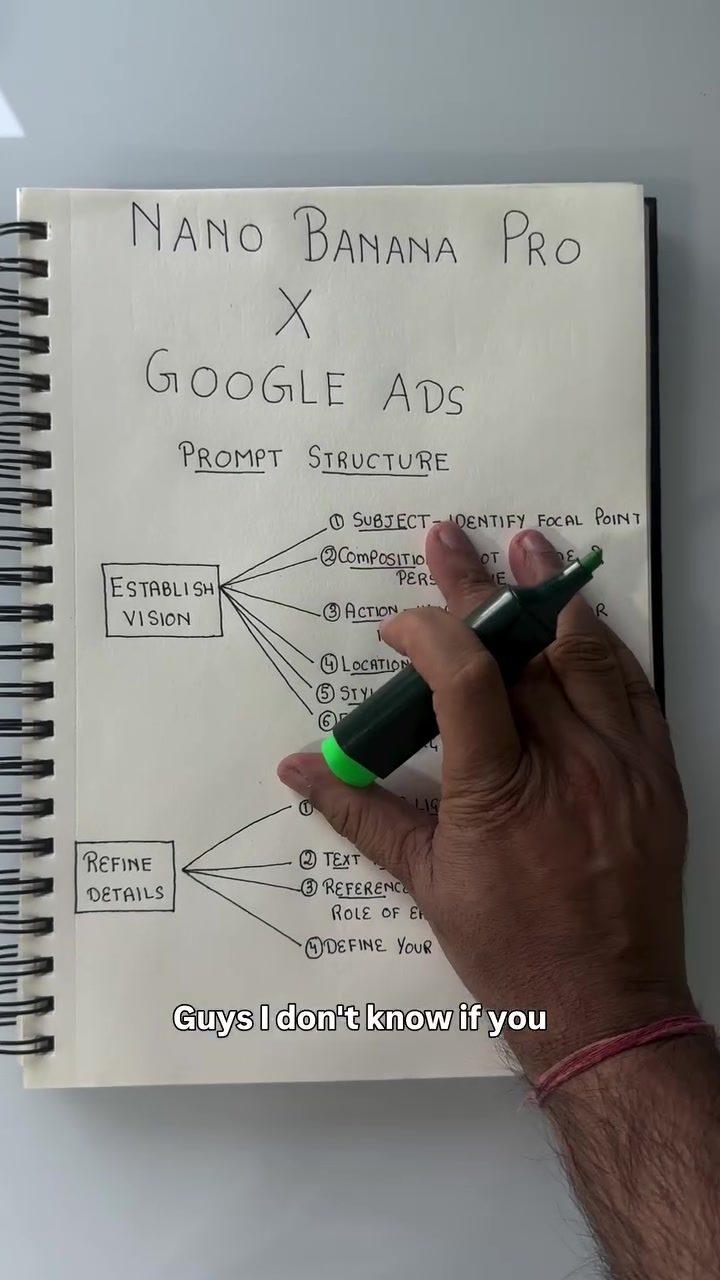
The Two-Part Prompt Structure
Nano Banana Pro divides its prompts into two main parts: vision and details. This division helps in clearly defining the creative direction and refining the specifics of the visual content.
Establishing Vision
The first part of the prompt structure focuses on vision. This is where you define the subject and the overall direction of your creative. Key elements to consider include:
- Subject: Identify the focal point of your creative. What should be the main subject or theme?
- Composition: Determine the frame and perspective. How will the subject be presented within the frame?
- Action: Describe what is happening or moving in the scene. Is there any movement or action that needs to be captured?
- Location: Specify the setting or background. Where is the scene taking place, and what is the context?
- Style: Define the aesthetic and mood. What is the overall feel and tone of the creative?
- Editing: Specify any changes you want to make when modifying an existing asset. How should the final image be edited to fit your vision?
By clearly defining these elements, you set a strong foundation for your creative process.
Refining Details
The second part of the prompt structure focuses on refining the details of your creatives. This is where you add specific elements to enhance the visual content.
- Camera and Lighting: Define the visual atmosphere. What should the lighting and camera settings be?
- Text Integration: Plan any text or copy that should be included in your creative. How should the text appear?
- Reference Image: Provide any reference images you want to use. These can help Nano Banana Pro understand the specific visual assets you want to incorporate.
- Canvas Size: Specify the aspect ratio of the creative. Should it be 9:16, 4:3, or another size?
These details help polish your creative, ensuring it meets your exact specifications.
Example of a Prompt
Let's go through an example to illustrate how this prompt structure works. Suppose you want to create an ad for a new product launch. Your prompt might look something like this:
Vision:
- Subject: New product (e.g., a smartphone).
- Composition: Close-up shot of the product.
- Action: The product is being held in a hand, showcasing its design.
- Location: A sleek, modern background.
- Style: Minimalist, high-tech aesthetic.
- Editing: Add a glossy finish and highlight key features.
Details:
- Camera and Lighting: Soft, diffused lighting with a shallow depth of field.
- Text Integration: "Introducing the New Smartphone" with a modern, sans-serif font.
- Reference Image: An image of a similar product shot in a professional studio.
- Canvas Size: 9:16 for a vertical ad format.
By following this structure, you can ensure that your creative is well-defined and aligns with your campaign goals.
Practical Tips
- Start with Vision: Always begin by defining your vision. This will guide the rest of your creative process and ensure that all details align with your overall goals.
- Be Specific: The more specific you are with your details, the better Nano Banana Pro can generate the visuals you want. Provide clear instructions for camera settings, text integration, and reference images.
- Use Reference Images: If available, use reference images to give Nano Banana Pro a clearer idea of the visual style and content you want.
- Experimentation: Don't be afraid to experiment with different aspect ratios, lighting, and compositions. Sometimes, the best creative ideas come from trying new things.
- Review and Refine: Regularly review your creatives and refine your prompts based on feedback and performance. This iterative process will help you continually improve your visual content.
Important Takeaways
- Structure Matters: Using a structured prompt helps ensure that your creatives are well-defined and align with your campaign goals.
- Details Count: Paying attention to the details, such as camera settings, text integration, and reference images, can significantly enhance the quality of your visuals.
- Adaptability: Being flexible and willing to experiment with different aspects of your prompt can lead to more innovative and effective creatives.
Conclusion
Mastering the prompt structure in Nano Banana Pro can greatly enhance your ability to create compelling visuals for Google Ads. By clearly defining your vision and refining the details, you can ensure that your creatives are both high-quality and aligned with your campaign objectives. Whether you're launching a new product, promoting an event, or simply refreshing your ad content, Nano Banana Pro provides the tools and structure needed to stand out in the competitive digital landscape.
Watch the Reel
Questions readers ask
What are Nano Banana Pro prompts and how do they enhance Google Ads?
Nano Banana Pro prompts are structured commands used to guide the image transformation process in Google Ads. They enhance campaigns by allowing users to create multiple creative directions from a single image, helping to combat creative fatigue and improve overall ad performance. By specifying creative vision and details, users can generate high-impact visuals tailored to their marketing goals.
How does Nano Banana Pro help in transforming images for Google Ads?
Nano Banana Pro transforms images for Google Ads by offering precise resizing, object combination, and multiple creative directions from a single image. This helps users break through creative fatigue and fill asset gaps in their campaigns. The tool's studio-quality controls ensure that the transformed images are of high quality and visually appealing.
What is the importance of creative vision and details in Nano Banana Pro prompts?
In Nano Banana Pro prompts, creative vision and details are crucial as they guide the image transformation process. By clearly defining the desired outcome, users can generate images that align with their brand identity and marketing objectives. This specificity helps in creating compelling visuals that resonate with the target audience and enhance campaign performance.
Can I use Nano Banana Pro for multiple creative directions from a single image?
Yes, Nano Banana Pro allows users to transform a single image into multiple creative directions. This feature is particularly useful for generating diverse and engaging content for Google Ads campaigns. By exploring different creative paths, users can refresh their ads and maintain audience interest over time.
How do I use Nano Banana Pro to improve my Google Ads campaign performance?
To improve Google Ads campaign performance with Nano Banana Pro, focus on mastering the prompt structure that emphasizes creative vision and details. By generating high-impact visuals and transforming images effectively, you can enhance the overall appeal and effectiveness of your ads. Regularly updating your creative assets with Nano Banana Pro can help combat creative fatigue and keep your audience engaged.
What are some examples of Nano Banana Pro prompts for Google Ads?
Examples of Nano Banana Pro prompts for Google Ads include commands like 'Create a vibrant, eye-catching banner ad for a summer sale' or 'Transform a product image into a lifestyle scene with a beach backdrop.' Specific prompts that detail the desired creative vision, such as color schemes, objects to include, and overall mood, yield the best results.
How can Nano Banana Pro help in combating creative fatigue in Google Ads?
Creative fatigue in Google Ads occurs when users repeatedly show the same visuals, leading to diminished audience engagement. Nano Banana Pro combats this by allowing users to refresh and transform images, creating new and dynamic content. By regularly updating ad visuals with Nano Banana Pro, users can maintain audience interest and improve the overall impact of their campaigns.
Related deep dives
Similar reads based on topic and creator.



Recent articles
Fresh deep dives from the latest Reels we unpacked.




Comments
Be the first to comment.