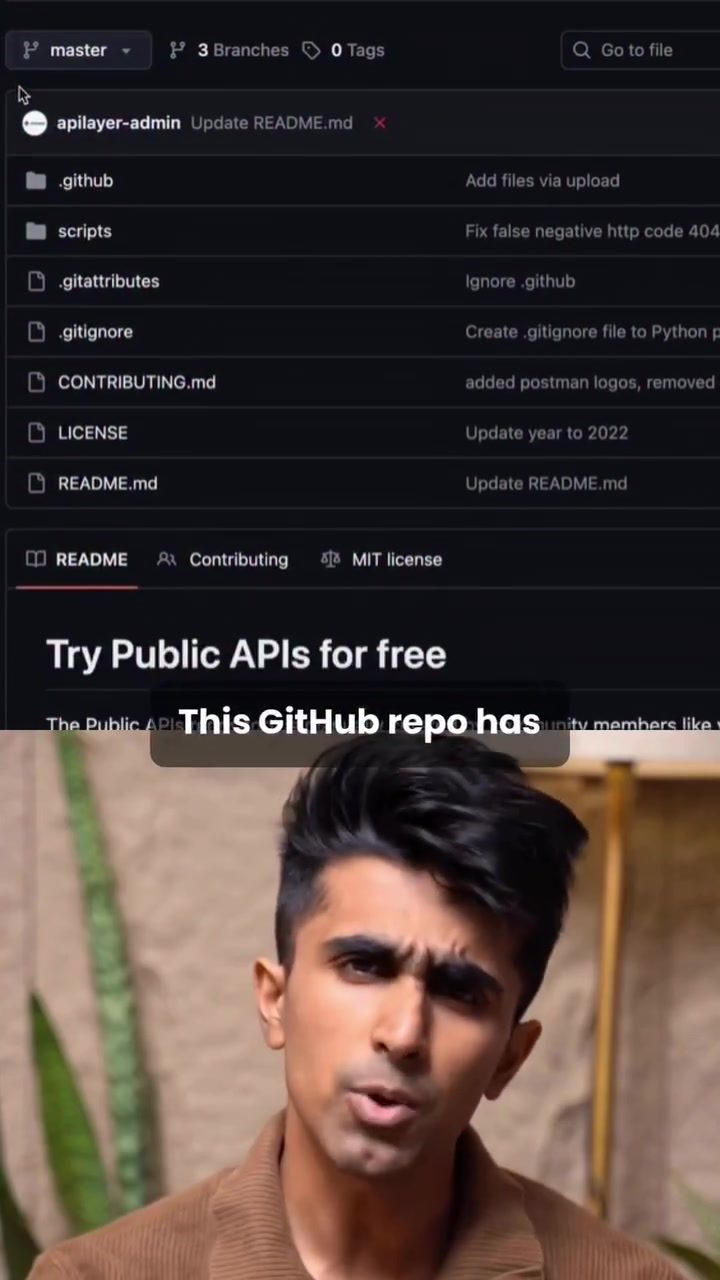
Exploring the Power of Public APIs with GitHub
Public APIs (Application Programming Interfaces) are tools that enable software applications to communicate with each other. They act as a bridge, allowing one application to use the functionalities of another. GitHub, a popular platform for software development, hosts a repository filled with over 100 free APIs spanning various sectors, including email, entertainment, healthcare, crypto, and weather. These APIs offer a wealth of possibilities for developers to integrate and enhance their applications.
Why This Matters
APIs are essential in modern software development because they allow for seamless integration of different services. For instance, an e-commerce platform can use a payment gateway API to process transactions, or a weather website can use a weather API to display real-time updates. By utilizing these APIs, developers can save time and resources, as they do not need to create these functionalities from scratch. Instead, they can focus on building unique features that set their applications apart.
What is an API and How Does it Work?
At its core, an API is a set of rules and protocols that allow different software applications to communicate with each other. Imagine an API as a messenger that delivers your request to a provider and then returns the response back to you. For instance, when you use a weather API to get the current temperature, the API sends your request to the weather service, retrieves the data, and returns it to your application.
In the context of software, an API allows you to call a function from a different application and use it within your own. This capability opens up a world of possibilities, enabling developers to build more robust and feature-rich applications.
Getting Started with Public APIs on GitHub
The GitHub repository mentioned earlier contains a vast array of public APIs. To get started, you can browse through the available APIs and choose one that fits your project's needs. For example, if you are building a weather application, you can search for a weather API that provides the required data.
Navigating the Repository
The repository is organized with clear documentation, making it easy to find the API you need. Here are some key files and directories you might encounter:
- README.md: This file provides an overview of the repository, including instructions on how to get started and examples of usage.
- .github: This directory contains configuration files specific to GitHub, such as the CONTRIBUTING.md file, which outlines guidelines for contributing to the repository.
- LICENSE: This file details the licensing terms for the APIs, ensuring you understand the legal implications of using them in your projects.
- Try Public APIs for free: This section of the repository highlights the availability of free APIs, encouraging developers to explore and utilize them.
Practical Examples
To illustrate how these APIs can be used, let's look at an example. Suppose you want to add real-time weather updates to a website. Here’s a step-by-step guide on how to achieve this using a weather API:
-
Choose an API: Select a weather API from the repository. For instance, the AccuWeather API can be used to get weather updates.
-
Integrate the API: Follow the API documentation to integrate it into your application. This typically involves making HTTP requests to the API endpoint and handling the response.
-
Display the Data: Use the retrieved data to update your application in real-time. For example, you can display the current temperature, weather conditions, and forecasts on your website.
Popular APIs and Their Uses
The GitHub repository offers a diverse range of APIs, each serving different purposes. Here are a few popular ones:
- Email APIs: These can be used to send and receive emails programmatically. They are useful for applications that require email notifications or automated email campaigns.
- Entertainment APIs: These provide data related to movies, music, and games. They can be integrated into entertainment applications to fetch movie details, music playlists, and game scores.
- Healthcare APIs: These offer data related to medical information, patient records, and health services. They are invaluable for healthcare applications that need to access and manage patient data.
- Crypto APIs: These provide real-time data on cryptocurrencies, including prices, market trends, and transaction histories. They are essential for applications that deal with cryptocurrency trading and management.
- Weather APIs: These offer real-time weather updates, forecasts, and historical weather data. They are perfect for applications that require weather information, such as travel apps, agricultural apps, and weather forecasting websites.
Practical Tips for Using Public APIs
When working with public APIs, consider the following tips to maximize their effectiveness:
1. Understand the Documentation
Before integrating an API, thoroughly read the documentation provided. The documentation will guide you through the API's endpoints, request parameters, and response formats, ensuring you use the API correctly.
2. Handle Errors Gracefully
APIs can sometimes return errors due to network issues, invalid requests, or rate limits. Ensure your application can handle these errors gracefully, providing users with informative messages and attempting to retry the request if necessary.
3. Optimize Performance
API calls can impact the performance of your application, especially if they are made frequently. Optimize your API usage by caching responses, using asynchronous calls, and implementing rate limiting to avoid overwhelming the API service.
4. Respect Rate Limits
Most public APIs have rate limits that restrict the number of requests you can make within a specific time frame. Be aware of these limits and design your application to stay within the allowed usage.
5. Secure Your API Keys
When you sign up for an API, you will typically receive an API key that you need to include in your requests. Keep this key secure and avoid hardcoding it into your application. Instead, use environment variables or secure storage solutions to manage your API keys.
6. Monitor Usage
Regularly monitor your API usage to ensure you are staying within the allowed limits and optimizing your application's performance. Many API providers offer usage dashboards that provide insights into your API requests and their performance.
7. Explore and Experiment
Don’t be afraid to explore different APIs and experiment with their functionalities. Public APIs are a valuable resource, and trying out different ones can help you discover new possibilities and enhance your applications.
Important Takeaways
- Diverse Range of APIs: The GitHub repository offers a wide variety of APIs across different sectors, providing developers with numerous options to enhance their applications.
- Ease of Use: Public APIs are generally easy to integrate and use, thanks to clear documentation and examples. This makes them accessible even for beginners in software development.
- Cost-Effective: Many of these APIs are free to use, making them a cost-effective solution for developers looking to add advanced functionalities to their applications.
- Real-Time Updates: APIs like the weather API can provide real-time updates, ensuring your application always has the latest and most accurate data.
- Versatility: APIs can be used in various applications, from e-commerce platforms to healthcare systems, making them versatile tools for developers.
Conclusion
Public APIs hosted on GitHub provide a wealth of opportunities for developers to enhance their applications with advanced functionalities. By leveraging these APIs, developers can save time, reduce costs, and create more feature-rich applications. Whether you are building an e-commerce platform, a healthcare system, or a weather forecasting website, there is an API available to meet your needs. Explore the repository, choose an API, and start integrating it into your projects today.
Watch the Reel
Questions readers ask
What are some popular free weather APIs available on GitHub?
GitHub hosts numerous free weather APIs, such as OpenWeatherMap, WeatherAPI, and Weatherstack. These APIs provide a wide range of weather data, including current conditions, forecasts, and historical data, which can be seamlessly integrated into applications.
How can I integrate a free weather API from GitHub into my application?
To integrate a free weather API from GitHub, you'll first need to find the API repository on GitHub. Once you've located the API, follow the documentation provided to sign up for an API key, and then use this key to make requests to the API. You can then parse the JSON or XML data received and display it in your application.
Are there any limitations to using free weather APIs from GitHub?
While free weather APIs from GitHub are a great resource, they often come with certain limitations. These can include rate limits, which restrict the number of API calls you can make in a given time period, and data restrictions, which may limit the type or amount of data you can access. Always review the API documentation to understand these limitations.
What programming languages can I use to integrate a weather API from GitHub?
Most weather APIs on GitHub support a variety of programming languages, including Python, JavaScript, Java, and C#. The API documentation will typically provide examples and libraries to help you get started with integration, regardless of the programming language you choose.
Do I need an API key to use free weather APIs from GitHub?
Yes, most free weather APIs on GitHub require an API key for access. This key is usually provided after signing up on the API provider's website. The API key is essential for authenticating your requests and ensuring that you stay within the usage limits set by the API provider.
Can I use free GitHub weather APIs for commercial applications?
The usage rights for free GitHub weather APIs vary by provider. Some APIs allow commercial use, while others restrict it. Always review the terms of service and licensing agreements provided by the API to ensure that you are compliant with their usage policies before integrating them into a commercial application.
What should I do if I encounter issues while integrating a weather API from GitHub?
If you encounter issues, the first step is to check the API documentation for troubleshooting tips. Many APIs also have community forums or support channels where you can ask for help. Additionally, reviewing the API repository on GitHub for any open issues or discussions can provide insights and solutions from other developers.
Related deep dives
Similar reads based on topic and creator.




Recent articles
Fresh deep dives from the latest Reels we unpacked.




Comments
Be the first to comment.