Claude Skill Suggestions: Enhancing AI Capabilities
Claude, a versatile AI platform, has recently integrated a new feature called skill suggestions. This functionality aims to recommend the best matching skills based on the user's described goal. The integration of this feature is facilitated by the Find Skills tool, which streamlines the process of identifying and implementing the most suitable skills from a vast array of options.
Why This Matters
In an era where AI-driven tools are becoming increasingly integral to various industries, the ability to quickly and accurately identify the right skills is crucial. Whether you are a developer, a data scientist, or a project manager, having the right set of skills at your disposal can significantly enhance your productivity and efficiency. Claude's new skill suggestion feature addresses this need by providing instant recommendations, helping users save time and focus on the tasks that matter most.
Main Discussion
What are Skill Suggestions?
Skill suggestions in Claude refer to the automated identification and recommendation of specific skills tailored to a user's described goal. This feature leverages the Find Skills tool, which is designed to quickly scan and analyze hundreds of skill options to provide the best match.
How Does It Work?
The process involves running a series of commands in a terminal interface. This includes:
-
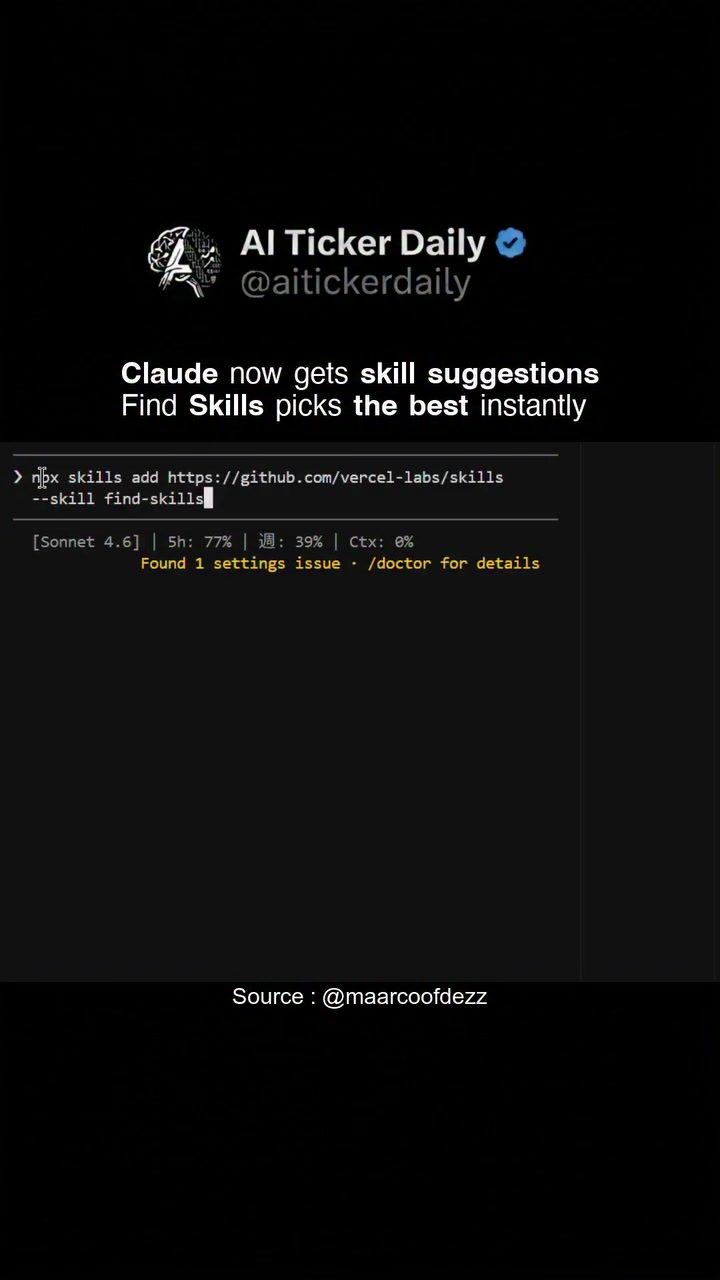
Installing the Find Skills Tool: Users can add the Find Skills tool to their environment using the command:
npx skills add https://github.com/vercel-labs/skills -
Specifying the Skill: Once the tool is installed, users can specify the skill they want to find by running a command like:
--skill find-skills -
Gitifying and Running Commands: The process involves Gitifying the environment and running Bash commands to ensure that the tool is properly integrated and ready to use. The terminal interface shows commands being executed, indicating that the tool is actively searching for and identifying the best skills.
-
Skill Recommendations: After analyzing the user's goal, the Find Skills tool provides instant recommendations based on the best matching skills available in the database.
Gitifying and Bash Commands
Gitifying is a process that involves using Git to manage and track changes in the codebase. This process is crucial for maintaining version control and ensuring that all changes are properly documented. The terminal interface shows the user executing a series of Bash commands, which are essential for running the Find Skills tool and getting instant skill recommendations.
On-Screen Text and Visuals
The visuals and on-screen text provide a clear roadmap of the entire process. For instance, the terminal interface shows commands such as:
npx skills add https://github.com/vercel-labs/skills
This command is essential for adding the Find Skills tool to the user's environment. The visuals also highlight the Gitifying process, which involves running commands like:
Bash(npx skills add https://github.com/vercel-labs/skills --skill find-skills)
These commands are critical for integrating the Find Skills tool and ensuring that it functions correctly. Additionally, on-screen text such as "Gitifying... (thinking)" and "Found 1 settings issue · /doctor for details" provide real-time updates on the progress and any potential issues that need to be addressed.
Practical Tips
Getting Started with Skill Suggestions
To get started with skill suggestions in Claude, follow these steps:
- Install the Find Skills Tool: Use the command
npx skills add https://github.com/vercel-labs/skillsto install the tool in your environment. - Specify the Skill: Run the command
--skill find-skillsto specify the skill you want to find. - Run Bash Commands: Execute the necessary Bash commands to ensure that the tool is properly integrated and ready to use.
Troubleshooting
If you encounter any issues during the process, the terminal interface provides real-time updates and suggestions. For example, if you encounter a settings issue, the on-screen text might display a message like "Found 1 settings issue · /doctor for details." This indicates that there is a settings issue that needs to be addressed, and the terminal will provide instructions on how to resolve it.
Advanced Usage
For advanced users, the Find Skills tool offers additional customization and configuration options. You can modify the commands and parameters to suit your specific needs and preferences. This flexibility allows you to tailor the tool to your unique requirements and optimize its performance.
Important Takeaways
- Instant Skill Recommendations: The skill suggestion feature in Claude provides instant recommendations based on the user's described goal, helping to save time and enhance productivity.
- Find Skills Tool: The integration of the Find Skills tool simplifies the process of identifying and implementing the best matching skills from a vast array of options.
- Gitifying and Bash Commands: The process involves using Git and Bash commands to ensure that the tool is properly integrated and ready to use.
- Real-Time Updates: The terminal interface provides real-time updates on the progress and any potential issues, making it easy to troubleshoot and resolve problems.
Conclusion
The integration of the skill suggestion feature in Claude represents a significant advancement in AI-driven tools. By leveraging the Find Skills tool, users can quickly and accurately identify the best matching skills tailored to their specific goals. This feature not only enhances productivity and efficiency but also provides a seamless and user-friendly experience. As AI continues to evolve, tools like Claude will play a crucial role in shaping the future of technology and innovation.
Watch the Reel
Questions readers ask
What is the purpose of the 'Find Skills' feature in Claude?
The 'Find Skills' feature in Claude is designed to identify and recommend the most relevant skills tailored to a user's specific goals. It streamlines the process of selecting the right skills from a wide range of options, making it easier to enhance productivity and efficiency.
How does the 'Find Skills' tool improve productivity?
By providing quick and accurate skill recommendations, the 'Find Skills' tool saves time and effort. Users can focus on their tasks rather than spending time searching for the right skills, thereby increasing overall productivity.
Who can benefit from using the 'Find Skills' feature in Claude?
The 'Find Skills' feature is beneficial for a wide range of professionals, including developers, data scientists, and project managers. Anyone looking to enhance their AI capabilities and streamline their workflow can benefit from this tool.
Can the 'Find Skills' tool be customized for different industries?
Yes, the 'Find Skills' tool is versatile and can be tailored to meet the needs of different industries. By inputting specific goals, users can receive industry-relevant skill recommendations, ensuring that the suggestions are highly applicable to their field.
What makes the 'Find Skills' feature stand out from other AI tools?
The 'Find Skills' feature stands out due to its precision in matching user goals with the most suitable skills. Unlike other tools that may offer general suggestions, 'Find Skills' focuses on personalized recommendations, making it a more effective tool for enhancing AI capabilities.
How does 'Find Skills' assist developers in their projects?
For developers, the 'Find Skills' feature can recommend specific skills and tools that are most relevant to their current project needs, such as programming languages, frameworks, or software development techniques. This ensures that developers are equipped with the right skills to tackle their projects efficiently.
What are the steps to implement the 'Find Skills' feature in Claude?
To implement the 'Find Skills' feature, users need to describe their goals clearly within the Claude platform. The tool will then analyze this input and recommend the best matching skills. Users can then add these skills to their AI platform to enhance their capabilities. No additional software or complex setup is required.
Related deep dives
Similar reads based on topic and creator.




Recent articles
Fresh deep dives from the latest Reels we unpacked.




Comments
Be the first to comment.