Kali Linux on Smartphones: Revolutionizing Mobile Cybersecurity
Imagine a toolkit as powerful as a desktop cybersecurity suite, but at your fingertips. This is exactly what Kali Linux on smartphones offers. Mobile hacking, once a niche field, is now a focal point in cybersecurity. As the author of this article, I've used the OffSec Kali Linux tool on a smartphone to demonstrate various cybersecurity capabilities, including demonstrations at the DEF CON 2026 convention.
Why This Matters
Smartphones are more than just communication devices; they are powerful computers that can be used for a variety of tasks, including cybersecurity. As our reliance on mobile devices increases, so does the need to understand and defend against mobile threats. Kali Linux, a popular cybersecurity distribution, offers a comprehensive suite of tools that can be used on rooted smartphones. This capability is demonstrated by the OffSec Kali Linux tool, which allows users to leverage a suite of Kali Linux tools on mobile devices.
Main Discussion
OffSec Kali Linux on Mobile: A Comprehensive Suite
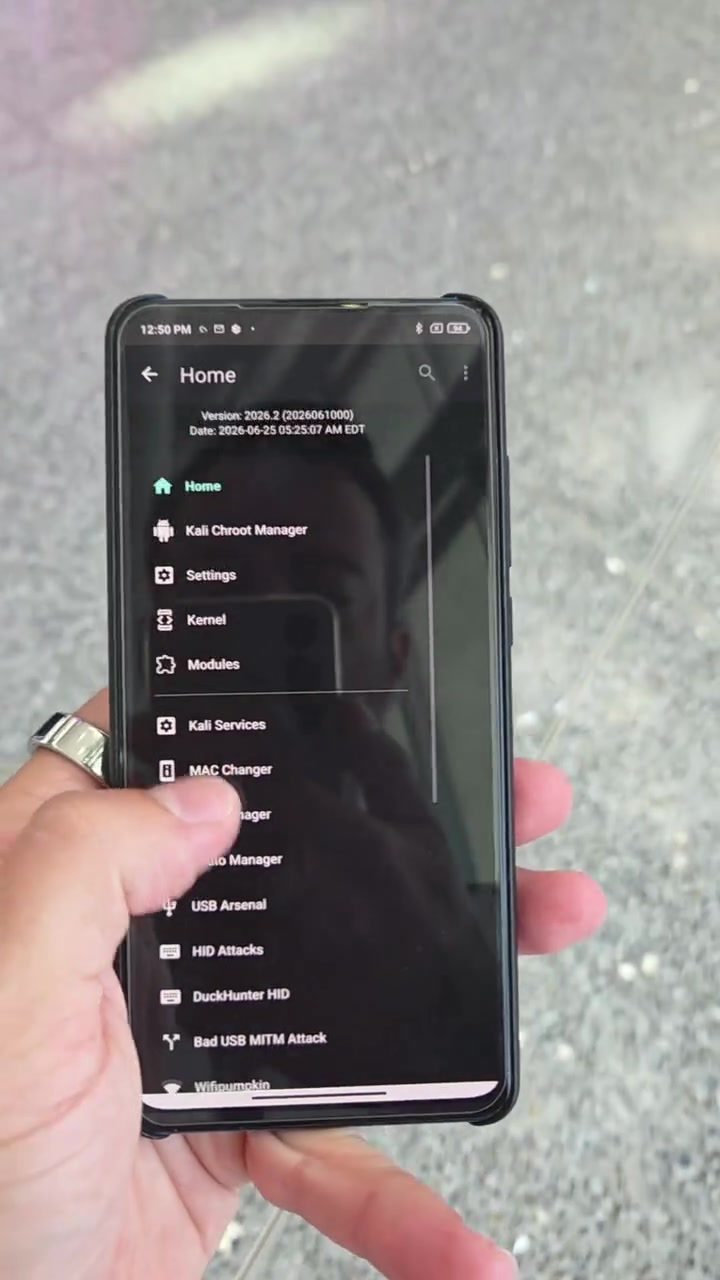
The OffSec Kali Linux tool is a versatile platform that brings the power of Kali Linux to smartphones. This toolkit is designed to work seamlessly with rooted smartphones, providing a set of powerful tools that are typically found on desktop systems. The Kali Chroot Manager, which is part of this toolkit, allows users to access various modules, including MAC Changer, Kernel, and USB Arsenal.
Key Features of the Kali Linux Toolkit
Network Manipulation
One of the standout features of the OffSec Kali Linux tool is its ability to manipulate network connections. Tools like MAC Changer allow users to alter the MAC address of their devices, which can be useful for evading network restrictions or enhancing privacy. Additionally, the USB Arsenal module provides a range of USB-based attacks, including the ability to emulate various USB devices.
Bluetooth and NFC Attacks
The toolkit also includes advanced Bluetooth and NFC capabilities. The Bluetooth Manager and NFC Relay modules are particularly noteworthy. Bluetooth Low Energy (BLE) tracking, BadBluetooth, and NFC relay attacks are among the many features available. These capabilities enable users to track devices, clone IDs, and perform various other BLE-related attacks, including identifying the state of iPhones.
Wi-Fi and Wireless Attacks
For Wi-Fi and wireless attacks, the toolkit includes a variety of options. Tools like Wigle allow for unique BLE name searches, and WPA2 cracking capabilities are available. The Evil Twin attack is another notable feature, which allows users to create a fake Wi-Fi network to intercept and manipulate traffic. The wifite automation tool is particularly useful for automating various Wi-Fi attacks.
Physical Attacks
The toolkit also includes physical attack capabilities, such as the Rubber Ducky module, which allows for automated physical attacks. The HID Attacks module makes it possible to launch attacks over USB, including keystroke injection and device emulation.
Practical Tips
Setting Up Kali Linux on a Smartphone
To get started with Kali Linux on a smartphone, you'll need a rooted device. Rooting a smartphone can vary depending on the device, but it generally involves gaining superuser access. Once rooted, you can install a Kali Linux chroot environment, which allows you to run Kali Linux tools on your smartphone.
Exploring the Kali Chroot Manager
The Kali Chroot Manager is the central hub for accessing various modules and tools. To explore the toolkit, start by opening the Kali Chroot Manager and navigating to the Modules section. Here, you'll find a range of tools, including Network Manipulation, Bluetooth, NFC, and Physical Attacks.
Understanding Kernel and Services
The Kernel and Services sections are crucial for managing the underlying system. The Kernel section allows you to configure and manage the Linux kernel, while the Services section allows you to start, stop, and configure various services, such as SSH and Apache.
Important Takeaways
Kali Linux on smartphones, as demonstrated by the OffSec Kali Linux tool, offers a powerful and versatile suite of cybersecurity tools. Whether you're performing network manipulation, Bluetooth attacks, or physical attacks, the toolkit provides a comprehensive range of capabilities.
Security and Ethical Considerations
It's important to note that while these tools can be incredibly powerful, they should be used responsibly. Unauthorized access and attacks on networks and devices are illegal and unethical. Always ensure you have explicit permission to test and manipulate networks and devices.
Community and Resources
The mobile hacking community is a valuable resource for learning and sharing knowledge. Events like DEF CON and mobile hacking communities provide opportunities to learn from experts and share your own findings. The toolkit, as demonstrated by the OffSec Kali Linux tool, is a testament to the capabilities of mobile cybersecurity tools and their potential in the broader field.
Conclusion
Kali Linux on smartphones, showcased by the OffSec Kali Linux tool, represents a significant advancement in mobile cybersecurity. With its comprehensive suite of tools, rooted smartphones can now perform a wide range of cybersecurity tasks, from network manipulation to physical attacks. As the field of mobile hacking continues to evolve, tools like these will play a crucial role in shaping the future of cybersecurity.
Watch the Reel
Questions readers ask
What is Kali Linux mobile and why was it featured at DEF CON 2026?
Kali Linux mobile is a version of the popular cybersecurity toolkit designed to run on smartphones, providing users with a comprehensive suite of tools for cybersecurity tasks. It was featured at DEF CON 2026 to showcase its capabilities in mobile hacking and defense against mobile threats, highlighting the growing importance of mobile cybersecurity.
What are some of the key features of Kali Linux on smartphones?
Kali Linux on smartphones offers a range of powerful features, including a collection of penetration testing tools, support for various hacking methods such as USB, Bluetooth, and BLE (Bluetooth Low Energy), and the ability to perform network assessments and vulnerability scans directly from a mobile device.
How can Kali Linux on smartphones be used for penetration testing?
Kali Linux on smartphones can be used for penetration testing by leveraging its suite of tools to identify and exploit vulnerabilities in mobile networks and devices. It allows users to perform tasks such as network mapping, vulnerability scanning, and exploit execution, all from the convenience of a mobile device.
What is the significance of the DEF CON 2026 hacks involving Kali Linux?
The DEF CON 2026 hacks involving Kali Linux demonstrated the potential of mobile hacking and the effectiveness of Kali Linux as a tool for both offensive and defensive cybersecurity measures. These demonstrations underscored the importance of mobile cybersecurity and the need for robust tools to address emerging threats.
Can Kali Linux on smartphones be used for Bluetooth and BLE hacking?
Yes, Kali Linux on smartphones can be used for Bluetooth and BLE hacking. It includes specific tools and kernel modules designed to exploit vulnerabilities in Bluetooth and BLE devices, allowing users to test the security of these connections and identify potential weaknesses.
How does the Kali Linux community contribute to mobile cybersecurity?
The Kali Linux community plays a crucial role in mobile cybersecurity by continuously developing and updating the toolkit, sharing knowledge, and collaborating on new techniques. This community-driven approach ensures that Kali Linux remains at the forefront of mobile cybersecurity, providing users with the latest tools and information to defend against mobile threats.
What are some common tools in the Kali Linux mobile hacking arsenal?
The Kali Linux mobile hacking arsenal includes a variety of tools such as Nmap for network scanning, Metasploit for exploiting vulnerabilities, and Wireshark for packet analysis. These tools, along with others, enable users to perform a wide range of cybersecurity tasks directly from their smartphones.
Related deep dives
Similar reads based on topic and creator.




Recent articles
Fresh deep dives from the latest Reels we unpacked.




Comments
Be the first to comment.