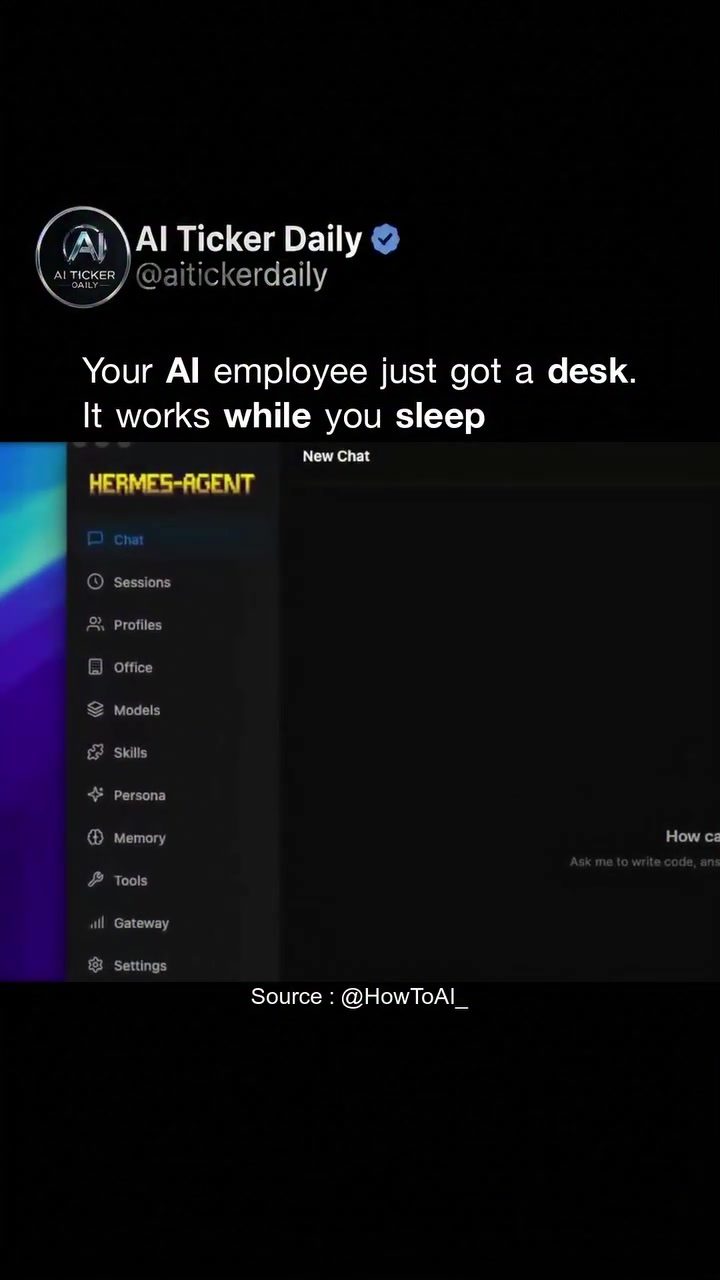
HERMES-AGENT: The AI Platform for Everyone
HERMES-AGENT is an autonomous AI platform that has recently transitioned from a developer-only tool to a user-friendly desktop application. This shift marks a significant change in the accessibility and usability of advanced AI tools, allowing non-technical users to leverage powerful AI capabilities without needing to dive into command lines or terminal windows. The platform operates seamlessly, providing continuous support, even while the user is inactive.
Why This Matters
The launch of the HERMES-AGENT desktop app signals a broader trend in the AI industry. The shift from command-line interfaces (CLI) to more user-friendly, desktop applications represents a move towards making AI tools accessible to a wider audience. As AI becomes more integrated into everyday life, the ability to use these tools without technical expertise is crucial. This transition is part of a broader consumerization of AI, where powerful AI capabilities are no longer reserved for developers but are available to anyone who wants to harness these tools for various applications.
The Evolution of AI Tools
From Developer Tools to Consumer Products
Traditionally, AI tools have been complex, requiring users to have a deep understanding of programming and development. This complexity has limited the use of AI to a select group of professionals. The HERMES-AGENT platform, in its previous form, was no exception to this. However, with the launch of its desktop application, it has opened up a new world of possibilities for users who are not developers. The platform now includes a clean, intuitive UI, making it accessible for anyone to use.
Key Features of the HERMES-AGENT Desktop App
The HERMES-AGENT desktop app comes packed with several key features that make it a powerful tool for both technical and non-technical users. These include:
-
Multi-Agent Management: The platform allows users to manage multiple AI agents, each with its own specific tasks and capabilities. This enables users to automate a wide range of tasks simultaneously, increasing efficiency and productivity.
-
Persistent Memory: One of the standout features is the platform's persistent memory. Once an AI agent learns or processes information, it retains this data, allowing for continuous improvement and adaptation over time.
-
Custom Skills and Personas: Users can create custom skills and personas for their AI agents, tailoring them to specific tasks or roles. This flexibility allows for a high degree of personalization, ensuring that the AI agents can meet the unique needs of each user.
-
Autonomous Workflows: The platform's autonomous workflows enable AI agents to operate independently, executing tasks without the need for constant supervision. This feature is particularly useful for users who want to automate repetitive tasks or need continuous support without constant monitoring.
The User Interface
The HERMES-AGENT platform's chat interface is designed to be intuitive, with several key sections:
-
Sessions: This section allows users to manage and review past interactions with their AI agents, providing a clear overview of completed tasks and progress.
-
Profiles: Users can create and manage different profiles for their AI agents, each with its own set of skills and capabilities.
-
Office: This section is designed for more complex tasks, allowing users to manage their AI agents in a more structured and organized manner.
-
Memory: This feature ensures that the AI agents retain all the information they have learned, allowing for continuous improvement and adaptation over time.
-
Tools: Here, users can access various tools and features that enhance the functionality of their AI agents, making them more versatile and efficient.
-
Persona: This section allows users to customize the way their AI agents interact, tailoring them to specific roles or tasks.
-
Gateway: This feature acts as a bridge between the user and the AI agents, managing all interactions and communications.
-
Settings: Users can adjust various settings to optimize the performance of their AI agents, ensuring they meet their specific needs and preferences.
Practical Tips for Getting Started
Setting Up Your First AI Agent
-
Download and Install the App: Start by downloading the HERMES-AGENT desktop app from the official website. Follow the installation instructions to set up the application on your device.
-
Create Your First AI Agent: Once the app is installed, open it and create your first AI agent. You can customize its skills, persona, and roles to suit your needs.
-
Set Up Autonomous Workflows: Configure the autonomous workflows to automate your desired tasks. This ensures that your AI agent can operate independently, executing tasks without constant supervision.
-
Review and Monitor: Use the chat interface to review and monitor the progress of your AI agents. Check the Sessions and Profiles to ensure that everything is running smoothly.
-
Customize and Adapt: As you use the platform, customize and adapt your AI agents’ skills and personas to meet your evolving needs. This continuous improvement will help you get the most out of the HERMES-AGENT platform.
Important Takeaways
The launch of the HERMES-AGENT desktop app represents a significant step forward in making advanced AI tools accessible to everyone. By providing a user-friendly interface and a range of powerful features, the platform allows non-technical users to leverage AI capabilities without needing to dive into complex programming. This democratization of AI is a crucial development, as it enables a wider audience to harness the power of AI for various applications, from personal productivity to complex business tasks. As more AI tools transition from CLI to desktop applications, the future of AI is becoming increasingly accessible and user-friendly, opening up a world of possibilities for users of all skill levels.
Conclusion
The HERMES-AGENT desktop app is a game-changer in the world of AI, making powerful tools accessible to a broader audience. With its user-friendly interface, multi-agent management, persistent memory, and autonomous workflows, the platform provides a comprehensive solution for users who want to leverage AI capabilities without needing to be developers. As the consumer era of AI begins, getting comfortable with tools like HERMES-AGENT can provide a significant working advantage, helping users stay ahead in an increasingly AI-driven world.
Watch the Reel
Questions readers ask
Who can benefit from the HERMES-AGENT desktop application?
The HERMES-AGENT desktop application is designed for everyday users who want to harness AI capabilities without needing technical expertise. Non-technical users, as well as professionals seeking to integrate AI into their daily tasks, can benefit from this user-friendly tool.
What are the advantages of the HERMES-AGENT desktop app over traditional AI tools?
The HERMES-AGENT desktop app offers a more accessible and user-friendly interface compared to traditional AI tools that often require command-line or terminal-based commands. This shift makes AI more approachable, especially for users who are not familiar with coding or technical jargon.
What makes HERMES-AGENT different from other AI chat apps?
HERMES-AGENT stands out due to its autonomous operation and seamless support, even when the user is inactive. This allows for continuous AI processes in the background, which sets it apart from many other AI chat apps that typically require active user interaction.
Can I run AI tasks in the background with the HERMES-AGENT desktop app?
Yes, one of the key features of the HERMES-AGENT desktop app is its ability to run AI tasks in the background. This means you can have AI processes running and completing tasks while you focus on other activities, enhancing productivity.
What happens when I am inactive on the HERMES-AGENT desktop app?
When you are inactive on the HERMES-AGENT desktop app, the platform continues to operate and provide support. This ensures that your AI tasks and processes do not get interrupted, allowing for a continuous and seamless experience.
Is the HERMES-AGENT desktop app suitable for those new to AI?
Absolutely, the HERMES-AGENT desktop app has been designed with ease of use in mind. This makes it excellent for users who are new to AI, as it eliminates the need for technical expertise and simplifies the process of running AI tasks.
What type of support can I expect from the HERMES-AGENT desktop app?
The HERMES-AGENT desktop app provides continuous support, ensuring that your AI tasks run smoothly. Even when you are inactive, the app operates in the background, making sure that you have a reliable and efficient experience with AI.
Related deep dives
Similar reads based on topic and creator.




Recent articles
Fresh deep dives from the latest Reels we unpacked.




Comments
Be the first to comment.