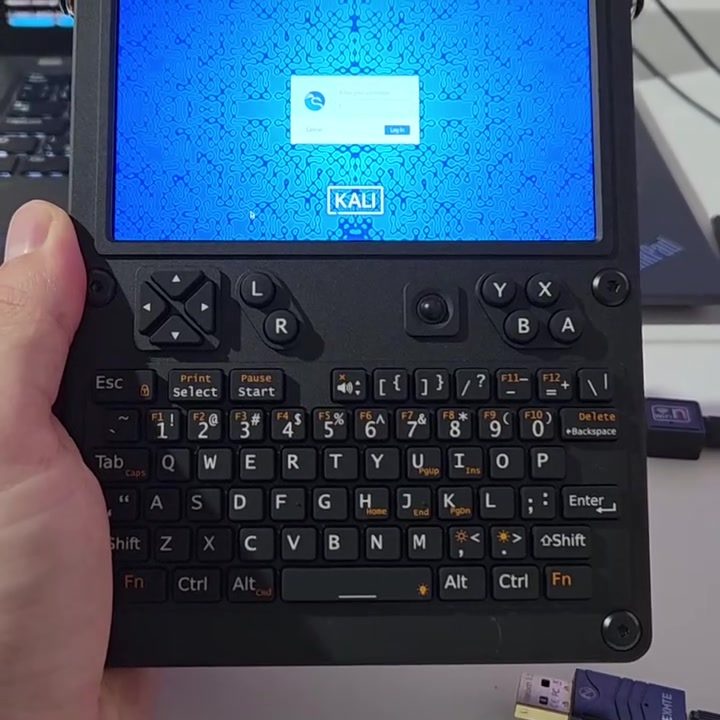
Kali Linux on a Handheld Device
Kali Linux is a powerful, Debian-based Linux distribution designed for digital forensics and penetration testing. Traditionally, it has been used on desktops and laptops, but the versatility of the operating system makes it an attractive option for handheld devices as well. Here, we explore the advantages, practical applications, and key considerations when using Kali Linux on a handheld device.
Why This Matters
Handheld devices equipped with Kali Linux can be game-changers for professionals in the fields of cybersecurity, digital forensics, and IT administration. The portability of these devices allows security experts to perform on-the-go tasks, such as network assessments, vulnerability scans, and data recovery, with ease. As cyber threats become more pervasive, tools that enhance mobility and efficiency are crucial in maintaining robust security protocols.
Main Discussion
Portable Power
One of the most significant advantages of running Kali Linux on a handheld device is its portability. The compact and lightweight design of these devices allows professionals to carry a full-fledged Linux distribution in their pockets, ready for deployment at any location. This is particularly useful for security audits where immediate action might be required.
Physical Interface
The handheld device showcased in this setup features a physical keyboard and a directional pad, which can be essential for precise input. The tactile feedback from a physical keyboard can be more efficient and less error-prone compared to an on-screen virtual keyboard, especially when performing complex commands and operations.
User Interface and Access
The user interface of a handheld device running Kali Linux is similar to that of a desktop. The login prompt is straightforward, requiring the user to enter their username and gain access to the system. Once logged in, you can utilize the full suite of Kali Linux tools, just as you would on a traditional computer. The device might have a smaller screen, but this is balanced by the portability and ease of use.
Practical Tips
Choosing the Right Device
When selecting a handheld device for running Kali Linux, consider the following factors:
- Processor Speed and RAM: Ensure the device has a sufficient processor and ample RAM to handle the tasks you plan to perform.
- Battery Life: Long battery life is crucial for extended fieldwork.
- Connectivity Options: Look for devices with multiple connectivity options, such as Wi-Fi, Bluetooth, and USB-C, to enhance versatility.
- Durability: A rugged design can protect the device from physical damage, which is essential for outdoor or fieldwork scenarios.
Essential Tools
Kali Linux comes pre-loaded with a plethora of tools for penetration testing, digital forensics, and more. Some essential tools to familiarize yourself with include:
- Nmap: A powerful network scanning tool.
- WiFi: Tools for assessing wireless network security.
- Metasploit: A framework for developing and executing exploit code.
- WireShark: A network protocol analyzer.
- John the Ripper: A password cracking tool.
Security Considerations
While the portability of a handheld device running Kali Linux offers numerous benefits, it also introduces security risks. Here are some best practices to secure your device:
- Physical Security: Ensure the device is always secure and not left unattended.
- Encryption: Use full-disk encryption to protect sensitive data.
- Regular Updates: Keep the operating system and all installed tools up to date to mitigate vulnerabilities.
Important Takeaways
Using Kali Linux on a handheld device can significantly enhance your mobility and flexibility as a cybersecurity professional. The physical interface, combined with the robust toolset of Kali Linux, makes it an invaluable asset for fieldwork. However, it is essential to choose the right device, familiarize yourself with essential tools, and prioritize security measures to fully leverage this powerful combination.
Conclusion
Whether you are a seasoned cybersecurity professional or just starting out, running Kali Linux on a handheld device can offer numerous advantages. The portability and efficiency of these devices, combined with the comprehensive toolset of Kali Linux, make them a valuable asset for anyone involved in digital forensics, penetration testing, or IT administration. By understanding the benefits, practical considerations, and essential tools, you can make the most of this powerful combination and stay ahead in the ever-evolving field of cybersecurity.
Watch the Reel
Questions readers ask
What are the key benefits of using Kali Linux on a handheld device for cybersecurity professionals?
Running Kali Linux on a handheld device offers several key benefits. Primarily, it enhances portability, allowing professionals to conduct tasks like network assessments and vulnerability scans from virtually anywhere. Additionally, the compact size and physical keyboard of handheld devices make them a convenient and efficient tool for on-the-go work. This setup eliminates the need to carry around bulky laptops while providing a robust and versatile operating system.
Which tasks can be efficiently performed using a handheld device running Kali Linux?
A handheld device equipped with Kali Linux can be used for a variety of tasks including network assessments, vulnerability scans, and data recovery. These tasks are streamlined by the powerful tools integrated into Kali Linux, making the device an essential tool for cybersecurity professionals who need to work in the field or on the move.
What types of handheld devices are compatible with Kali Linux?
Kali Linux can be installed on various handheld devices, including those with ARM architecture, such as the Raspberry Pi or the Pinebook. These devices often come with a physical keyboard, which is beneficial for input-intensive tasks. It's important to ensure that the device has sufficient processing power and memory to handle the demands of Kali Linux and the associated tools.
How does the portability of Kali Linux on a handheld device benefit IT administration?
The portability of Kali Linux on a handheld device is a significant advantage for IT administrators. It allows them to conduct network assessments and troubleshoot security issues in real-time, regardless of their location. This level of mobility ensures that IT professionals can respond quickly to urgent situations and maintain the integrity of their systems, making it an invaluable tool for on-site support and emergency response.
What are the primary uses of Kali Linux on mobile devices in digital forensics?
In digital forensics, Kali Linux on mobile devices is used for tasks such as data recovery and analysis. The compact size of the handheld device allows for forensics to be conducted in the field, making it easier to gather and analyze data from crime scenes or other remote locations. This capability is crucial for preserving evidence and conducting thorough investigations.
Can a handheld device running Kali Linux be used for continuous monitoring of network security?
Yes, a handheld device running Kali Linux can be used for continuous monitoring of network security. With the right set of tools and configurations, these devices can perform real-time security assessments, detect anomalies, and generate alerts. This makes them suitable for monitoring the security posture of networks in various environments, including remote offices and temporary setups.
What should be considered when setting up Kali Linux on a handheld device?
When setting up Kali Linux on a handheld device, consider the device's hardware specifications, such as processing power and memory, to ensure optimal performance. Additionally, ensure that the device has the necessary ports and connectivity options to interface with other devices and networks. Finally, consider the security measures, such as setting up strong passwords and enabling encryption, to protect the data and integrity of the device.
Related deep dives
Similar reads based on topic and creator.




Recent articles
Fresh deep dives from the latest Reels we unpacked.




Comments
Be the first to comment.