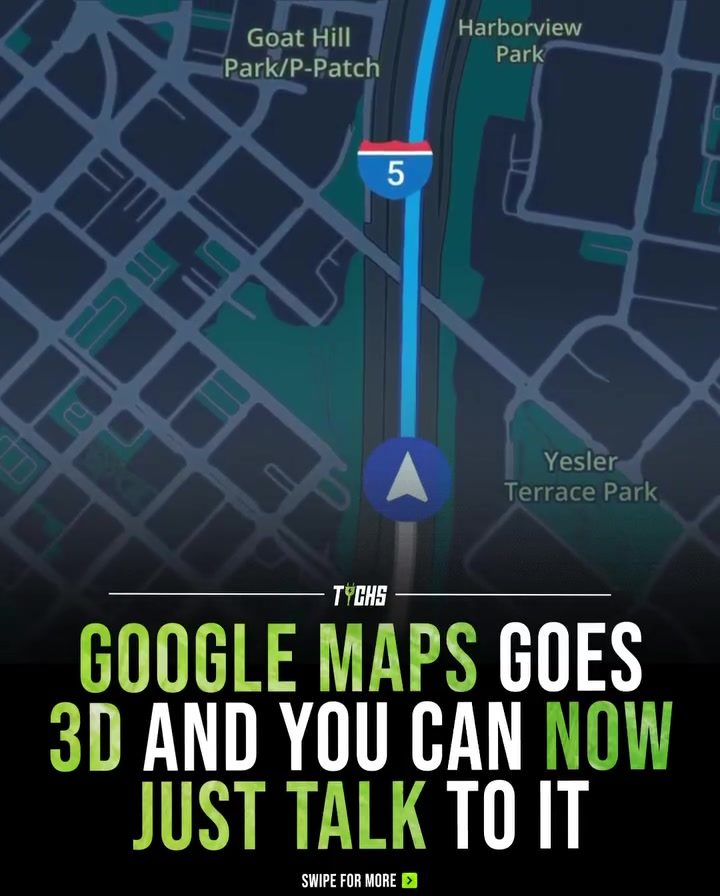
Google Maps 3D View: Navigating the World in a Whole New Way
The latest update to Google Maps introduces a revolutionary 3D view, transforming how we navigate and explore the world. This significant upgrade integrates advanced artificial intelligence features from Google Gemini, enhancing the platform's ability to understand locations, answer complex questions, and provide smarter recommendations. The combination of AI and Google's vast mapping data offers deeper insights into cities, routes, businesses, and nearby experiences.
Why This Matters
This shift from simple navigation to an AI-powered exploration tool marks a major milestone in how we interact with our surroundings. By leveraging the 3D view, users can now gain a more immersive and intuitive understanding of their environment. This makes it easier to discover new locations, plan trips, and engage with the real world in more meaningful ways.
Main Discussion
3D View: A More Immersive Experience
The 3D view in Google Maps provides a more detailed and immersive experience. Users can now see streets, landmarks, and buildings in a three-dimensional perspective, making it easier to visualize routes and understand spatial relationships. This feature is particularly useful for exploring unfamiliar areas, as it offers a more realistic view of the environment.
AI-Powered Insights
With the integration of Google Gemini, the navigation app can now provide deeper insights into various aspects of cities and routes. The AI can answer complex questions about places, giving users more detailed and relevant information. For instance, you can ask about the best nearby cafes, the fastest routes to avoid traffic, or even the most scenic routes for a leisurely drive.
Voice Commands for Hands-Free Navigation
One of the most exciting features of the update is the ability to interact with the map using voice commands. This hands-free navigation option allows users to keep their eyes on the road while getting directions. Whether you're driving, biking, or walking, you can now ask Google Maps for directions, search for nearby points of interest, and even get real-time updates on traffic conditions without touching your device.
Enhanced Recommendations
Google Maps now offers smarter recommendations based on AI-driven insights. The platform can suggest nearby experiences, such as restaurants, shops, and attractions, tailored to your preferences. This feature makes it easier to discover new places and plan trips, whether you're a local exploring your city or a traveler in an unfamiliar destination.
Practical Tips
Exploring New Areas
Use the 3D view to get a better sense of new areas. Zoom in on specific landmarks or streets to familiarize yourself with the layout before you visit. This can be particularly helpful when planning a trip or moving to a new city.
Using Voice Commands
Make the most of voice commands for a hands-free navigation experience. Practice using commands like "Show me the fastest route to [destination]" or "Find nearby restaurants" to get the hang of it. This feature is especially useful when driving, as it allows you to keep your focus on the road.
Discovering Local Attractions
Take advantage of the enhanced recommendations to discover local attractions. Whether you're looking for the best coffee shops, art galleries, or hiking trails, Google Maps can help you find the hidden gems in your area. Explore the "Explore" tab for personalized suggestions based on your interests.
Important Takeaways
- The 3D view in Google Maps provides a more immersive and detailed navigation experience.
- AI-powered insights offer deeper information about locations, routes, and nearby experiences.
- Voice commands allow for hands-free navigation, making it safer and easier to get around.
- Enhanced recommendations help users discover new places and plan trips more effectively.
Conclusion
The latest update to Google Maps, featuring a 3D view and AI-powered insights, represents a significant leap in navigation technology. By combining advanced AI with detailed mapping data, the platform offers a more immersive, intuitive, and interactive experience. Whether you're exploring a new city or planning a trip, the enhanced features of Google Maps make it easier than ever to navigate the world with confidence.
Watch the Reel
Questions readers ask
What is the Google Maps 3D View update all about?
The Google Maps 3D View update introduces an immersive 3D experience that transforms how users navigate and explore cities, routes, and businesses. This update integrates advanced AI features to provide deeper insights and smarter recommendations.
How does the 3D View enhance trip planning?
The 3D View allows users to interact with locations more intuitively and gain a better understanding of their surroundings. With 3D route planning, users can visualize their journeys more effectively, helping to plan trips with greater precision.
What role does AI play in the Google Maps 3D View?
AI, specifically Google Gemini, powers the 3D View by enhancing the platform's ability to understand locations and provide smart recommendations. It enables the system to answer complex questions and offer a more immersive experience.
Can I explore cities in 3D with the new Google Maps update?
Yes, the update allows users to explore cities, routes, and businesses in a detailed 3D environment. This feature provides a more engaging way to discover and interact with local areas and attractions.
How do I access the 3D View feature on Google Maps?
To access the 3D View, open the Google Maps app and look for the 3D icon, usually located at the bottom right of the screen. Tap on it to switch to the 3D view and start exploring your surroundings in an immersive 3D environment.
What new features does the 3D View offer for navigation?
With the 3D View, users can experience a more immersive navigation experience. The 3D maps provide a better sense of direction and orientation, making it easier to navigate complex routes and understand the layout of a particular area.
Can the 3D View help with local business exploration?
Absolutely. The 3D View offers a more engaging way to explore local businesses. Users can get a better sense of the physical layout, surroundings, and proximity of different establishments, enhancing the overall experience of discovering new places.
Related deep dives
Similar reads based on topic and creator.




Recent articles
Fresh deep dives from the latest Reels we unpacked.



Comments
Be the first to comment.