Google Authenticator 2FA Vulnerability: The #Pixnapping Attack
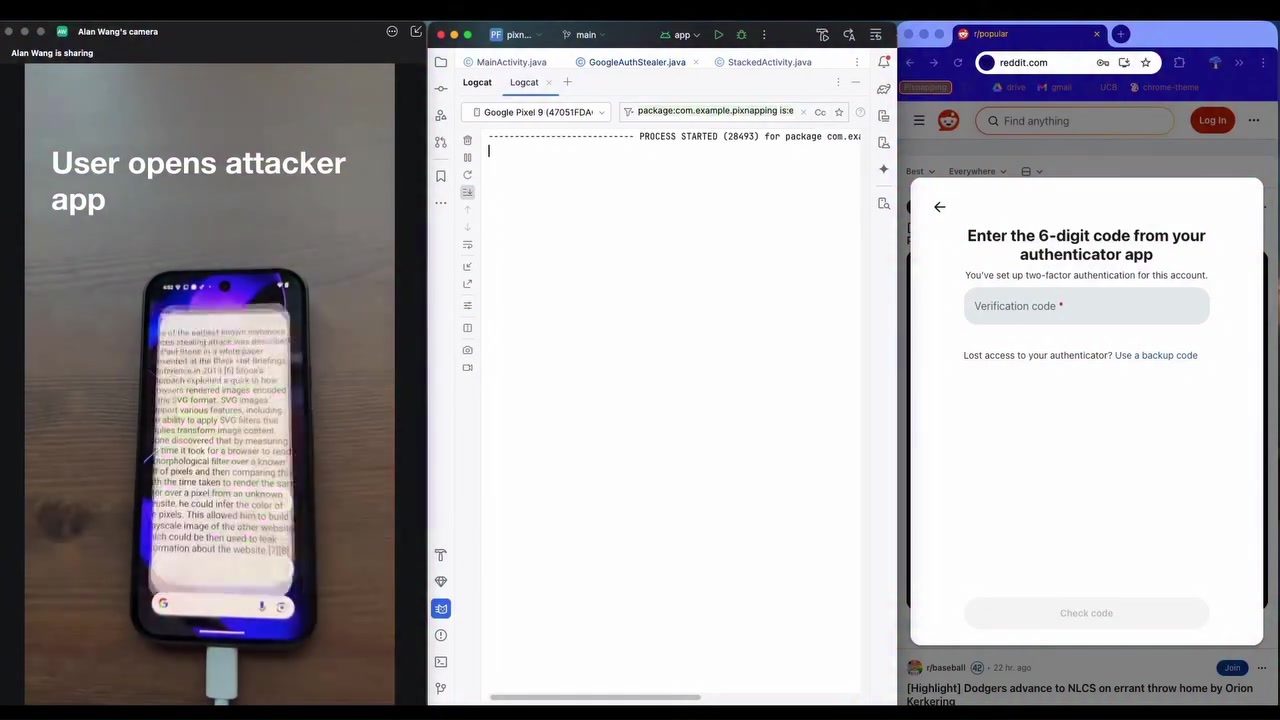
Google Authenticator is a popular smartphone app used by millions of users for two-factor authentication (2FA). Recently, a significant vulnerability has been uncovered that allows an attacker to exploit Android APIs and a hardware side channel to leak information displayed by other apps. This attack, dubbed #Pixnapping, affects all Android devices and is not yet fixed. The demonstration reveals how an attacker can extract a 2FA code from Google Authenticator in under 30 seconds.
Context: Why This Matters
Understanding the implications of the #Pixnapping attack is crucial for anyone who relies on 2FA for security. With the rise of cyber threats, 2FA has become a cornerstone of digital security. However, this vulnerability threatens the very foundation of this security measure. By exploiting Android APIs and a hardware side channel, an attacker can bypass permission requirements and leak sensitive information, potentially compromising user accounts and data.
Main Discussion
What is the #Pixnapping Attack?
The #Pixnapping attack is a sophisticated method that allows an attacker app to extract information displayed by other apps on an Android device. This attack does not require any special permissions, making it a significant threat. The attack leverages a timing side channel to measure the time it takes for a browser to render a morphological filter over a set of pixels. By doing so, the attacker can extract a 2FA code and print it in a log message.
How Does It Work?
The attack involves several steps. First, the attacker app opens a stack of activities to induce graphical operations. This triggers the rendering of the 2FA code on the screen. The attacker then uses a timing side channel to measure the time it takes for the browser to render specific pixels. By analyzing these timing measurements, the attacker can extract the 2FA code. The leaked code is then printed in a log message, completing the attack.
The Vulnerability in Google Authenticator
Google Authenticator, being a widely used 2FA app, is a prime target for such attacks. The demonstration shows how a 2FA code can be stolen within 30 seconds. This highlights the urgency of addressing this vulnerability. The stolen digits, as shown in the demo, include "5", "7", "1", and "502717," indicating the effectiveness of the attack.
The Role of Android APIs and Hardware Side Channels
The #Pixnapping attack exploits Android APIs and a hardware side channel to achieve its goals. This means that the vulnerability is not limited to a specific app but affects the entire Android ecosystem. The use of a timing side channel allows the attacker to bypass traditional security measures, making it a formidable threat.
Practical Tips
Protecting Yourself from the #Pixnapping Attack
While the vulnerability is not yet fixed, there are several steps you can take to protect yourself:
- Use Additional Security Measures: In addition to 2FA, consider using other security measures such as biometric authentication or physical security keys.
- Stay Informed: Keep an eye on updates and patches from Google and other app developers. As soon as a fix is available, apply it to your device.
- Avoid Suspicious Apps: Be cautious about the apps you install on your device. Avoid downloading apps from untrusted sources.
- Monitor Your Accounts: Regularly monitor your accounts for any unusual activity. If you suspect a breach, take immediate action to secure your accounts.
What to Do If You Suspect a Breach
If you suspect that your 2FA code has been compromised, take the following steps:
- Change Your Passwords: Immediately change the passwords for all accounts that use the compromised 2FA code.
- Enable Additional Security Measures: Enable additional security measures such as biometric authentication or physical security keys.
- Contact Support: Contact the support teams of the affected services and inform them about the potential breach.
Reporting the Vulnerability
If you encounter this vulnerability or any similar issues, report it to the relevant authorities and app developers. By doing so, you can help in the development of patches and fixes to protect other users.
Important Takeaways
- The #Pixnapping attack allows an attacker app to leak information displayed by other apps on an Android device without requiring special permissions.
- The attack exploits Android APIs and a hardware side channel to extract a 2FA code from Google Authenticator in under 30 seconds.
- The vulnerability affects all Android devices and is not yet fixed.
- Users should take additional security measures and stay informed about updates and patches.
- If you suspect a breach, take immediate action to secure your accounts.
Conclusion
The #Pixnapping attack is a significant threat to the security of 2FA on Android devices. By exploiting Android APIs and a hardware side channel, an attacker can extract sensitive information, including 2FA codes, in a matter of seconds. While the vulnerability is not yet fixed, taking additional security measures and staying informed can help protect your accounts and data. As the digital landscape continues to evolve, it is crucial to remain vigilant and proactive in safeguarding our digital identities.
Watch the Reel
Questions readers ask
What is the Pixnapping attack and how does it affect Google Authenticator?
The Pixnapping attack is a newly discovered vulnerability that targets 2FA codes generated by the Google Authenticator app on Android devices. By exploiting Android APIs and a hardware side channel, attackers can extract and steal 2FA codes, potentially compromising user accounts. This method allows attackers to bypass traditional permission controls and access sensitive information without user awareness.
Which devices are vulnerable to the Pixnapping attack?
All Android devices are currently susceptible to the Pixnapping attack. The vulnerability resides in how the operating system handles certain APIs and hardware interactions, making every device with Google Authenticator a potential target. Since the exploit relies on how the Android system operates, there is no single model or manufacturer immune to the risk.
What actions should I take to protect my Google Authenticator codes from being stolen?
While the Pixnapping vulnerability is significant, there are a few steps you can take to enhance your security. Avoid using Google Authenticator on Android devices until a patch is released. Consider using alternative 2FA methods, such as hardware keys or authentication apps that do not rely on Android's APIs. Additionally, monitor your accounts for any suspicious activity and use strong, unique passwords for all your accounts.
How does the Pixnapping attack exploit Android APIs?
The Pixnapping attack leverages specific Android APIs that handle screen content and hardware interactions. By exploiting these APIs, attackers can manipulate the display and capture information from other apps, such as the 2FA codes shown in Google Authenticator. This side-channel attack allows them to extract sensitive information without requiring explicit user permissions, making it a severe threat to digital security.
Is the Pixnapping attack specific to Google Authenticator, or can it target other apps?
Although the Pixnapping attack was demonstrated with Google Authenticator, the underlying vulnerability can potentially affect other apps that display sensitive information. Any app showing confidential data, such as passwords, PINs, or authentication codes, could be at risk. The attack exploits a fundamental weakness in how Android handles certain APIs, making various apps susceptible to similar exploits.
What is the current status of the Pixnapping attack fix?
As of now, the Pixnapping vulnerability has not been fixed. Android users should be aware of the risks and take necessary precautions. Stay informed about updates from Google and Android manufacturers. Once a patch is released, ensure your device is updated promptly to protect against this and other emerging threats.
Why is it crucial to understand the Pixnapping attack, and what are its implications for digital security?
Understanding the Pixnapping attack is vital because it highlights the evolving nature of digital threats and the need for robust security measures. With 2FA being a frontline defense mechanism, any vulnerability in its implementation can severely compromise user accounts. The Pixnapping attack shows that even widely used and trusted apps and systems can have hidden vulnerabilities, emphasizing the importance of vigilance and proactive security practices.
Related deep dives
Similar reads based on topic and creator.




Recent articles
Fresh deep dives from the latest Reels we unpacked.




Comments
Be the first to comment.