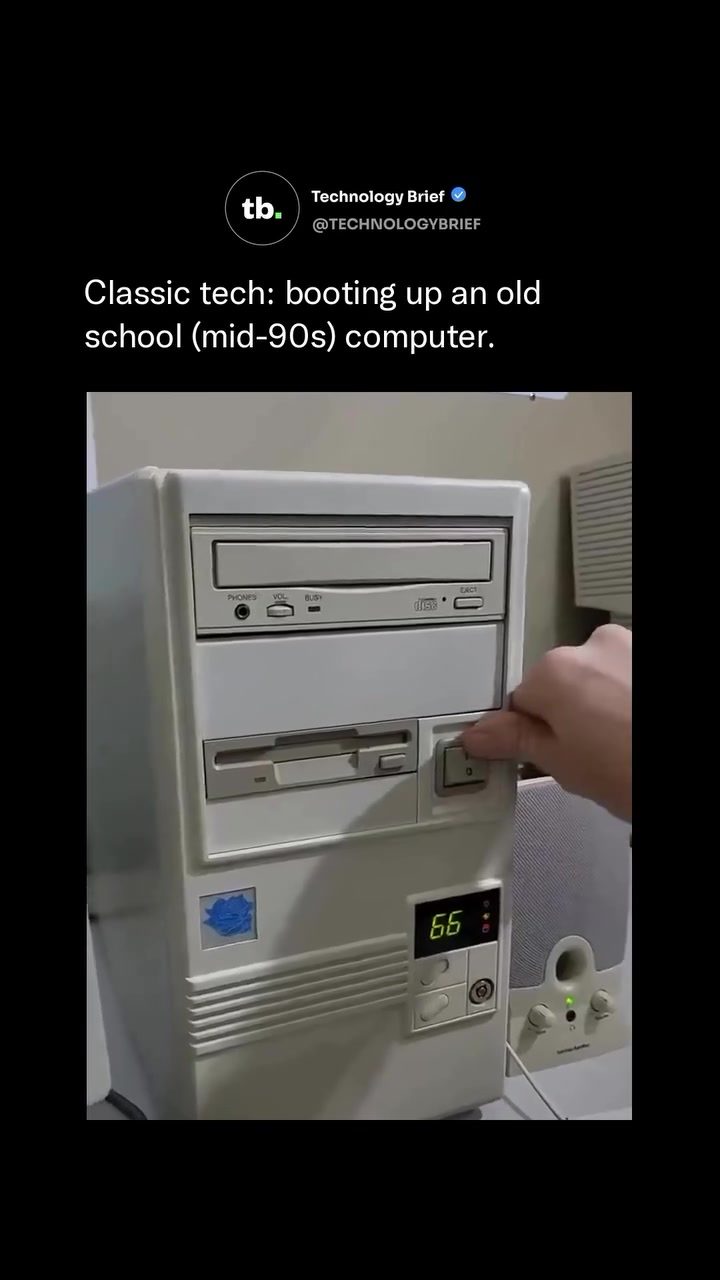
Booting Up an Old Computer: A Journey into Mid-90s Technology
Vintage computers hold a special place in the hearts of tech enthusiasts. They offer a glimpse into the past, showcasing the technological advancements and limitations of their time. This mid-1990s PC, built around an Intel 486DX2 running at 66MHz, is a prime example of a machine from the DOS era. This processor, known as the "sweet spot" of the DOS era, was fast enough to run nearly every game of the time without compatibility issues. Let's dive into the details of this classic setup.
Context / Why This Matters
The mid-1990s was a transitional period in personal computing. The transition from text-based interfaces to graphical user interfaces (GUIs) was well underway, and this PC captures that pivotal moment. Understanding the components and capabilities of these machines provides insight into the evolution of computing and the foundations of modern technology.
Main Discussion
The Hardware: A Look Inside the Machine
The Intel 486DX2 was a significant advancement in CPU technology. Running at 66MHz, it was capable of handling a wide range of tasks and games from the era. The machine is equipped with 16MB of RAM, a 427MB hard drive, a Sound Blaster Pro sound card, and a Matsushita CD-ROM drive. These components were typical upgrades for a serious home PC in 1995, enhancing both performance and multimedia capabilities.
- The 16MB of RAM was substantial for the time, allowing for smoother multitasking and better performance in applications and games.
- The 427MB hard drive offered ample storage for software and games, a luxury compared to the smaller drives of earlier computers.
- The Sound Blaster Pro sound card was renowned for its high-quality audio, essential for the immersive gaming experience of the era.
- The Matsushita CD-ROM drive was a cutting-edge addition, enabling users to install software and games from CDs, which were becoming increasingly popular.
The Software: MS-DOS 6.22
The operating system running on this machine is MS-DOS 6.22, released in June 1994. This was the last version Microsoft sold as a standalone product, marking the end of an era for DOS. Everything on this system is typed and run through a text-based command line, a stark contrast to the modern GUI. There are no mouse-driven desktops or icons—just direct commands entered by the user. This hands-on approach required users to be familiar with DOS commands, making it a technical skill to master.
The BIOS and System Information
The BIOS (Basic Input/Output System) on screen is dated November 17, 1995, placing this machine right at the tail end of the DOS era, just as Windows 95 was taking over. The BIOS provides essential information about the system's hardware and helps initialize the system during the boot process. Key details displayed include:
- CPU Clock: 66MHz
- CPU Type: 80486DX-S
- Diskette Drive A: 1.44M, 3.5 in
- System Configurations: Various details about the hardware components and driver information
The Boot Sequence
The boot sequence of this mid-90s PC is a fascinating process. It begins with the power-on self-test (POST), where the BIOS checks the hardware components to ensure they are functioning correctly. The screen displays various system configurations and driver information, typical of mid-1990s PCs. This includes details about the CPU, RAM, and other hardware components, all in a text-based format. The Creative DOS Multimedia Architecture (v1.00) is also mentioned, indicating the presence of advanced multimedia capabilities for the time.
The Cost and Market
By 1995, a setup like this would cost roughly $1,000 to $1,500 new. Retailers like CompUSA, whose branding appears on the monitor bezel, were popular destinations for purchasing such high-end PCs. This price range reflected the advanced features and capabilities of the machine, making it a significant investment for home users.
Practical Tips
If you're interested in diving into vintage computing or restoring an old PC, here are some practical tips:
- Start with the Right Components: Look for a reliable motherboard and CPU, such as the Intel 486DX2, which was a workhorse of the era. Ensure the RAM and hard drive are compatible with the system.
- Obtain Original Software: MS-DOS 6.22 and other DOS-based software can be found online through legitimate sources or from vintage computing forums.
- Acquire Necessary Drivers and Documentation: Many old systems require specific drivers to function correctly. Look for original documentation or online resources from vintage computing communities.
- Preserve Original Parts: If you're restoring a vintage PC, try to keep as many original parts as possible. This not only maintains the authenticity but also ensures compatibility.
- Join Vintage Computing Communities: Websites and forums dedicated to vintage computing can be invaluable resources. Members often share tips, resources, and even parts for restoration projects.
Important Takeaways
- The mid-1990s marked a transitional period in computing, moving from text-based interfaces to GUIs.
- The Intel 486DX2 at 66MHz was a powerful processor for its time, capable of running most games and applications without compatibility issues.
- MS-DOS 6.22 was the last standalone version of DOS, highlighting the shift towards more user-friendly operating systems.
- The hardware components, such as the Sound Blaster Pro and Matsushita CD-ROM drive, were significant upgrades that enhanced the user experience.
- The boot sequence and system information displayed during the startup process provide a detailed look into the inner workings of the machine.
Conclusion
Booting up an old computer from the mid-1990s offers a unique glimpse into the past and the evolution of technology. This classic setup, with its Intel 486DX2 processor and MS-DOS operating system, represents a pivotal moment in computing history. Understanding the components, capabilities, and context of this era provides valuable insights into how far technology has come and the foundations upon which modern systems are built. Whether you're a vintage computing enthusiast or simply curious about the past, exploring these old systems can be a rewarding and enlightening experience.
Watch the Reel
Questions readers ask
What makes the Intel 486DX2 at 66MHz significant in computing history?
The Intel 486DX2 at 66MHz is significant because it marked a significant leap in processing power during the mid-1990s. It was powerful enough to run most games and software of the era without compatibility issues, making it a popular choice for both home and office use during the transition from DOS to graphical interfaces.
What are the key components of a typical 1995 computer system?
A typical 1995 computer system would include a 486DX or higher processor, such as the 486DX2 at 66MHz, along with components like a motherboard, RAM (usually 4-8MB), a hard drive (around 250MB to 500MB), a floppy disk drive, and a CD-ROM drive. The system would also include a basic graphics card and a sound card, along with a monitor and keyboard.
How did the transition from DOS to Windows affect daily computer use in the mid-1990s?
The transition from DOS to Windows introduced graphical user interfaces (GUIs), making computers more accessible to users who were not familiar with command-line interfaces. This shift allowed for more intuitive navigation and multitasking, significantly changing how people interacted with their computers on a daily basis. However, many users still relied on DOS for specific tasks and games.
What are the specifications of the Matsushita 486DX2 66MHz?
The Matsushita 486DX2 66MHz is a variant of the Intel 486DX2 processor, running at 66MHz. It features a 16KB integrated L1 cache and a 16-bit data bus, along with a 32-bit address bus. This configuration allowed it to handle the demands of the mid-1990s software and games more efficiently than its predecessors.
Why is booting up a 486DX computer from the mid-1990s a unique experience?
Booting up a 486DX computer from the mid-1990s is unique due to the slow, methodical process and the distinctive sounds of the hardware initializing. This period saw a mix of DOS and early Windows environments, offering a nostalgic experience with the familiar beeps, whirs, and the gradual loading of the operating system, which can be quite different from the instant boot-up of modern machines.
What were the typical uses of a 486DX2 66MHz computer in the mid-1990s?
In the mid-1990s, a 486DX2 66MHz computer was typically used for a variety of tasks, including word processing, spreadsheet management, and gaming. It was also commonly used for running early versions of Windows and DOS-based software. Its robust performance made it suitable for both home entertainment and professional applications.
What kind of games could be played on a 486DX2 66MHz computer?
The 486DX2 66MHz was capable of running a wide range of mid-1990s games, including popular titles like 'Doom,' 'Duke Nukem 3D,' and 'SimCity 2000.' Its processing power and memory configuration made it an ideal machine for the gaming enthusiasts of the era, offering smooth performance for many of the era's top games.
Related deep dives
Similar reads based on topic and creator.




Recent articles
Fresh deep dives from the latest Reels we unpacked.




Comments
Be the first to comment.