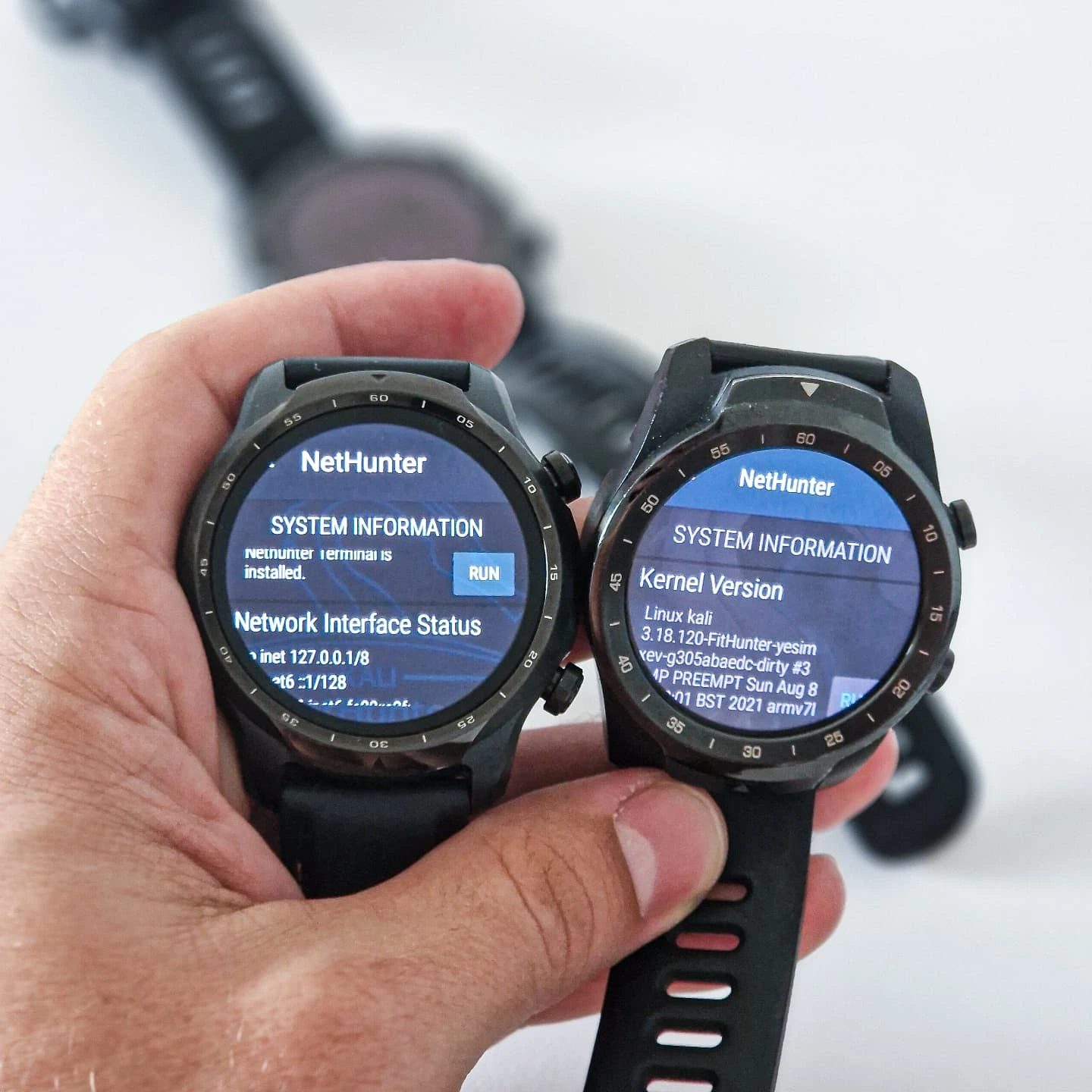
Linux on a Smartwatch
Running Linux on a smartwatch might seem like an unconventional idea, but it opens up a world of possibilities for tech enthusiasts and security professionals. The TicWatch Pro and TicWatch Pro 3, known for their timekeeping and fitness tracking capabilities, have been transformed into powerful mobile hacking tools by running the NetHunter distribution. This transformation highlights the potential of smartwatches beyond their traditional use cases.
Context / Why this matters
Smartwatches have evolved significantly over the years, becoming more than just accessories for telling time. With advanced sensors and powerful processors, modern smartwatches can run complex applications and even operate as portable security tools. By leveraging the NetHunter distribution, these smartwatches gain the ability to perform penetration testing and security assessments on the go.
Main discussion
What is NetHunter?
NetHunter is a Debian-based penetration testing and security toolkit that is specifically designed to run on Android devices. It includes a suite of powerful tools that are commonly used in the field of cybersecurity, such as Kali Linux. By installing NetHunter on a smartwatch, users can carry out security audits and penetration testing from a device worn on their wrist.
The TicWatch Pro and TicWatch Pro 3
The TicWatch Pro and TicWatch Pro 3 are popular smartwatches known for their durable build, long battery life, and advanced fitness tracking features. These smartwatches have a unique feature that allows them to be rooted and flashed with custom kernels. This capability is crucial for running NetHunter, as it requires root access to function correctly.
Running NetHunter on a Smartwatch
To run NetHunter on a smartwatch, the device must be rooted and flashed with a custom kernel. This process involves several steps, including unlocking the bootloader, installing a custom recovery, and then flashing the NetHunter ROM. Once the device is set up, it can execute Linux commands and tools directly from the smartwatch. This setup is particularly useful for security professionals who need to perform on-site assessments and may not have access to a laptop or other larger devices.
Key Features of NetHunter on a Smartwatch
-
System Information: The smartwatch displays detailed system information, including network interface status, kernel version, and Busybox startup messages. This information is crucial for understanding the device's current state and diagnosing any issues that may arise.
-
Network Interface Status: With NetHunter, the smartwatch can monitor and manage network connectivity, making it a valuable tool for network security assessments.
-
Busybox and Kernel Version: The smartwatch can display the Busybox startup messages and the kernel version, providing insights into the system's operational environment.
-
Root Access: The NetHunter distribution ensures that the smartwatch has root access, allowing for the execution of powerful commands and tools that would otherwise be restricted.
Penetration Testing and Security Assessments
Running NetHunter on a smartwatch significantly enhances its capabilities for penetration testing and security assessments. Security professionals can use the smartwatch to scan networks, identify vulnerabilities, and perform various security audits. The ability to carry out these tasks from a wearable device adds a layer of convenience and mobility, making it easier to conduct on-site assessments in various environments.
Practical tips
-
Rooting and Flashing: Ensure that your smartwatch is compatible with the NetHunter distribution. Follow the specific instructions for rooting and flashing the custom kernel. This process typically involves unlocking the bootloader, installing a custom recovery, and flashing the NetHunter ROM.
-
Backup Data: Before proceeding with any modifications, back up your data. Rooting and flashing can be risky, and there is a chance of data loss or bricking the device.
-
Learn the Tools: Familiarize yourself with the various tools included in the NetHunter distribution. Understanding how to use these tools effectively will enhance your ability to perform security assessments.
-
Security and Privacy: Be mindful of the security and privacy implications of running a penetration testing tool on a wearable device. Ensure that you are compliant with all relevant laws and regulations when using the NetHunter distribution for security assessments.
Important takeaways
Running Linux on a smartwatch opens up a new realm of possibilities for tech enthusiasts and security professionals. The ability to perform penetration testing and security assessments from a wearable device adds a layer of convenience and mobility. The TicWatch Pro and TicWatch Pro 3, along with the NetHunter distribution, demonstrate the potential for smartwatches to be more than just fitness and timekeeping devices. By leveraging the capabilities of NetHunter, these smartwatches can be transformed into powerful security tools.
Conclusion
The integration of Linux, specifically the NetHunter distribution, on smartwatches like the TicWatch Pro and TicWatch Pro 3 showcases the versatility and potential of wearable technology. This setup not only enhances the device's functionality but also provides a unique tool for security professionals. As technology continues to evolve, the possibilities for smartwatches and other wearable devices will only expand, making them indispensable tools for various applications.
Watch the Reel
Questions readers ask
Can any smartwatch run the NetHunter distribution like the TicWatch Pro models?
The NetHunter distribution is specifically tailored for devices with certain hardware capabilities. While the TicWatch Pro and Pro 3 models are compatible, other smartwatches may not meet the necessary requirements for running NetHunter effectively. It's essential to check the device specifications and community support before attempting to install NetHunter on a different smartwatch model.
What are the benefits of installing NetHunter on a TicWatch Pro 3?
Installing NetHunter on a TicWatch Pro 3 transforms it into a powerful mobile hacking tool. This allows users to perform penetration testing and security assessments directly from their wrist. Additionally, it enables the use of various hacking tools and utilities, making it a versatile device for security professionals and tech enthusiasts.
How do I install NetHunter on my TicWatch Pro?
To install NetHunter on a TicWatch Pro, you'll first need to unlock the bootloader, root your device, and install a custom recovery like TWRP. From there, you can flash the NetHunter zip file. The process involves multiple steps and requires a good understanding of Android and Linux systems. Detailed guides and community forums can provide step-by-step instructions tailored to the TicWatch Pro model.
What is the role of BusyBox in the NetHunter installation on a TicWatch?
BusyBox is a software suite that provides several Unix tools in a single executable file, which is crucial for running Linux on the TicWatch. During the NetHunter installation, BusyBox is often used to enhance the functionality of the smartwatch by providing essential command-line utilities that are not available by default, making it easier to manage and use the device as a hacking tool.
Can I use my TicWatch Pro for security assessments after installing NetHunter?
Absolutely. With NetHunter installed, your TicWatch Pro becomes a mobile security tool, allowing you to perform various penetration testing tasks and security assessments. The smartwatch can be used to scan networks, exploit vulnerabilities, and gather security-related information, making it a valuable asset for security professionals in the field.
What are the risks involved in running Linux on a TicWatch Pro?
Running Linux on a TicWatch Pro, particularly with the NetHunter distribution, can void the device's warranty and potentially brick the device if not done correctly. There is also a risk of exposing the device to security vulnerabilities if not properly configured and maintained. It's important to follow reliable guides and community forums to mitigate these risks and ensure a successful installation.
How can I ensure my TicWatch Pro remains secure while running NetHunter?
To maintain the security of your TicWatch Pro while running NetHunter, it's crucial to keep the system and all installed tools up-to-date. Regularly update the NetHunter distribution, apply security patches, and use strong, unique passwords for any accounts or services accessed through the device. Additionally, be cautious about the networks you connect to and the data you store on the device.
Related deep dives
Similar reads based on topic and creator.




Recent articles
Fresh deep dives from the latest Reels we unpacked.




Comments
Be the first to comment.