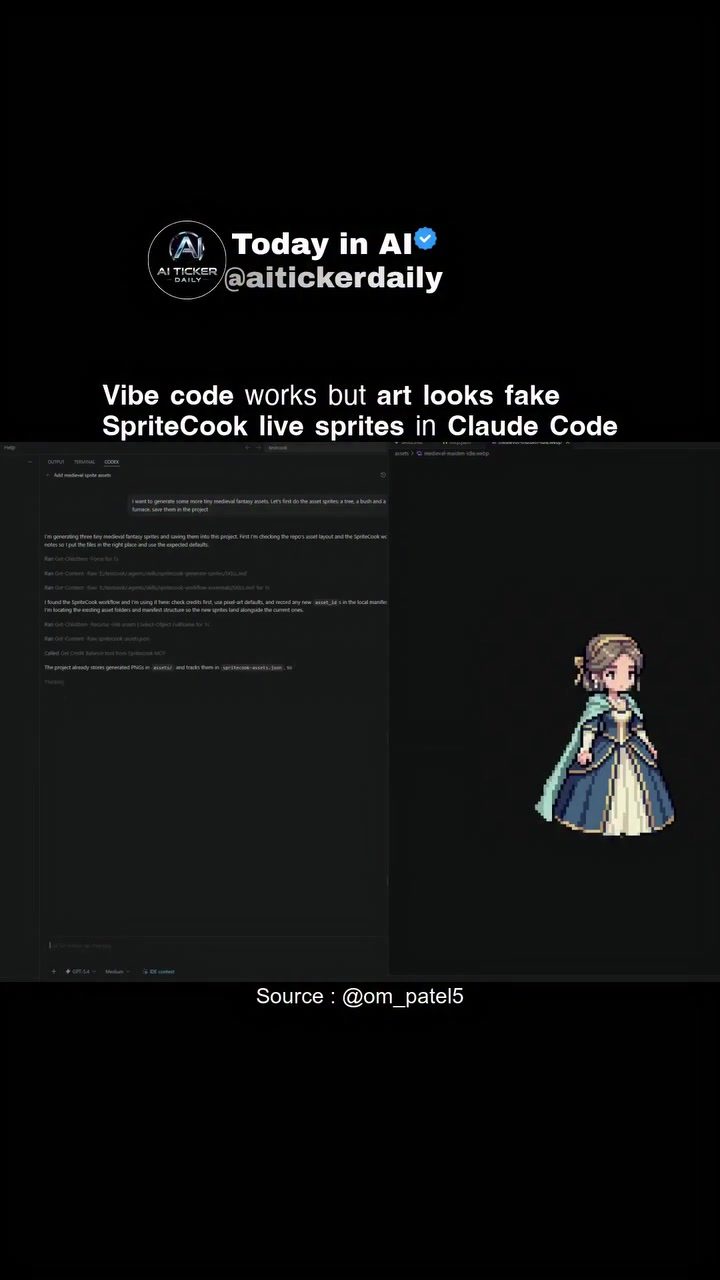
SpriteCook is a powerful tool designed to streamline the game development process by generating animated pixel art in real time. This SaaS (Software as a Service) product integrates seamlessly with Claude Code as an MCP (Managed Code Platform) tool, allowing developers to request sprites on the fly. By eliminating the need for ugly gray placeholder squares, SpriteCook ensures a consistent style and handles animations effectively, thereby cutting the asset-hunting bottleneck.
Context: Why This Matters
In the realm of game development, creating and managing pixel art can be a time-consuming and labor-intensive process. SpriteCook addresses this challenge by leveraging AI to generate high-quality, animated sprites in real time. This not only speeds up the development process but also ensures a consistent visual style throughout the game, enhancing the overall user experience.
Main Discussion
The Power of Real-Time Sprite Generation
SpriteCook stands out for its ability to generate pixel art in real time. This means that as developers code their game, they can simultaneously see the sprites being created. This real-time generation is particularly useful for developers who prefer a "vibe-coding" approach, where the development process is more fluid and iterative. The tool allows for immediate visual feedback, making it easier to make on-the-spot adjustments and ensuring that the final product meets the desired aesthetic and functional requirements.
Integrating with Claude Code
One of the standout features of SpriteCook is its integration with Claude Code. By connecting to Claude Code as an MCP tool, developers can harness the full power of AI-driven sprite generation. This integration allows the agent (the AI-powered component) to request sprites on the fly, ensuring that the sprites are generated as needed and not preemptively. This dynamic approach helps in maintaining a consistent style and handling animations effectively, which is crucial for creating a cohesive and immersive game environment.
The integration ensures that the game's visual elements are always up-to-date, reducing the need for manual updates and corrections. This seamless integration also means that developers can focus more on the creative aspects of game development, rather than getting bogged down by the technical details of sprite creation.
Addressing the Discrepancy Between Code and Art
While SpriteCook excels in generating sprites quickly and efficiently, there is a noted discrepancy between the functionality of the code and the visual quality of the generated art. This discrepancy is often a result of the complex nature of AI-driven art generation. The AI algorithms used in SpriteCook are designed to mimic the human creative process, but they are not yet at a point where they can fully replicate the nuances and creativity of a human artist.
Practical Tips
Leveraging the Free Tier
SpriteCook offers a free tier, which is an excellent starting point for developers looking to explore the tool's capabilities. The free tier provides access to basic features, allowing developers to test the tool's functionality and see if it fits their workflow. This risk-free trial can be invaluable for independent developers or small teams looking to enhance their game development process without a significant financial investment.
Exploring the Blog and Documentation
For developers looking to delve deeper into SpriteCook, the company's blog and documentation are excellent resources. The blog provides comprehensive guides and tutorials on setting up the agent and sprite-generation process, making it easier for developers to get started. The documentation includes detailed instructions and best practices, ensuring that developers can make the most of the tool's capabilities.
Engaging with the Community
The SpriteCook community is active and welcoming, providing a platform for developers to share their experiences, ask questions, and get support. Engaging with the community can be incredibly beneficial for developers, especially those who are new to the tool. The community can offer valuable insights, tips, and tricks that can help developers optimize their use of SpriteCook.
Important Takeaways
Consistency and Efficiency
One of the most important takeaways from using SpriteCook is the consistency and efficiency it brings to the game development process. By generating sprites in real time and ensuring a consistent style, SpriteCook helps developers create a cohesive and immersive game environment. This consistency is crucial for maintaining the game's aesthetic and functional integrity, ensuring that the final product meets the desired quality standards.
Cutting the Asset-Hunting Bottleneck
The ability of SpriteCook to cut the asset-hunting bottleneck is a significant advantage for developers. Asset-hunting, the process of searching for and acquiring the necessary visual elements, can be a time-consuming and frustrating task. By generating sprites on the fly, SpriteCook eliminates the need for this labor-intensive process, allowing developers to focus on other aspects of game development.
Continued Improvement and Updates
The team behind SpriteCook is continually working to improve the tool, addressing the discrepancies between the code and the generated art. As AI technology advances, developers can expect to see even more sophisticated and high-quality sprite generation, further enhancing the tool's capabilities and usefulness.
Conclusion
SpriteCook is a game-changer in the world of game development, offering a powerful, real-time solution for generating animated pixel art. Its integration with Claude Code and ability to handle animations and maintain a consistent style make it an invaluable tool for developers. By leveraging the free tier, exploring the documentation, and engaging with the community, developers can make the most of SpriteCook's capabilities, enhancing their game development process and creating more immersive and visually appealing games.
Watch the Reel
Questions readers ask
What is SpriteCook and how does it benefit game developers?
SpriteCook is an AI-powered tool that generates animated pixel art in real time, streamlining the game development process. It benefits developers by eliminating the need for placeholder images, ensuring a consistent visual style, and handling animations effectively, which saves time and resources.
How does SpriteCook integrate with Claude Code?
SpriteCook integrates with Claude Code as a Managed Code Platform (MCP) tool, allowing developers to request and generate sprites instantly. This seamless integration enables developers to create and manage game sprites directly within their development environment.
Can SpriteCook generate animated sprites?
Yes, SpriteCook is designed to generate high-quality, animated sprites in real time. This feature is particularly useful for game developers who need dynamic and engaging visuals without spending excessive time creating them manually.
What is the primary advantage of using AI for generating game sprites?
Using AI for generating game sprites, as SpriteCook does, significantly speeds up the development process. It reduces the time and effort required to create and manage pixel art, allowing developers to focus more on other critical aspects of game development.
What types of pixel art can SpriteCook generate?
SpriteCook can generate a variety of pixel art, including characters, backgrounds, and other game elements. Its AI capabilities ensure that the generated art maintains a consistent style and quality, making it suitable for a wide range of game genres and styles.
How does SpriteCook help in maintaining a consistent visual style in games?
SpriteCook ensures a consistent visual style by generating sprites that match the overall aesthetic of the game. This consistency is achieved through its AI algorithms, which learn from the style of existing assets and apply it to new creations, eliminating the need for manual adjustments.
What is the pricing structure for SpriteCook?
As of my last update, specific pricing details for SpriteCook are not provided. For the most accurate and up-to-date information, it is recommended to visit the official SpriteCook website or contact their support team directly.
Related deep dives
Similar reads based on topic and creator.




Recent articles
Fresh deep dives from the latest Reels we unpacked.




Comments
Be the first to comment.