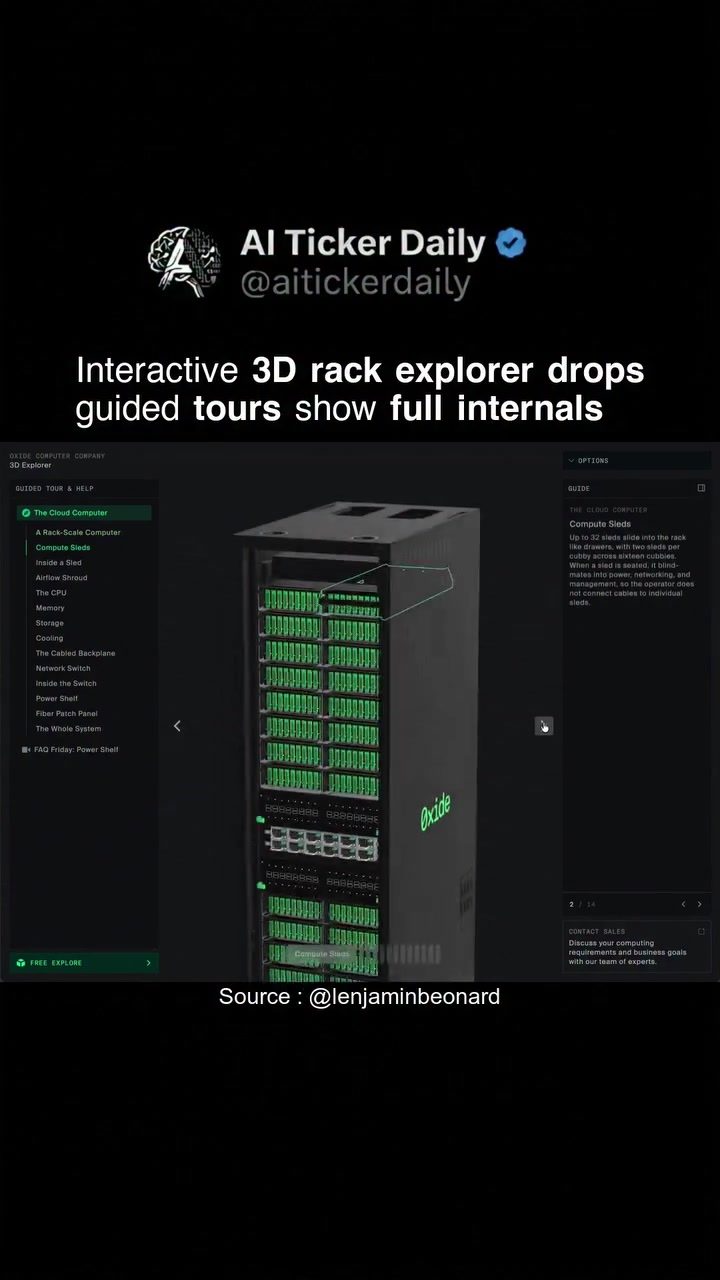
Exploring the Innards of Rack-Scale Computers with Oxide's 3D Explorer
Rack-scale computers are the backbone of modern data centers, offering high density and efficient resource utilization. To fully understand and appreciate these powerful machines, Oxide has developed an innovative 3D explorer that allows users to delve into the intricate details of their rack-scale computers.
Why This Matters
In an era where data centers are expanding rapidly, understanding the internal workings of rack-scale computers is crucial. These systems are designed to maximize efficiency, scalability, and performance, making them ideal for large-scale computing needs. By exploring the internals of these computers, users can gain insights into how these systems are designed to handle massive amounts of data and provide reliable performance.
Diving into the 3D Explorer
The 3D explorer, built using three.js and React Three Fiber, offers an immersive experience that brings the complex internals of a rack-scale computer to life. Users can navigate through guided tours, exploring each component in detail. This interactive approach not only makes the learning process more engaging but also provides a clear understanding of how each part contributes to the overall functionality of the system.
Compute Sleds
Compute sleds are the core building blocks of the rack-scale computer. These modular units house the essential computing components, including the CPU, memory, and storage. The 3D explorer allows users to view the compute sleds from different angles, providing a comprehensive view of their design and functionality. Understanding the layout and configuration of compute sleds is essential for optimizing performance and ensuring efficient resource utilization.
Airflow Shrouds and Cooling Systems
Effective cooling is vital for the performance and longevity of any high-density computing system. The 3D explorer highlights the airflow shrouds and other cooling mechanisms integrated into the rack-scale computer. Users can observe how airflow is managed to dissipate heat efficiently, ensuring that the system remains within optimal operating temperatures. This detailed view helps in understanding the importance of proper cooling in maintaining system stability and performance.
CPU, Memory, and Storage
The CPU, memory, and storage are the key components that define the computing power of any system. The 3D explorer showcases the placement and configuration of these components within the rack-scale computer. Users can explore how the CPU interacts with memory and storage, providing a clear understanding of data flow and processing capabilities. This detailed view helps in optimizing system performance and ensuring efficient use of resources.
Network Switch and Power Shell
The network switch and power shell are critical components that ensure seamless connectivity and reliable power supply. The 3D explorer provides an in-depth look at these components, allowing users to understand how they are integrated into the overall system. This detailed view helps in identifying potential bottlenecks and optimizing network performance and power management.
Practical Tips for Exploring the 3D Explorer
-
Start with Guided Tours: The 3D explorer offers guided tours that provide a structured approach to exploring the system. These tours are an excellent starting point for users who are new to rack-scale computers and want to understand the basics.
-
Explore Individual Components: Once familiar with the overall structure, users can explore individual components in detail. The interactive nature of the 3D explorer allows users to zoom in and out, rotate, and view components from different angles.
-
Understand the Data Flow: One of the key benefits of the 3D explorer is the ability to visualize the data flow within the system. Users can trace how data moves from the storage to the CPU and memory, providing a clear understanding of the system's processing capabilities.
-
Optimize Cooling and Power Management: The detailed view of the airflow shrouds and power shell helps users in understanding the importance of proper cooling and power management. This knowledge can be crucial in optimizing system performance and ensuring reliable operation.
Important Takeaways
Exploring the internals of a rack-scale computer through the 3D explorer provides several important takeaways:
-
Modular Design: The modular design of rack-scale computers allows for easy scalability and flexibility. Users can add or remove compute sleds as needed, ensuring that the system can adapt to changing demands.
-
Efficient Cooling: Proper cooling is essential for maintaining system performance and reliability. The detailed view of airflow shrouds and cooling mechanisms highlights the importance of effective heat management.
-
Data Flow Visualization: Understanding the data flow within the system is crucial for optimizing performance. The 3D explorer provides a clear visual representation of how data moves through the system, helping users in identifying potential bottlenecks.
-
Network and Power Management: The network switch and power shell are critical components that ensure seamless connectivity and reliable power supply. Exploring these components in detail helps in optimizing network performance and power management.
Conclusion
The 3D explorer for Oxide's rack-scale computers offers an unprecedented level of detail and interactivity, allowing users to explore the complex internals of these powerful systems. By understanding the design and functionality of each component, users can gain valuable insights into optimizing performance, ensuring reliability, and maximizing efficiency. Whether you are a data center engineer, IT professional, or simply curious about the inner workings of rack-scale computers, the 3D explorer provides a comprehensive and engaging way to delve into the world of high-density computing.
Watch the Reel
Questions readers ask
What is Oxide's 3D Rack-Scale Computer Explorer?
Oxide's 3D Rack-Scale Computer Explorer is an interactive tool that enables users to explore the detailed design of rack-scale computers. It provides an immersive experience, allowing users to examine components like compute sleds and cooling systems, which helps in understanding how these systems contribute to overall data center efficiency.
How can exploring the 3D model of a rack-scale computer benefit me?
By exploring the 3D model, you can gain a comprehensive understanding of how rack-scale computers are designed and function, particularly how they optimize for density and resource efficiency. This can help users make informed decisions about data center setup and maintenance.
What components can I explore in the 3D model?
The 3D model allows you to explore key components such as compute sleds, which are modular units housing processors, memory, and storage. You can also examine the cooling systems and airflow design, which are critical for maintaining optimal performance.
Can I use the 3D explorer to understand data center cooling systems?
Yes, the 3D explorer includes detailed views of the cooling systems within rack-scale computers. This can help you understand how airflow and cooling mechanisms work together to maintain efficient operation and prevent overheating, which is vital for data center performance.
Is the 3D explorer available for guided tours during weekdays?
As of now, the 3D explorer is an interactive online tool available at all times. For more personalized or guided tours, you may need to check Oxide's resources or contact them directly for specific availability and scheduling of tours.
How does the 3D explorer help in data center efficiency?
The 3D explorer provides insights into the design and functionality of rack-scale computers, helping users understand how these systems are optimized for high-density, efficient resource utilization. This knowledge can improve decision-making in data center operations, leading to better overall efficiency.
Can I explore the 3D model without any prior technical knowledge?
Yes, the 3D explorer is designed to be user-friendly and intuitive, allowing users with varying levels of technical knowledge to navigate and explore the model. It provides a visual and interactive way to understand the complexities of rack-scale computers.
Related deep dives
Similar reads based on topic and creator.




Recent articles
Fresh deep dives from the latest Reels we unpacked.




Comments
Be the first to comment.