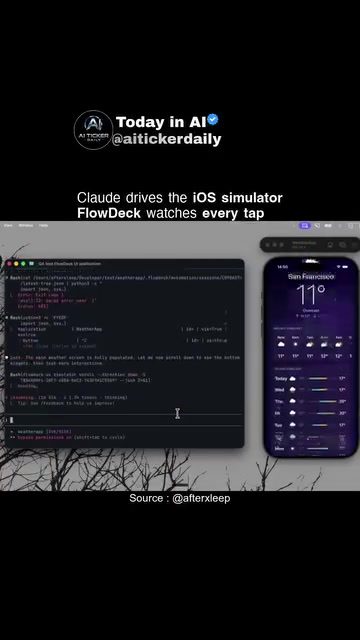
AI-Powered iOS Simulations: Boosting Efficiency in App Development
AI-powered iOS simulators are transforming the way developers test and debug their applications. By leveraging advanced AI models, these tools streamline the development process, eliminating the need for manual steps and traditional debugging tools like Xcode. This approach not only saves time but also enhances the overall efficiency and reliability of app development.
Why This Matters
For developers, time is a precious resource. Traditional methods of app testing and debugging can be labor-intensive and time-consuming. AI-powered iOS simulators offer a more efficient alternative, allowing developers to focus on innovation rather than repetitive tasks. This shift can lead to faster development cycles, improved app quality, and a more rewarding development experience.
The Role of AI in iOS Simulations
AI models like Claude are at the forefront of this technological shift. Claude, an AI model, can simulate user interactions and observe system responses within an iOS simulator. This capability is crucial for identifying and fixing bugs without the need for manual intervention.
Claude: The AI Model
Claude is designed to interact with the iOS simulator, mimicking user actions such as tapping and scrolling. This model can navigate through the app, find bugs, and even fix them, providing a comprehensive testing environment. By automating these tasks, Claude ensures that the app experience is thoroughly tested, reducing the chances of bugs slipping through to the final product.
Simulating User Interactions
One of the key features of AI-powered iOS simulators is their ability to simulate user interactions. This includes tapping, scrolling, and other common actions that users perform. By replicating these interactions, the simulator can detect issues that might not be apparent during manual testing. This level of detail is essential for creating a seamless user experience.
FlowDeck: Enhancing Simulator Capabilities
FlowDeck is a powerful tool that complements AI-powered iOS simulators. It provides a command-line interface (CLI) and monitoring capabilities, allowing developers to track every tap within the simulator. This feature is invaluable for debugging and testing, as it gives developers a detailed view of how the app responds to user interactions.
Monitoring and Debugging
FlowDeck's monitoring capabilities are critical for identifying and fixing bugs. By tracking every tap, FlowDeck helps developers pinpoint the exact moment when a bug occurs, making it easier to diagnose and resolve the issue. This level of precision is essential for maintaining the integrity of the app and ensuring a smooth user experience.
Workflow Integration
FlowDeck integrates seamlessly with the simulator and AI models, creating a cohesive workflow. This integration allows developers to automate the testing process, from simulating user interactions to observing system responses. By streamlining these steps, FlowDeck enables developers to focus on more complex tasks, such as optimizing code and enhancing app features.
Practical Tips for Using AI-Powered iOS Simulators
Leverage AI for Comprehensive Testing
Utilize AI models like Claude to perform thorough testing of your app. This includes simulating a wide range of user interactions and scenarios, ensuring that the app can handle various situations effectively.
Integrate FlowDeck for Enhanced Debugging
Incorporate FlowDeck into your development workflow to monitor every tap within the simulator. This will help you identify and fix bugs more efficiently, improving the overall quality of your app.
Automate Repetitive Tasks
Use AI-powered simulators to automate repetitive tasks, such as testing and debugging. This will free up your time to focus on more creative and strategic aspects of app development.
Important Takeaways
- AI-powered iOS simulators offer a more efficient and reliable way to test and debug apps.
- Claude, an AI model, can simulate user interactions and observe system responses, providing comprehensive testing capabilities.
- FlowDeck enhances simulator capabilities by monitoring every tap, aiding in debugging and testing.
- By automating repetitive tasks and leveraging AI, developers can improve app quality and reduce development time.
Conclusion
AI-powered iOS simulators are revolutionizing the app development landscape. By automating testing and debugging processes, these tools enable developers to create high-quality apps more efficiently. Whether you're a seasoned developer or just starting out, leveraging AI and tools like FlowDeck can significantly enhance your development workflow and deliver a better user experience.
Watch the Reel
Questions readers ask
How does AI assist in testing iOS apps?
AI, through advanced models like Claude, automates user interactions and detects bugs in iOS simulators. This automation helps identify issues quickly and accurately, reducing the need for manual testing.
What benefits does FlowDeck offer for iOS app development?
FlowDeck enhances app development by integrating AI, which streamlines workflows and reduces manual steps. This integration allows developers to focus more on creating innovative features and less on repetitive testing tasks.
Can AI-powered simulators replace traditional tools like Xcode for iOS app testing?
While AI-powered simulators can significantly enhance efficiency and reliability, they are often used to complement traditional tools like Xcode. These simulators streamline the testing process by automating many tasks, which can be especially beneficial in identifying bugs and optimizing performance.
How does AI improve the quality of iOS apps?
AI improves iOS app quality by automating user interaction testing and bug detection. This thorough and precise process ensures that apps are more reliable and perform better, ultimately enhancing the user experience.
What is the role of Claude in iOS app testing?
Claude is an advanced AI model used in iOS app testing to automate user interactions and detect bugs in simulators. By handling these critical tasks, Claude helps developers save time and focus on more creative aspects of development.
How do AI-powered tools streamline iOS app development?
AI-powered tools streamline iOS app development by automating testing and debugging processes. This automation reduces the need for manual interventions and traditional debugging steps, making the overall development process more efficient and reliable.
What is the advantage of integrating AI into the iOS app testing workflow?
Integrating AI into the iOS app testing workflow boosts efficiency by automating repetitive tasks, such as user interaction testing and bug detection. This allows developers to focus on innovation and deliver high-quality apps more quickly.
Related deep dives
Similar reads based on topic and creator.




Recent articles
Fresh deep dives from the latest Reels we unpacked.




Comments
Be the first to comment.