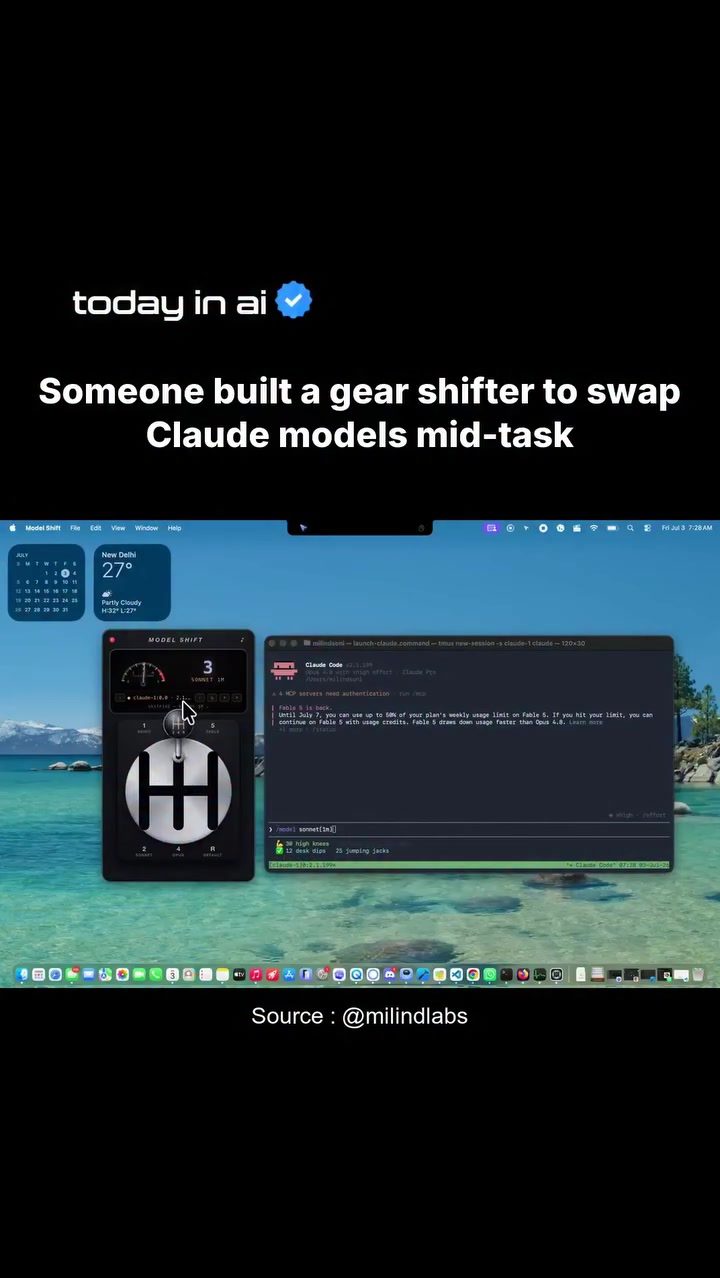
AI Model Shifting with a Gear Shifter Interface
AI models are powerful tools for handling a variety of tasks, but not all models are created equal. Different models excel in different areas, and switching between them mid-task can significantly enhance efficiency. This is where the concept of a physical gear shifter interface for swapping AI models comes into play.
Why This Matters
In the realm of artificial intelligence, the ability to switch between models seamlessly can be a game-changer. By using different models tailored to specific tasks, you can optimize performance and reduce the need for interruptions or new sessions. This approach is particularly useful in environments where tasks vary widely, from complex problem-solving to quick edits.
Main Discussion
The Concept of AI Model Shifting
The idea behind AI model shifting is straightforward: different tasks require different levels of computational power and specialized algorithms. By having a physical gear shifter interface, users can effortlessly switch between models mid-task, ensuring that the right tool is used for the job at hand. This concept is not just about convenience; it's about maximizing the effectiveness of AI in real-time applications.
The Gear Shifter Interface
The gear shifter interface showcased in the demo is a custom-built solution designed to swap between Claude models. Claude models, such as Fable 5 and Opus 4.8, are used for various tasks. Fable 5 is optimized for complex work, while Opus 4.8 is better suited for quick edits. The interface allows users to switch between these models without interrupting the current task or starting a new session.
Terminal Commands and Session Management
The gear shifter interface operates within a terminal window, utilizing commands like 'launch-claude-command' and 'tmux new-session' for session management. These commands enable users to seamlessly transition between different AI models. The terminal environment provides a robust and flexible interface for managing AI tasks, ensuring that the transition between models is smooth and efficient.
The Role of tmux
tmux is a terminal multiplexer that allows users to manage multiple terminal sessions from a single window. In the context of AI model shifting, tmux is crucial for maintaining continuity. It enables users to keep multiple AI models running in different sessions, making it easy to switch between them as needed. This feature is particularly useful for tasks that require frequent model changes, as it eliminates the need to close and reopen sessions.
Launcher for Claude Models
The 'launch-claude-command' is a key component of the gear shifter interface. This command is used to initiate and manage Claude models within the terminal. By integrating this command with the gear shifter, users can quickly switch between different models, ensuring that the right model is used for the task at hand. This command is a testament to the flexibility and power of the gear shifter interface, allowing users to optimize their workflow efficiently.
Practical Tips
Choosing the Right Model
When using a gear shifter interface for AI model shifting, it's essential to choose the right model for the task. For complex tasks that require in-depth analysis, Fable 5 is a suitable choice. For quick edits and simpler tasks, Opus 4.8 is more appropriate. Understanding the strengths of each model will help you make the most of the gear shifter interface.
Optimizing Terminal Commands
To get the most out of the gear shifter interface, it's important to optimize your terminal commands. Familiarize yourself with 'launch-claude-command' and 'tmux new-session' to ensure smooth transitions between models. Customizing these commands to fit your specific workflow can enhance efficiency and productivity.
Managing Sessions Efficiently
Efficient session management is crucial for successful AI model shifting. Use tmux to keep multiple sessions running simultaneously, allowing you to switch between models without interruptions. This approach ensures that you can handle a variety of tasks seamlessly, enhancing your overall productivity.
Important Takeaways
Flexibility in AI Model Usage
The gear shifter interface for AI model shifting demonstrates the flexibility and power of AI in real-time applications. By using different models tailored to specific tasks, you can optimize performance and enhance efficiency. This approach is particularly useful in environments where tasks vary widely, from complex problem-solving to quick edits.
Seamless Transitions
The ability to switch between AI models seamlessly is a significant advantage of the gear shifter interface. Using terminal commands and session management tools like tmux, users can transition between models without interruptions, ensuring continuity and efficiency in their workflow.
Customization and Optimization
Customizing the gear shifter interface to fit your specific needs can significantly enhance its effectiveness. Optimizing terminal commands and managing sessions efficiently are key to making the most of this innovative tool. By tailoring the interface to your workflow, you can achieve optimal performance and productivity.
Conclusion
AI model shifting with a gear shifter interface is a powerful concept that enhances the flexibility and efficiency of AI in real-time applications. By using different models tailored to specific tasks, you can optimize performance and reduce the need for interruptions or new sessions. The gear shifter interface, combined with terminal commands and session management tools, provides a seamless and efficient way to manage AI tasks, ensuring that the right tool is used for the job at hand.
Watch the Reel
Questions readers ask
What is a gear shifter interface for AI model switching?
A gear shifter interface for AI models is a physical tool designed to allow users to switch between different AI models seamlessly during a task. It enhances efficiency by enabling users to tailor their AI model to the specific needs of their current task, without having to stop and restart.
How does using a gear shifter to switch AI models improve task efficiency?
Using a gear shifter to switch AI models mid-task allows you to use the most suitable model for each part of your task. This reduces the time spent on less efficient processes and minimizes interruptions, leading to a more streamlined workflow.
Can the gear shifter interface be used for any type of AI task?
Yes, the gear shifter interface is designed to be versatile and can be used for a wide range of tasks. Whether you're working on complex problem-solving or quick edits, the interface helps you swap models to optimize performance for each specific task.
Is it difficult to learn how to use a gear shifter interface for AI model switching?
The gear shifter interface is designed to be intuitive and user-friendly. Most users can quickly grasp how to switch models mid-task with minimal practice, making it accessible for users with varying levels of AI expertise.
What are the benefits of switching AI models mid-task?
Switching AI models mid-task can significantly enhance the performance and efficiency of your AI processes. By using the most appropriate model for each part of the task, you can complete tasks more quickly and accurately, saving time and resources.
In what scenarios is a gear shifter interface for AI most useful?
A gear shifter interface for AI is most useful in scenarios where tasks vary widely and require different AI capabilities. This includes environments where both intricate problem-solving and swift edits are needed, making it ideal for dynamic and multifaceted workflows.
How does the gear shifter interface streamline the AI model switching process?
The gear shifter interface streamlines AI model switching by providing a quick and easy method to switch between models without disrupting the workflow. This ensures that users can focus on their tasks rather than on managing the technical aspects of AI model switching.
Related deep dives
Similar reads based on topic and creator.




Recent articles
Fresh deep dives from the latest Reels we unpacked.




Comments
Be the first to comment.