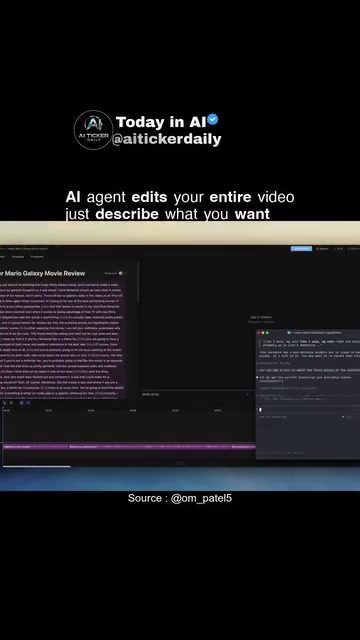
AI-Driven Video Editing
AI-powered video editing software is revolutionizing the way creators put together their projects. These advanced tools can handle project-level tasks based on simple text descriptions, making the editing process more efficient and less time-consuming. One such tool is Daydream, a video editor that leverages AI to streamline the editing workflow.
Why This Matters
The traditional video editing process is often labor-intensive, requiring manual adjustments and meticulous attention to detail. This can be a significant barrier for creators who want to focus more on the creative aspects of their work rather than the technical details. AI-driven video editing addresses this challenge by automating many of the repetitive tasks, allowing creators to produce high-quality content more efficiently.
Main Discussion
The Power of AI in Video Editing
AI video editing software, like Daydream, uses advanced algorithms to understand and execute text descriptions. This means that instead of manually clicking through various tools and menus, you can simply describe what you want, and the AI will handle the rest. For example, you can instruct the AI to strip out pauses and bad takes from voiceovers, pull in b-roll (secondary footage) that fits the narration, and keep iterating on the timeline to create a polished final product.
Key Features of AI Video Editing Software
Several key features make AI video editing software a game-changer for creators:
- Automated Editing: The AI can automatically edit the video based on your text descriptions, saving you time and effort. This includes removing unwanted segments, adding transitions, and adjusting the pacing of the video.
- Smart B-roll Integration: The software can intelligently pull in b-roll footage that complements the main video. This means you don't have to spend hours searching for the perfect supplementary clips.
- Voiceover Enhancement: AI can strip out pauses and bad takes from voiceovers, ensuring a smooth and professional audio track.
- Iterative Editing: The AI continuously refines the timeline, making adjustments and improvements as needed. This iterative process ensures that the final product is as polished as possible.
User Experience
One of the standout features of AI video editing software is the user experience. Daydream, for instance, offers an intuitive interface that is easy to navigate, even for those who are new to video editing. The software's agent-style control is reminiscent of other AI-powered tools like Claude Code and Codex, where you describe the desired outcome, and the system proposes and applies the necessary edits.
Practical Tips
Getting Started with AI Video Editing
If you're considering using AI video editing software, here are some practical tips to help you get started:
- Describe Clearly: Be as specific as possible when describing the edits you want. The more detailed your instructions, the better the AI can understand and execute them.
- Experiment with B-roll: AI can pull in a wide variety of b-roll footage, so don't be afraid to experiment with different types of supplementary clips. You might discover new creative possibilities.
- Iterate and Refine: Take advantage of the iterative editing process. Review the AI's edits, provide feedback, and let the software refine the timeline until you're satisfied with the result.
- Utilize Voiceover Enhancements: Don't overlook the AI's ability to enhance voiceovers. This feature can significantly improve the quality of your audio, making your videos more engaging and professional.
Choosing the Right Software
When selecting AI video editing software, consider the following factors:
- Ease of Use: Look for software that offers an intuitive and user-friendly interface. This will make the editing process more enjoyable and less frustrating.
- Feature Set: Ensure the software includes the features you need, such as automated editing, smart b-roll integration, and voiceover enhancement.
- User Community and Support: Opt for software with a strong user community and robust support system. This can be invaluable when you encounter issues or need advice.
Important Takeaways
AI-driven video editing software has the potential to transform the way creators produce content. By automating many of the repetitive tasks associated with traditional editing, these tools enable creators to focus more on the creative aspects of their work. Key takeaways include:
- Efficiency: AI can significantly speed up the editing process, allowing creators to produce high-quality content more quickly.
- Quality: The iterative editing process ensures that the final product is polished and professional.
- User Experience: Modern AI video editing software offers an intuitive and user-friendly interface, making it accessible to creators of all skill levels.
Conclusion
AI-driven video editing software is a powerful tool for creators who want to streamline their workflow and produce high-quality content more efficiently. By leveraging advanced algorithms, these tools can automate many of the repetitive tasks associated with traditional editing, allowing creators to focus on the creative aspects of their work. Whether you're a seasoned video editor or just starting out, AI video editing software offers a range of features and benefits that can enhance your productivity and creativity.
Watch the Reel
Questions readers ask
How does Daydream AI simplify the video editing process?
Daydream AI simplifies video editing by allowing users to input text descriptions for their desired edits. The AI then automates the editing process based on these descriptions, reducing the need for manual adjustments and making the workflow more efficient.
Can I use Daydream AI for complex video editing tasks?
Yes, Daydream AI can handle a variety of complex video editing tasks. By using simple text descriptions, you can instruct the AI to perform intricate edits, such as color grading, scene transitions, or even advanced effects, without needing to manually adjust each element.
What types of text descriptions can I use with Daydream AI?
You can use a wide range of text descriptions with Daydream AI, from basic instructions like 'cut to scene 3' to more detailed commands like 'apply a vintage filter to the entire video.' The AI is designed to interpret and execute these descriptions to streamline your video editing workflow.
How does Daydream AI compare to traditional video editing software?
Unlike traditional video editing software, Daydream AI automates many repetitive tasks, saving time and effort. Traditional software often requires manual adjustments, which can be time-consuming and require a steep learning curve. Daydream AI simplifies this by allowing users to focus on the creative aspects of their projects.
Is Daydream AI suitable for beginners in video editing?
Absolutely, Daydream AI is particularly beneficial for beginners. The tool's user-friendly interface and the ability to use simple text descriptions make it accessible to those without extensive video editing experience. This allows new creators to produce high-quality videos with minimal technical knowledge.
Can Daydream AI help with video editing for social media content?
Yes, Daydream AI is an excellent tool for creating social media content. Its ability to automate edits based on text descriptions ensures that social media creators can quickly produce engaging and polished videos, keeping up with the fast-paced nature of social media platforms.
Related deep dives
Similar reads based on topic and creator.




Recent articles
Fresh deep dives from the latest Reels we unpacked.




Comments
Be the first to comment.