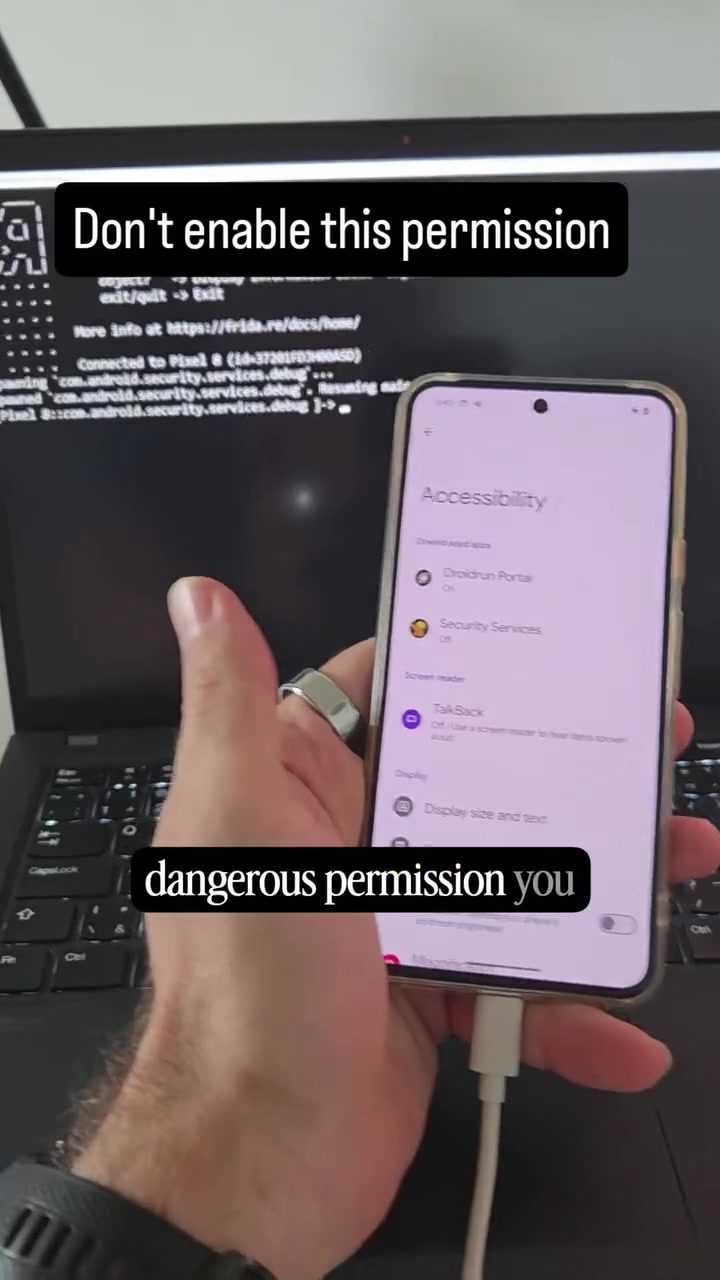
Android Security Settings and the Dangers of Accessibility Services
Android smartphones are powerful devices that offer a wide range of features and functionalities. However, with great power comes great responsibility, especially when it comes to security. One of the most critical aspects of Android security is understanding and managing the permissions granted to applications. Among these, accessibility services stand out as particularly sensitive. These services, when misused, can compromise the security of your device and personal information.
Context / Why This Matters
In the digital age, smartphones have become an integral part of our daily lives, storing sensitive information such as passwords, financial details, and personal communications. Ensuring the security of these devices is paramount. One of the most dangerous permissions that can be granted to any Android application is the accessibility service. This permission allows apps to interact with the screen and input controls, potentially giving them the ability to log keystrokes, capture screens, and even control the device remotely.
Main Discussion
Understanding Accessibility Services
Accessibility services were originally designed to assist users with disabilities by providing features like screen readers and voice commands. However, these same services can be exploited by malicious applications. When an app gains accessibility permissions, it can perform actions on behalf of the user, making it a powerful tool for both legitimate and malicious use.
The Most Dangerous Permission
Malware, such as Droidrun, has been known to exploit accessibility services to capture user inputs and gain unauthorized access to sensitive data. This makes accessibility services one of the most dangerous permissions to grant to an application. When enabled, such malware can log passwords, credentials, visited websites, and messages, effectively compromising the user's privacy and security.
Demonstrating the Risk
To illustrate the danger, consider a scenario where a malicious application is granted accessibility permissions. The app can then monitor and record every keystroke, including passwords and PINs, as well as capture screenshots of sensitive information. This data can be used for nefarious purposes, such as identity theft, financial fraud, or unauthorized access to personal accounts.
How to Identify and Disable Accessibility Services
Given the risks, it's crucial to be cautious about which applications are granted accessibility permissions. Here’s how to identify and disable these services on your Android device:
- Go to Settings: Navigate to the "Settings" menu on your Android device.
- Accessibility Services: Scroll down and tap on "Accessibility."
- Installed Services: Look for the list of installed accessibility services and review each one. If you are unsure about an application, it is best to disable it.
- Disable Unnecessary Services: Tap on the service you want to disable and toggle it off. If you suspect an application might be malicious, consider uninstalling it altogether.
Practical Tips
1. Be Selective with Permissions: Only grant accessibility permissions to applications from trusted sources and when absolutely necessary. Avoid giving these permissions to apps that do not explicitly require them for functionality.
2. Regularly Review Permissions: Periodically check the list of applications with accessibility permissions and revoke them from any that you no longer trust or use.
3. Use Security Tools: Utilize security tools and apps designed to scan and monitor your device for malicious activity. These tools can help identify and remove malware before it causes harm.
4. Stay Informed: Keep up-to-date with the latest security threats and best practices for Android security. Knowledge is a powerful defense against cyber threats.
Important Takeaways
Accessibility services on Android devices are a double-edged sword. While they provide valuable assistance to users with disabilities, they also pose significant security risks if exploited by malicious applications. It is essential to be mindful of the permissions granted to apps and to regularly review and manage these settings to safeguard your device and personal information.
Conclusion
In summary, understanding and managing accessibility services is a critical aspect of Android security. By being cautious about which applications are granted these permissions and regularly reviewing your device settings, you can significantly enhance your smartphone's security. Always prioritize your digital safety and stay informed about the latest security practices to protect your device and personal data.
Watch the Reel
Questions readers ask
What are Android Accessibility Services and why are they risky?
Android Accessibility Services are features designed to assist users with disabilities by providing customized feedback and control. However, they pose a risk because they can be abused by malicious apps to gain extensive control over your device, potentially capturing sensitive data and compromising your security.
How do malicious apps exploit Android Accessibility Services?
Malicious apps can request permission to use accessibility services, and if granted, they can perform actions like reading and modifying screen content, simulating touches, and even bypassing screen locks. This level of access allows them to steal personal information, install additional malware, and manipulate device settings without the user’s knowledge.
What are some best practices for securing Android Accessibility Services?
To secure your device, avoid granting accessibility permissions to apps unless you are certain they are legitimate and necessary. Regularly review the list of enabled accessibility services in your device settings and disable any that are not in use. Additionally, always download apps from trusted sources and keep your device’s software up to date.
Can Android Accessibility Services be used to bypass screen locks?
Yes, malicious apps exploiting accessibility services can potentially bypass screen locks. They can simulate touch inputs or interact with the screen content, allowing unauthorized access to your device. This is why it is crucial to be cautious about which apps you grant these permissions to.
How can I tell if an app is using accessibility services for malicious purposes?
Look for unusual behavior such as unexpected pop-ups, rapid battery drain, or unfamiliar icons in your notification bar. If an app suddenly requests accessibility permissions, be wary and investigate its legitimacy through reviews and developer information. Also, check the permissions requested by the app and ensure they align with its intended functionality.
What should I do if I suspect an app is misusing accessibility services?
Immediately revoke the accessibility permissions from the suspicious app through your device settings. Then, uninstall the app and scan your device for malware using a reputable security app. Report the app to the Google Play Store if you believe it is malicious, helping to protect other users from potential threats.
Are there any signs that my Android device has been compromised through accessibility services?
Signs of compromise include unexpected changes in device settings, unfamiliar apps appearing on your device, unusual data usage, and unauthorized access to your personal information. If you notice any of these signs, take immediate action to secure your device by revoking accessibility permissions, uninstalling suspicious apps, and performing a security scan.
Related deep dives
Similar reads based on topic and creator.




Recent articles
Fresh deep dives from the latest Reels we unpacked.




Comments
Be the first to comment.