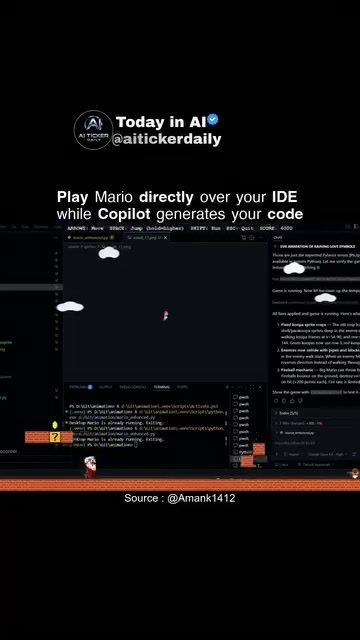
AI-powered code generation with Mario game
Integrating gaming with software development might seem like an unusual pairing, but a recent demonstration by aTickerDaily shows how a transparent Mario overlay can run directly on top of an Integrated Development Environment (IDE). This creative setup allows developers to keep coding while waiting for AI-generated code, thanks to AI-powered code generation tools. This turns downtime into playful multitasking, bridging the gap between work and leisure.
Context / Why this matters
In the fast-paced world of software development, efficiency is key. Developers often face situations where they need to wait for code to compile or for AI tools to generate code snippets. This waiting time can be frustrating, but it doesn't have to be unproductive. By overlaying a game like Mario directly on top of the IDE, developers can turn this downtime into a fun and engaging activity.
Main discussion
The Setup
The demonstration features a transparent overlay of the classic Mario game running on top of an IDE. This setup is designed to keep developers engaged and productive, even when they are waiting for code to be generated. The game elements are seamlessly integrated into the coding environment, allowing for a smooth transition between coding tasks and gameplay.
Real-time Code Generation
One of the key features of this setup is the real-time code generation. While playing Mario, the IDE continues to generate code snippets in the background. This ensures that by the time the developer is ready to return to coding, the necessary code has already been generated. This integration of gameplay and coding not only makes the waiting time more enjoyable but also enhances productivity.
The Role of AI in Code Generation
AI-powered code generation tools, such as Copilot, are becoming increasingly popular in the software development community. These tools use advanced algorithms to generate code snippets based on the developer's inputs, significantly reducing the time and effort required for coding tasks. The integration of AI in this setup allows for a more efficient workflow, where developers can focus on high-level tasks while the AI handles the more repetitive ones.
Balancing Work and Play
The idea of overlaying a game like Mario on top of an IDE is a clever way to balance work and play. It acknowledges the need for breaks and leisure time, even within a busy work environment. By turning downtime into playful interaction, developers can maintain their focus and productivity levels, ultimately leading to better outcomes.
Practical tips
Choose the Right Tools
To replicate this setup, it is essential to choose the right tools. An IDE that supports overlays and plugins, along with a reliable AI-powered code generation tool, will provide the best results. Ensure the game you choose has a transparent overlay feature.
Stay Focused
While the integration of gameplay and coding can be fun and engaging, it is important to stay focused on the primary task. Use this setup to make the most of your downtime but ensure that it doesn't interfere with your coding tasks.
Take Breaks
Even with the integration of gameplay, it's important to take regular breaks. Use this setup as a reminder to step away from the screen for a few minutes, stretch, and relax. This will help you return to your coding tasks with renewed energy.
Important takeaways
The integration of a transparent Mario overlay on an IDE is a clever way to enhance productivity and enjoyment in software development. By turning downtime into gameplay, developers can maintain their focus and productivity levels, ultimately leading to better outcomes. This setup not only makes the coding process more enjoyable but also highlights the potential of AI-powered tools in enhancing efficiency.
Enhance Productivity
This unique approach to software development shows how integrating playful elements into the workflow can boost productivity. By keeping developers engaged during downtime, this setup ensures that waiting for code generation is no longer a waste of time.
Creative Use of Downtime
The idea of overlaying a game on top of an IDE demonstrates the creative use of downtime. By turning waiting periods into enjoyable activities, developers can maintain their focus and productivity, leading to a more fulfilling work experience.
Conclusion
The overlay of a transparent Mario game on an IDE while utilizing AI-powered code generation tools is a testament to the innovative ways developers are finding to make the most of their time. This setup not only enhances productivity but also makes the coding process more enjoyable. Whether you are a seasoned developer or just starting, integrating playful elements into your workflow can significantly improve your efficiency and satisfaction.
Watch the Reel
Questions readers ask
How does the Mario overlay work on an IDE?
The Mario overlay is a transparent layer that runs on top of your Integrated Development Environment (IDE). It displays the classic Mario game, allowing you to play while your IDE is still fully functional and accessible in the background. This setup enables you to code and play simultaneously, making waiting times more enjoyable.
What is an AI copilot for coding?
An AI copilot for coding is a tool that assists developers by generating code snippets, suggesting completions, and providing real-time feedback. It helps streamline the coding process, making it faster and more efficient. When integrated with a gaming overlay, it turns waiting times into productive and fun multitasking opportunities.
Can using a Mario overlay on an IDE improve productivity?
Yes, using a Mario overlay on an IDE can enhance productivity by making downtime more engaging. While waiting for code to compile or for AI tools to generate code, developers can play Mario, reducing frustration and keeping their minds active. This multitasking approach can help maintain focus and motivation throughout the day.
Is the Mario game overlay distracting while coding?
The Mario game overlay is designed to be transparent and unobtrusive, ensuring that it does not interfere with the coding process. You can easily switch your focus between coding and playing Mario without any significant distraction. This balance allows you to stay engaged and productive during coding downtime.
How can AI coding assist tools enhance gaming in an IDE?
AI coding assistants can enhance gaming in an IDE by generating code quickly, allowing developers to spend more time playing games like Mario. This integration ensures that developers can take productive coding breaks, making their overall workflow more enjoyable and efficient. The AI tool handles the repetitive tasks, freeing up time for leisure activities.
What kind of coding tasks can AI assist with while I play Mario?
AI coding assistants can help with a variety of tasks, including generating code snippets, auto-completing lines of code, detecting errors, and providing suggestions for optimizing code. While you play Mario, the AI can handle these tasks, ensuring that your coding progress continues smoothly without interruption.
Can I customize the Mario overlay to fit my coding preferences?
While the specifics may vary, many transparent overlays, including Mario, can often be customized to some extent. This might include adjusting the transparency level, resizing the game window, or even mapping controls to better suit your workflow. Check the settings of your specific overlay tool to see what customization options are available.
Related deep dives
Similar reads based on topic and creator.

Recent articles
Fresh deep dives from the latest Reels we unpacked.




Comments
Be the first to comment.