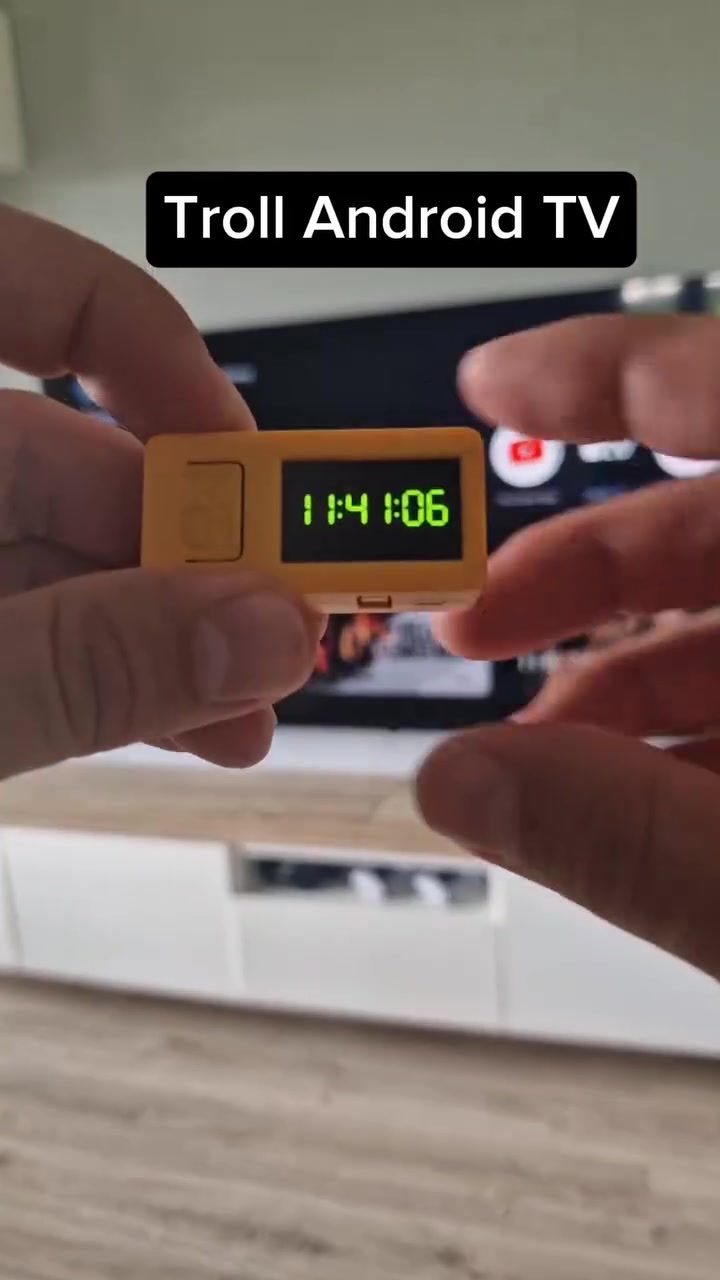
TV Remote Hack: Unlocking Android TV's Full Potential
Diving into the world of smart TVs, the Android TV platform offers a vast array of features and apps, but did you know that a small, custom remote control can unlock even more possibilities? The M5StickC remote, paired with some clever programming, can modify TV settings, access hidden features, and even bypass region restrictions. This hack transforms the traditional TV experience, opening up a world of customization and entertainment.
Why This Matters
Android TV is a powerful platform that combines the best of television and streaming apps. However, the default remote might not offer all the functionalities you need. The M5StickC remote, paired with Bluetooth and custom firmware, can bridge that gap. By using this hack, users can access more apps, modify settings that are usually hidden, and even bypass region restrictions for a more personalized viewing experience.
The ability to tinker with your TV settings provides a deeper level of control, allowing users to optimize their viewing experience. Whether you want to fine-tune display settings, access region-restricted content, or simply experiment with new features, this hack offers a gateway to unlimited possibilities.
The M5StickC Remote: A Versatile Gadget
The M5StickC is a small, programmable remote control that can be paired with Android TVs. This tiny gadget, roughly the size of a USB stick, packs a punch with its Bluetooth capabilities and custom firmware options.
How It Works
The M5StickC remote operates by emulating a standard Android TV remote, but with added capabilities. By programming it with custom firmware, users can send specific commands to the TV, altering settings and accessing hidden features.
Key Features
The remote works with Bluetooth and can be programmed with custom firmware, allowing for a wide range of functionalities. It typically runs on a low-power consumption battery, making it energy-efficient despite its small size. With its compact design, the remote can be easily carried around, making it a versatile tool for tech enthusiasts.
Programming the Remote
Programming the M5StickC remote involves using custom firmware like NemoFirmware. This allows users to send specific commands to the TV, such as modifying settings, accessing hidden menus, or even bypassing region restrictions.
Here's a brief overview of the steps involved:
- Install Development Tools: You'll need to set up a development environment to compile the custom firmware.
- Write the Firmware: Using a programming language, you can write the code to send specific commands to the TV.
- Flash the Firmware: Once the code is ready, flash it onto the M5StickC remote.
- Pair the Remote: Connect the remote to your Android TV via Bluetooth.
- Execute Commands: Use the remote to send commands to the TV, unlocking hidden features and settings.
Bypassing Region Restrictions
One of the most compelling features of the M5StickC remote is its ability to bypass region restrictions. This means you can access content that is usually unavailable in your region. The process involves sending specific commands to the TV, which alters its settings to appear as if it's located in a different region.
How to Bypass Region Restrictions
To bypass region restrictions, follow these steps:
- Program the Remote: Write the necessary code to send region-altering commands.
- Flash the Firmware: Flash the custom firmware onto the M5StickC remote.
- Execute Commands: Use the remote to send the commands to your Android TV, changing its region settings.
Accessing Hidden Features
The M5StickC remote can also be programmed to access hidden features on your Android TV. These features are often restricted due to various reasons, but with the right commands, you can unlock them for a richer TV experience.
Practical Tips
If you're considering using the M5StickC remote to hack your Android TV, here are some practical tips to get you started:
- Choose the Right Firmware: Select a custom firmware that is compatible with your M5StickC remote and Android TV model.
- Backup Settings: Before making any changes, ensure you have a backup of your current settings. This way, you can easily revert to them if needed.
- Start Small: Begin by making minor adjustments to see how the remote works. Gradually move on to more complex commands as you get comfortable.
- Stay Updated: Keep your firmware and development tools updated to access the latest features and security patches.
Important Takeaways
The M5StickC remote offers a unique way to enhance your Android TV experience. By programming it with custom firmware, you can unlock hidden features, bypass region restrictions, and access a wider range of content. This hack is not just about customization; it's about taking control of your entertainment experience and making the most of your Android TV.
Conclusion
The M5StickC remote is a versatile gadget that can significantly enhance your Android TV experience. By programming it with custom firmware, you can unlock hidden features, bypass region restrictions, and access a wealth of new content. Whether you're a tech enthusiast or just someone looking to get more out of your TV, the M5StickC remote is a valuable tool to have in your arsenal. So, why not give it a try and see what new possibilities it can unlock?
Watch the Reel
Questions readers ask
What is the M5StickC remote and how does it work with Android TV?
The M5StickC is a small, programmable gadget that can be customized to function as a remote control for Android TV. It pairs with your TV via Bluetooth and, with the right programming, can access and modify settings that the standard remote can't reach, unlocking a variety of hidden features.
Can the M5StickC remote help bypass region restrictions on Android TV?
Yes, one of the key advantages of using a custom M5StickC remote is its ability to bypass region restrictions. By programming specific commands, users can access content that might otherwise be unavailable in their region, enhancing their streaming experience with apps like Netflix, Disney+, and HBO Max.
How do I program the M5StickC remote for Android TV?
Programming the M5StickC remote involves using a microcontroller and writing custom firmware that translates the button presses into commands your Android TV understands. There are online resources and communities that provide guidance and sample code to help you get started.
Can the M5StickC remote control streaming apps like YouTube and Netflix?
Absolutely. The M5StickC remote can be programmed to control a wide range of streaming apps, including YouTube, Netflix, Disney+, and HBO Max. By customizing the remote, you can enhance your control over these apps, making navigation and playback more efficient.
Is it possible to use the M5StickC remote to access hidden settings on Android TV?
Yes, the M5StickC remote can access hidden settings on Android TV. By sending specific commands, you can unlock settings that are not typically accessible through the standard remote, giving you a deeper level of control over your TV's functionality.
Can I control my Android TV with a mobile device instead of a custom remote?
While the M5StickC remote offers a high degree of customization, you can also control your Android TV with a mobile device. Many apps are available on both iOS and Android platforms that allow you to use your smartphone as a remote control, offering similar functionalities to the M5StickC but with less customization.
Related deep dives
Similar reads based on topic and creator.




Recent articles
Fresh deep dives from the latest Reels we unpacked.




Comments
Be the first to comment.