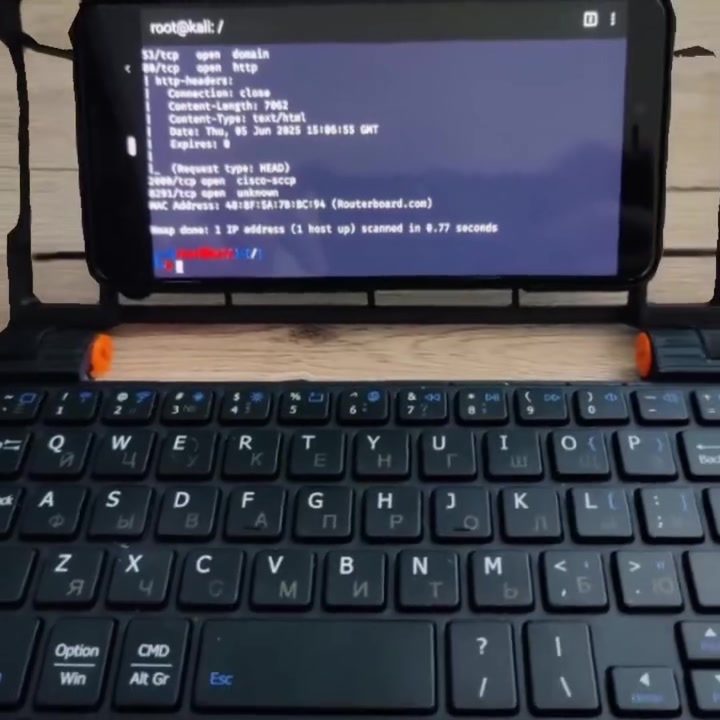
Transforming Your Old Smartphone into a Pocket Cyberdeck with Kali NetHunter
A pocket cyberdeck is a compact, powerful computing device designed for cybersecurity and penetration testing. By transforming an old smartphone into a pocket cyberdeck, you can create a highly portable and capable tool for network scanning, vulnerability assessment, and more. Here, we'll explore how to turn an outdated smartphone into a powerful cybersecurity tool using Kali NetHunter and a 3D-printed chassis.
Why This Matters
In today's digital world, cybersecurity is more important than ever. Professionals and enthusiasts alike need portable, powerful tools to assess and secure networks. A pocket cyberdeck offers the perfect blend of portability and capability, making it an ideal tool for on-the-go cybersecurity tasks. By repurposing an old smartphone, you can create a cost-effective and highly functional device tailored to your needs.
Main Discussion
What is Kali NetHunter?
Kali NetHunter is a popular Android-based penetration testing platform that combines the power of Kali Linux with the mobility of an Android device. It transforms your smartphone into a portable security tool, enabling you to perform a wide range of network security tasks. With NetHunter, you can conduct network scans, exploit vulnerabilities, and analyze network traffic, all from the palm of your hand.
The 3D-Printed Chassis
To create a pocket cyberdeck, you'll need a 3D-printed chassis designed to house your smartphone securely. This chassis not only protects your device but also gives it a sleek, professional look. For this project, a minimalist palmtop-style chassis is ideal, as it provides a compact form factor while still offering easy access to all the necessary ports and controls.
Choosing the Right Smartphone
Any modern smartphone can be used for this project, but some models are better suited than others. A device with a large screen, ample processing power, and support for external peripherals is ideal. The Google Pixel 3 XL, for example, is a popular choice due to its powerful hardware and compatibility with Kali NetHunter. Ensure your chosen device meets the hardware requirements and has enough battery life for extended use.
Setting Up Kali NetHunter
To get started with Kali NetHunter, you'll need to install the NetHunter custom ROM on your smartphone. Here’s a step-by-step guide:
- Unlock the Bootloader: Unlocking the bootloader allows you to install custom ROMs. This process varies by device, so consult the specific instructions for your model.
- Install a Custom Recovery: Flash a custom recovery like TWRP (Team Win Recovery Project) to your device. This allows you to install and manage custom ROMs.
- Install NetHunter: Download the NetHunter ROM for your device and flash it using the custom recovery. Follow the installation instructions carefully to ensure a successful setup.
- Configure NetHunter: Once installed, configure NetHunter to suit your needs. This includes setting up wireless access, enabling necessary permissions, and installing additional tools from the Kali Linux repository.
Network Scanning with Kali NetHunter
Network scanning is a fundamental task in cybersecurity, involving the identification of open ports, services, and vulnerabilities on a network. Kali NetHunter provides a range of tools for network scanning, including Nmap, which is commonly used for this purpose.
Open Ports and Connection Information
During a network scan, you might encounter various open ports and services. For instance, ports 53/tcp and 88/tcp are commonly used for DNS and Kerberos, respectively. Understanding what these ports represent is crucial for identifying potential vulnerabilities and misconfigurations. Additionally, examining connection headers, such as "Content-Type: text/html" and "Date: Thu, 05 Jun 2025 15:06:55 GMT," can provide insights into the communication between devices on the network.
Identifying Devices
Network scanning also involves identifying devices on the network. For example, a MAC address like "48:BF:5A:7B:DC:94" can be traced back to a specific manufacturer, in this case, Routerboard.com. This information is valuable for understanding the network topology and identifying potential security risks.
MAC Address
In a network, every device has a unique identifier called a MAC address. This address is crucial for network communication and can reveal important details about the device. For instance, the MAC address "48:BF:5A:7B:DC:94" corresponds to a Routerboard, a type of router manufactured by MikroTik. Identifying this information during a network scan allows you to understand the network infrastructure and potential vulnerabilities.
Practical Tips
Customizing Your Pocket Cyberdeck
Once you have your pocket cyberdeck set up, consider customizing it to better suit your needs. This can include:
- Adding External Peripherals: Connect external keyboards, mice, or monitors to enhance usability.
- Installing Additional Tools: Expand the functionality of your cyberdeck by installing additional penetration testing tools.
- Enhancing Security: Implement additional security measures such as encryption and secure boot to protect your device and data.
Maintaining Your Pocket Cyberdeck
Regular maintenance is essential to keep your pocket cyberdeck in top condition. This includes:
- Updating Software: Keep your NetHunter installation and all installed tools up to date.
- Monitoring Performance: Regularly check the device's performance to ensure it's running smoothly.
- Charging and Battery Management: Ensure your device has a reliable power source and manage battery usage effectively.
Important Takeaways
Transforming an old smartphone into a pocket cyberdeck with Kali NetHunter is a practical and cost-effective way to enhance your cybersecurity capabilities. By following the steps outlined, you can create a powerful, portable tool for network scanning, vulnerability assessment, and more. Remember to customize and maintain your device to ensure it meets your specific needs and remains secure.
Conclusion
A pocket cyberdeck is a versatile and powerful tool for cybersecurity professionals and enthusiasts. By repurposing an old smartphone, you can create a compact, capable device tailored to your needs. Whether you're conducting network scans, assessing vulnerabilities, or analyzing traffic, a pocket cyberdeck offers the portability and functionality you need to stay ahead in the ever-evolving world of cybersecurity.
Watch the Reel
Questions readers ask
What is Kali NetHunter and how does it enhance my smartphone?
Kali NetHunter is an Android-based toolkit designed for penetration testing and security auditing. It allows you to transform your smartphone into a portable cybersecurity tool, enabling tasks like network scanning, vulnerability assessment, and even acting as a TCP scanner. With Kali NetHunter, your smartphone becomes a versatile and powerful asset for cybersecurity tasks.
Can any Android device be used to build a portable cyberdeck with Kali NetHunter?
While many Android devices can be used, it's important to check the compatibility list on the Kali NetHunter website. Devices that support Kali NetHunter are typically rooted or unlocked, and some models may work better than others. It's also a good idea to consider the device's processing power and storage capacity for optimal performance as a cyberdeck.
What is a 3D-printed chassis and why is it useful for a pocket cyberdeck?
A 3D-printed chassis is a custom-made, three-dimensional printed casing designed to house and protect the components of your pocket cyberdeck. It provides a compact, secure, and professional-looking design, making your smartphone cyberdeck more durable and easier to handle. Additionally, a 3D-printed chassis can accommodate various accessories and ports, enhancing the functionality of your device.
What are the benefits of using a pocket cyberdeck for network security?
A pocket cyberdeck offers the advantage of portability, allowing you to carry out network security tasks on-the-go. It’s an ideal tool for professionals who need to perform network scanning and vulnerability assessments in different locations. With a pocket cyberdeck, you can quickly assess and secure networks, identify potential threats, and take immediate action to mitigate risks.
How can I get started with building a smartphone hacking tool using Kali NetHunter?
To start building a smartphone hacking tool, first, ensure your device is compatible with Kali NetHunter. Then, follow the installation steps provided by the Kali NetHunter website, which typically involves rooting the device and installing the Kali NetHunter app. Once installed, you can use various tools within the app to perform tasks like network scanning and vulnerability assessment. Additionally, consider using a 3D-printed chassis for a more professional and durable setup.
What kind of network security tasks can I perform with a mobile cyberdeck?
With a mobile cyberdeck, you can perform a variety of network security tasks. These include network scanning to identify devices on a network, vulnerability assessments to find weak points, and TCP scanning to test network connectivity. Additionally, you can use the device for penetration testing, wireless assessments, and more, making it a comprehensive tool for on-the-go cybersecurity activities.
Is a 3D-printed chassis necessary for building a smartphone terminal cyberdeck?
While a 3D-printed chassis is not strictly necessary, it provides several benefits. It offers a more secure and professional design, protecting the device and its components. Additionally, a 3D-printed chassis can include custom features like additional ports or slots for accessories, enhancing the functionality and usability of your smartphone cyberdeck. If portability and durability are important to you, a 3D-printed chassis is a worthwhile investment.
Related deep dives
Similar reads based on topic and creator.




Recent articles
Fresh deep dives from the latest Reels we unpacked.




Comments
Be the first to comment.