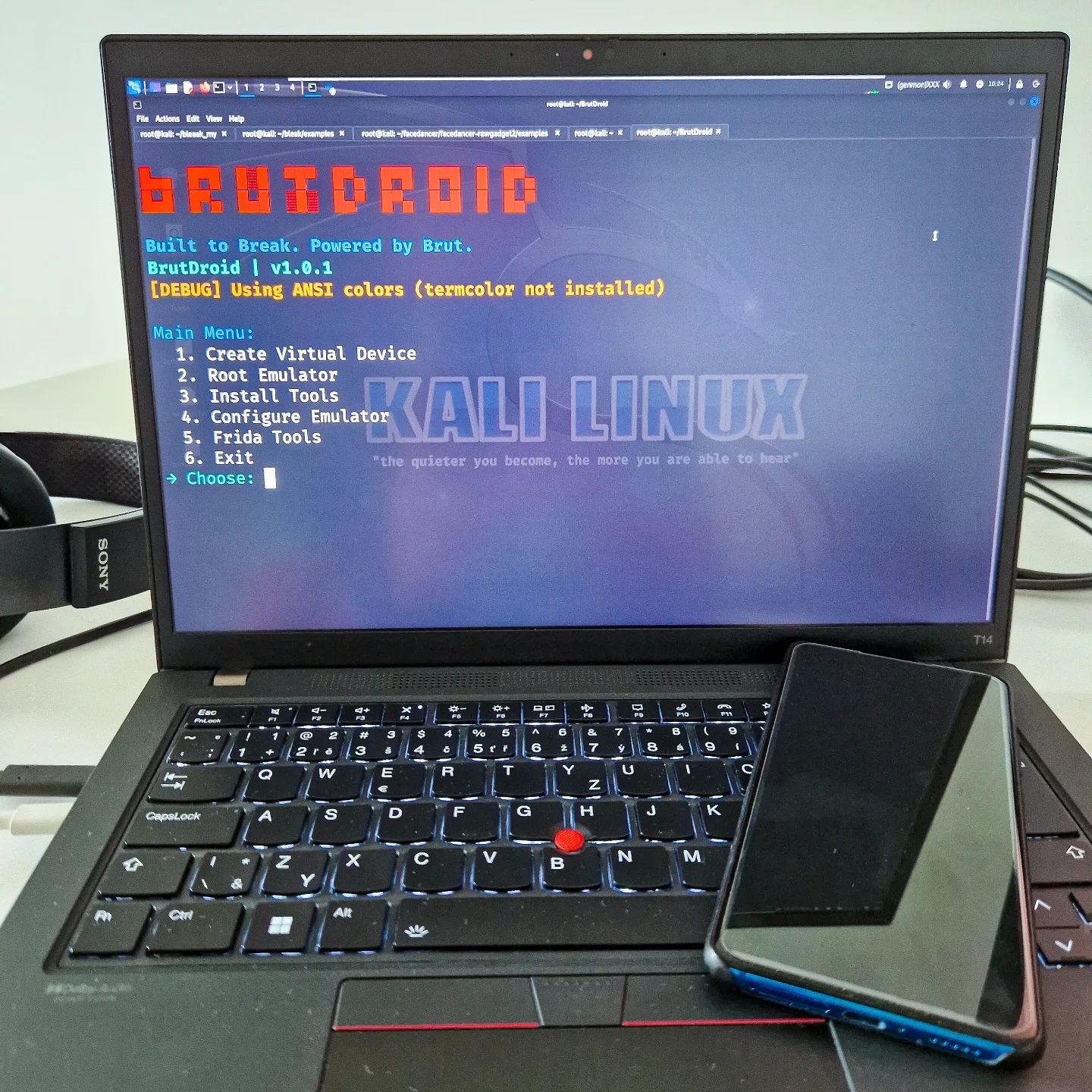
BrutDroid: The Ultimate Android Security Toolkit
Emulators are powerful tools for developers, hackers, and security researchers. BrutDroid, an Android Security Toolkit, is a game-changer in automating the tedious setup of emulators. This article delves into BrutDroid, its features, and why it's a handy tool for anyone in the Android security space.
Context / Why this matters
In the realm of cybersecurity, emulators are indispensable. They enable the safe testing and analysis of software and applications without the risk of compromising real devices. BrutDroid takes this a step further by automating the setup of emulators, Magisk, Frida, and Burp certificates, among other essential tools. This automation not only saves time but also ensures that your environment is consistently configured, reducing the chances of errors and discrepancies in your testing.
Main discussion
What is BrutDroid?
BrutDroid is a comprehensive Android Security Toolkit designed to automate emulator setup tasks. It provides an efficient way to integrate crucial tools such as Magisk, Frida, and Burp certificates, facilitating a seamless and secure environment for Android security research. The toolkit is particularly useful for penetration testers, mobile security researchers, and developers.
Features of BrutDroid
Automation of Tedious Tasks
One of the standout features of BrutDroid is its ability to automate the setup of various tools and environments. With a single command, you can configure your emulator to include Magisk, Frida, and Burp certificates, among others. This automation significantly reduces the time and effort required to set up a secure testing environment.
Kali Linux Integration
BrutDroid supports running Kali Linux in a virtual environment. This integration allows users to leverage the extensive suite of cybersecurity tools available in Kali Linux within an Android emulator. This is particularly useful for penetration testers who need a robust and flexible environment for their security assessments.
ANSI Color Usage
The toolkit utilizes ANSI colors for terminal output, providing a more visually intuitive and user-friendly experience. This feature is particularly useful for developers and security researchers who spend a lot of time in terminal windows, as it makes it easier to distinguish different types of output and errors.
Debugging Capabilities
BrutDroid is currently in a debug state, which means it is under active development and testing. This ensures that users have access to the latest features and improvements. The debugging information displayed on the screen helps developers identify and resolve issues more efficiently.
Tools Included in BrutDroid
Magisk
Magisk is a popular systemless root solution for Android devices. It allows users to achieve root access without modifying the system partition, which is crucial for maintaining device stability and security. BrutDroid automates the setup of Magisk, making it easier for users to gain root access and perform advanced tasks.
Frida
Frida is a dynamic instrumentation toolkit for developers, reverse-engineers, and security researchers. It allows you to inject JavaScript to explore native apps on Windows, macOS, Linux, iOS, Android, and QNX.
Burp Certificates
Burp Suite is a popular web vulnerability scanner. Burp certificates are essential for intercepting and analyzing HTTPS traffic, a critical task for any security researcher. BrutDroid includes the setup for Burp certificates, ensuring that users can perform comprehensive security assessments of mobile applications.
Practical tips
Setting Up BrutDroid
To get started with BrutDroid, follow these steps:
-
Install BrutDroid: Download the toolkit from the official GitHub repository.
-
Run the Setup Command: Use the command provided in the repository to automate the setup of your emulator and related tools.
-
Configure Kali Linux: If you need to run Kali Linux in a virtual environment, follow the instructions in the BrutDroid documentation to ensure seamless integration.
-
Leverage Debug Mode: Utilize the debug information displayed on the screen to troubleshoot any issues that arise during the setup process.
Customizing Your Environment
BrutDroid allows for extensive customization, enabling users to tailor their environment to their specific needs. For example, you can configure the emulator to include additional tools or customize the terminal output to better suit your workflow.
Best Practices
- Keep Your Tools Updated: Regularly update BrutDroid and its included tools to ensure you have the latest features and security patches.
- Use Debug Information: Pay close attention to the debug information displayed on the screen. This can help you identify and resolve issues more efficiently.
- Leverage Community Support: Engage with the community on forums and GitHub to share tips, ask questions, and contribute to the development of BrutDroid.
Important takeaways
BrutDroid is a powerful Android Security Toolkit that automates the setup of essential tools and environments for Android security research. Its integration with Kali Linux, support for Magisk, Frida, and Burp certificates, and use of ANSI colors for terminal output make it an invaluable tool for developers, hackers, and security researchers. By leveraging BrutDroid, you can save time, ensure a consistent testing environment, and stay ahead in the ever-evolving field of cybersecurity.
Conclusion
BrutDroid stands out as a comprehensive and efficient solution for automating emulator setup tasks. Its integration with Kali Linux, support for critical tools, and user-friendly features make it an essential toolkit for anyone involved in Android security research. By streamlining the setup process and providing a robust environment for testing, BrutDroid helps security professionals focus on what they do best—securing the digital world. Embrace the power of BrutDroid and take your Android security research to the next level.
Watch the Reel
Questions readers ask
What is BrutDroid and who can benefit from it?
BrutDroid is an Android Security Toolkit designed to automate the setup of emulators and essential security tools. It is beneficial for developers, hackers, and security researchers who need a reliable and secure environment to test and analyze Android applications without the need for manual configuration.
How does BrutDroid simplify the setup of Android emulators?
BrutDroid streamlines the setup process by automating the installation of crucial components like Magisk, Frida, and Burp certificates. This one-command setup significantly reduces the time and effort required to configure an emulator, ensuring a consistently secure environment.
What are the key features of the BrutDroid toolkit?
The BrutDroid toolkit includes automated setup for Android emulators, integration of Magisk for root access, Frida for dynamic instrumentation, and Burp certificates for secure communication. These features are essential for debugging mobile apps and conducting comprehensive security research.
Can BrutDroid be used with Kali Linux?
Yes, BrutDroid is compatible with Kali Linux, making it a powerful tool for security professionals who prefer using this distribution. The toolkit can be easily integrated into a Kali Linux environment, providing a robust platform for Android security research and penetration testing.
What are the benefits of using BrutDroid for Android security research?
BrutDroid benefits for Android security research include saving time through automation, ensuring a secure environment, and providing essential tools for thorough analysis. By automating the setup of emulators and integrating tools like Magisk and Frida, BrutDroid enables more efficient and effective security research.
Related deep dives
Similar reads based on topic and creator.




Recent articles
Fresh deep dives from the latest Reels we unpacked.




Comments
Be the first to comment.