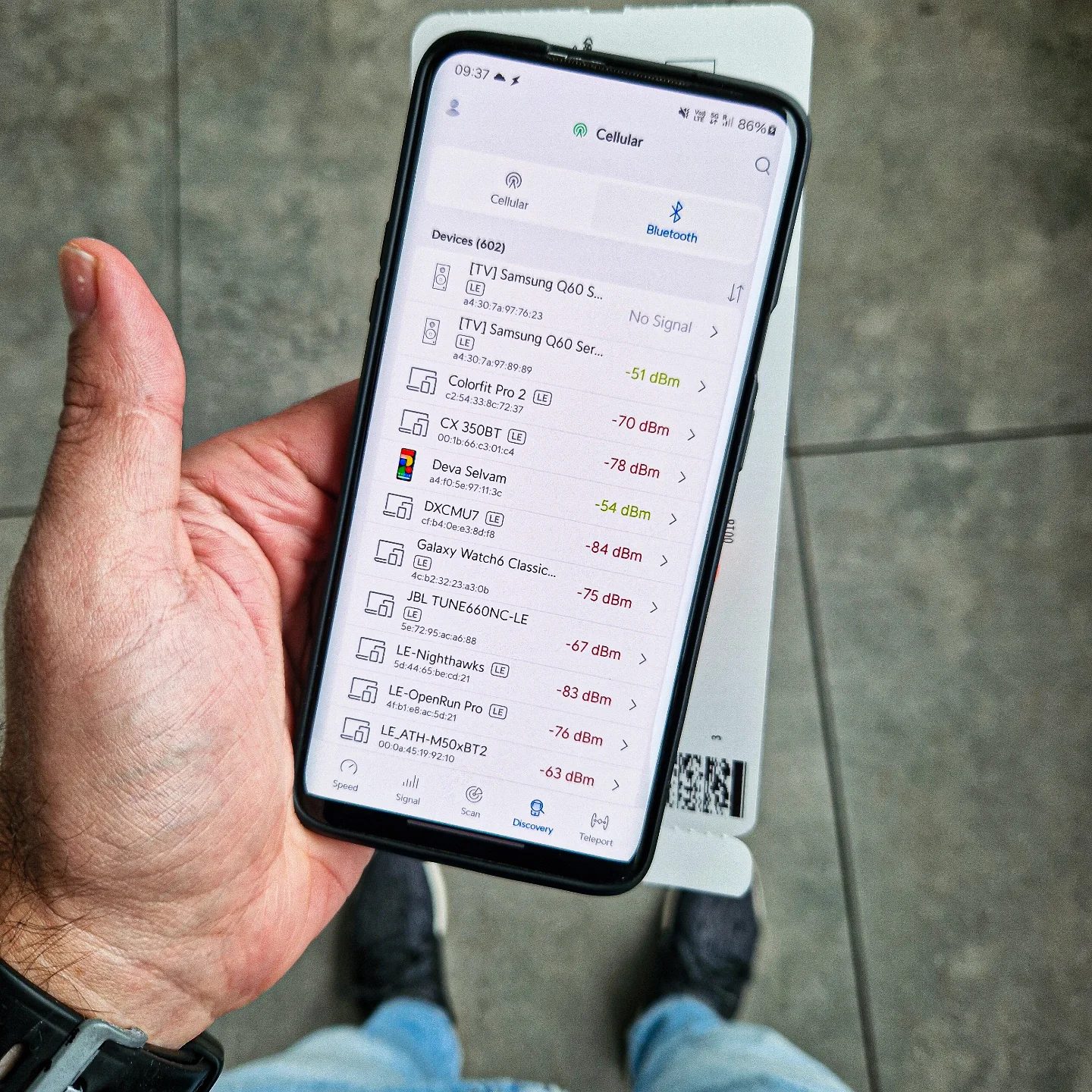
Bluetooth Device Management on Smartphones
In today’s interconnected world, managing Bluetooth devices on your smartphone is crucial for both convenience and security. Bluetooth technology allows seamless connections between various devices, from smartphones and smartwatches to smart TVs and headphones. However, this convenience comes with potential risks, particularly when it comes to vulnerabilities and unpatched devices.
Why This Matters
Bluetooth devices are ubiquitous, especially in public places like airports. Understanding how to manage and secure these connections is essential for protecting your personal data and device integrity. This is particularly important given the rising number of vulnerabilities, such as the Bluetooth pairing vulnerability that leads to 0-click Remote Code Execution (RCE) (CVE-2023-45866).
Common Devices and Their Roles
Devices like the Samsung Q60 Series TV and the Galaxy Watch6 are often connected to smartphones. These devices can offer a range of functionalities, from streaming content to monitoring health metrics. However, these connections also create potential entry points for security threats. Ensuring that all connected devices are up-to-date with the latest security patches is vital.
Bluetooth Security Risks
Bluetooth connections can be exploited if devices are not properly secured. Vulnerabilities like CVE-2023-45866 highlight the importance of keeping all connected devices updated. This vulnerability allows for 0-click RCE, meaning that an attacker can execute malicious code on a device without any user interaction. By keeping your devices updated, you can mitigate these risks.
Vulnerability Example: CVE-2023-45866
CVE-2023-45866 is a critical vulnerability that affects Bluetooth pairing processes. This flaw can be exploited by attackers to gain unauthorized access to a device, potentially leading to data theft or other malicious activities. Ensuring that all your Bluetooth-enabled devices are patched against such vulnerabilities is a proactive step towards enhancing your security.
Bluetooth Vulnerabilities
Bluetooth devices, such as the Samsung Galaxy Watch6, can be vulnerable to various exploits if not properly managed. This includes the risk of unauthorized access and data breaches. Users should regularly check for updates and apply patches to ensure that their devices are secure.
Keeping Devices Updated
Regular updates are essential for maintaining the security of your Bluetooth devices. Manufacturers often release patches and updates to address known vulnerabilities. By staying up-to-date, you can protect your devices from potential exploits and ensure smooth functionality.
Practical Tips for Managing Bluetooth Devices
Regularly Update Devices
Ensure that all your Bluetooth-enabled devices, including smartphones, smartwatches, and TVs, are updated with the latest security patches. This helps mitigate risks associated with known vulnerabilities.
Use Strong Pairing Codes
When connecting new devices, use strong, unique pairing codes to prevent unauthorized access. Avoid default or easily guessable codes.
Disable Bluetooth When Not in Use
Turning off Bluetooth when it’s not in use can significantly reduce the risk of unauthorized access. This is particularly important in public places where the risk of exploitation is higher.
Check Device Settings
Regularly review the list of connected devices on your smartphone. Disconnect any devices that are no longer in use or that you do not recognize. This can help prevent unauthorized access and potential data breaches.
Use Trusted Devices
Ensure that all connected devices are from reputable manufacturers and are known to prioritize security. This reduces the risk of vulnerabilities and ensures that you have access to timely updates and patches.
Important Takeaways
- Bluetooth devices offer convenience but come with potential security risks.
- Vulnerabilities like CVE-2023-45866 highlight the importance of keeping devices updated.
- Regularly check and update all connected devices.
- Use strong pairing codes and disable Bluetooth when not in use.
- Review connected devices regularly and disconnect any unknown or unused ones.
Conclusion
Managing Bluetooth devices on your smartphone is a critical aspect of maintaining both convenience and security. By staying informed about potential vulnerabilities and following best practices for device management, you can minimize risks and protect your personal data. Whether it's updating your Samsung Galaxy Watch6 or ensuring that your Samsung Q60 Series TV is secure, proactive management is key. Always stay vigilant and stay up-to-date with the latest security patches to keep your devices safe.
Watch the Reel
Questions readers ask
What are the main Bluetooth security risks I should be aware of when using my smartphone in public places?
In public places, the primary Bluetooth security risks include unauthorized access to your device, data interception, and exploitation of vulnerabilities. Hackers may attempt to pair with your device or intercept data transmitted over Bluetooth. Keeping your Bluetooth off when not in use and avoiding automatic pairing can mitigate these risks.
How can I protect my smartphone from Bluetooth hacking?
To protect your smartphone from Bluetooth hacking, ensure that your device's software and Bluetooth firmware are up-to-date. Avoid leaving Bluetooth on continuously, and disable it when not in use. Additionally, use strong, unique passcodes for Bluetooth pairing and be cautious of unknown devices attempting to connect.
What should I do if I suspect my smartphone has been compromised through a Bluetooth vulnerability?
If you suspect a Bluetooth vulnerability has compromised your smartphone, immediately turn off Bluetooth. Change all your passwords and enable two-factor authentication for your accounts if possible. Perform a thorough scan of your device with a reputable security app to identify and remove any potential threats. Lastly, update your device’s software and Bluetooth security patches.
Are there any specific Bluetooth security tips for airports or crowded public locations?
In airports or crowded public locations, the risk of Bluetooth hacking is higher due to the proximity of many devices. Keep your Bluetooth off or in non-discoverable mode. Avoid using Bluetooth in these areas unless necessary. If you must use it, turn it off as soon as you’re done. Be especially wary of unknown devices trying to connect.
What is a secure Bluetooth connection and how can I ensure my connections are secure?
A secure Bluetooth connection is one that uses strong encryption and authentication methods to protect data during transmission. To ensure your connections are secure, always use trusted devices and avoid automatic pairing. Keep your device’s software and Bluetooth firmware updated. Use Bluetooth only when necessary and always turn it off when not in use.
How can I prevent unauthorized Bluetooth device access to my smartphone?
To prevent unauthorized Bluetooth device access, turn off Bluetooth when not in use. Use strong, unique passcodes for pairing. Disable automatic pairing and keep your device’s software up-to-date. Regularly check for and install Bluetooth security patches to protect against known vulnerabilities. Always be cautious of unknown devices attempting to connect.
What are the benefits of keeping my smartphone’s Bluetooth software up-to-date?
Keeping your smartphone’s Bluetooth software up-to-date is essential for protecting against known vulnerabilities and preventing unauthorized access. Updates often include security patches that fix flaws exploited by hackers. Regular updates ensure that your device is equipped with the latest security features, enhancing overall Bluetooth safety.
Related deep dives
Similar reads based on topic and creator.




Recent articles
Fresh deep dives from the latest Reels we unpacked.




Comments
Be the first to comment.