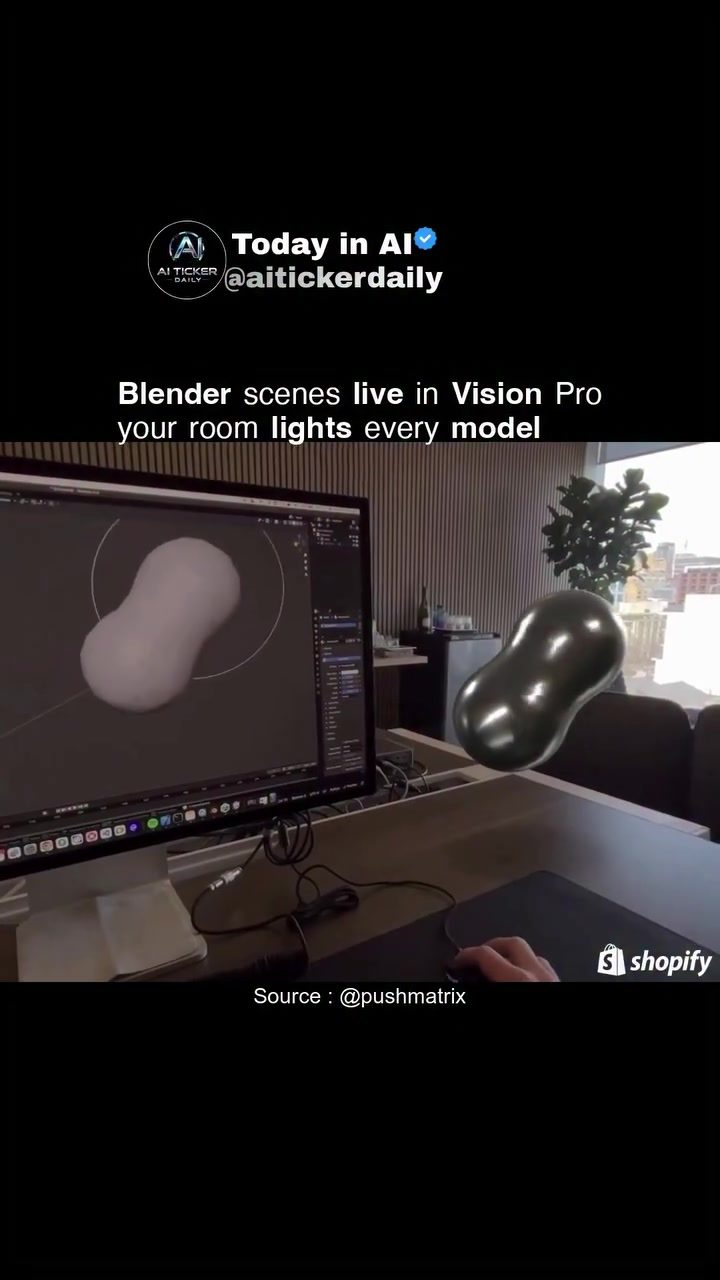
Live Blender Scenes in Vision Pro
Blender, a powerful open-source 3D creation suite, is now being pushed into new realms through its integration with Vision Pro. The live rendering of Blender scenes in a real-world environment offers a glimpse into the future of 3D design and visualization.
Context / Why This Matters
Real-time rendering of 3D scenes is becoming increasingly important as industries like architecture, gaming, and film production demand faster, more realistic visualizations. The ability to see and interact with 3D models in real-time can revolutionize workflows, making them more efficient and intuitive. The integration of Blender with Vision Pro represents a significant step forward in this direction, leveraging real-world lighting to enhance the realism and accuracy of 3D models.
Main Discussion
Blender and Vision Pro: A New Frontier
Blender is known for its robust capabilities in 3D modeling, animation, and rendering. Vision Pro, on the other hand, is a high-tech headset designed to provide an immersive virtual reality experience. When these two technologies are combined, the results are stunning. The live rendering of Blender scenes in Vision Pro allows users to interact with 3D models in a way that was previously impossible.
Real-World Lighting and HDRI
One of the standout features of this integration is the use of real-world lighting to drive how models are rendered in the headset. Traditionally, computer-generated scenes rely on High Dynamic Range Imaging (HDRI) to simulate realistic lighting conditions. However, the live setup in Vision Pro uses the actual lighting in the room, providing a more accurate and dynamic representation of the 3D scene. This real-time adaptation to environmental lighting is a game-changer, as it eliminates the need for pre-rendered HDRI maps and allows for a more authentic visual experience.
Performance and Pipeline Details
While the live demo showcases the potential of this technology, it’s important to note that performance and pipeline details are still at a demo level. This means that while the concept is proven, there may be some limitations and optimizations needed before it becomes a mainstream tool. The setup itself requires a robust computer monitor, a high-performance graphics card, and a headset capable of real-time rendering. Additionally, the software pipeline needs to be finely tuned to ensure smooth operation and minimal latency.
Practical Applications
The integration of Blender with Vision Pro has several practical applications. Architects can use it to visualize their designs in real-time, allowing for on-the-spot adjustments and more accurate presentations. Game developers can create immersive environments and test them in real-world conditions. And in the film industry, this technology can be used for real-time pre-visualization, enabling directors and cinematographers to see how the final product will look before it reaches the editing phase.
Practical Tips
For anyone looking to experiment with this technology, here are some practical tips:
- High-Performance Hardware: Ensure you have a high-performance computer monitor and graphics card to handle the live rendering.
- Quality Headset: Use a headset like Vision Pro that supports real-time rendering and immersive experiences.
- Optimization: Fine-tune your software pipeline to minimize latency and ensure smooth performance.
- Lighting Conditions: Pay attention to the lighting in your room, as it will directly influence how your 3D models are rendered.
Important Takeaways
- Real-Time Rendering: The integration of Blender with Vision Pro allows for real-time rendering of 3D scenes, providing an immersive and interactive experience.
- Real-World Lighting: The use of real-world lighting enhances the authenticity of 3D models, eliminating the need for pre-rendered HDRI maps.
- Performance Considerations: While the demo showcases the potential, performance and pipeline details are still at a demo level, requiring further optimization.
- Practical Applications: This technology has wide-ranging applications in industries like architecture, gaming, and film production.
Conclusion
The live rendering of Blender scenes in Vision Pro represents a significant advancement in 3D design and visualization. By leveraging real-world lighting and providing an immersive experience, this technology has the potential to revolutionize various industries. As the performance and pipeline details are further refined, we can expect to see even more innovative applications and widespread adoption.
Watch the Reel
Questions readers ask
How does the integration of Blender with Vision Pro enhance 3D design?
By enabling live rendering of Blender scenes in real-world environments, the integration enhances 3D design by providing a more intuitive and realistic user experience. It allows designers to see and interact with their 3D models in real-time, leveraging real-world lighting conditions for enhanced accuracy and realism.
What are the benefits of using Vision Pro for 3D design in architecture?
Vision Pro allows architects to visualize their designs in a real-world context, making it easier to identify potential issues and refine their work. The ability to see 3D models in real-time, with accurate lighting, can greatly improve the design process and help clients better understand and engage with the proposed architectural plans.
Can I use Vision Pro for live 3D rendering in gaming?
Yes, the integration of Blender with Vision Pro allows for real-time 3D rendering, which is invaluable in the gaming industry. This feature enables developers to test and refine their game environments and assets directly in a real-world setting, leading to more immersive and accurate gaming experiences.
What advantages does real-world lighting bring to 3D models in Blender through Vision Pro?
Real-world lighting provides a more accurate and realistic representation of how 3D models will appear in actual environments. This helps designers make informed decisions about materials, textures, and lighting setups, ultimately leading to more realistic and visually appealing 3D models.
How does Blender's integration with Vision Pro improve workflow efficiency in 3D design?
The live rendering feature in Vision Pro allows for immediate feedback and adjustments, eliminating the need for lengthy rendering processes. This real-time interaction streamlines the design process, making it faster and more efficient, ultimately saving time and resources.
What is the significance of Vision Pro for 3D design in film production?
Vision Pro can help film production teams by allowing them to visualize and interact with 3D models in real time. This can be particularly useful for pre-visualization, set design, and special effects, ensuring that the final product aligns closely with the creative vision and reducing the need for extensive post-production adjustments.
Can I use Vision Pro for live rendering if I am not a professional 3D designer?
Yes, Vision Pro with Blender can be a valuable tool for hobbyists and enthusiasts. The intuitive and realistic user experience makes it easier for beginners to understand and work with 3D models. The real-world visualization can help users experiment and learn in a more engaging and interactive way.
Related deep dives
Similar reads based on topic and creator.



Recent articles
Fresh deep dives from the latest Reels we unpacked.




Comments
Be the first to comment.