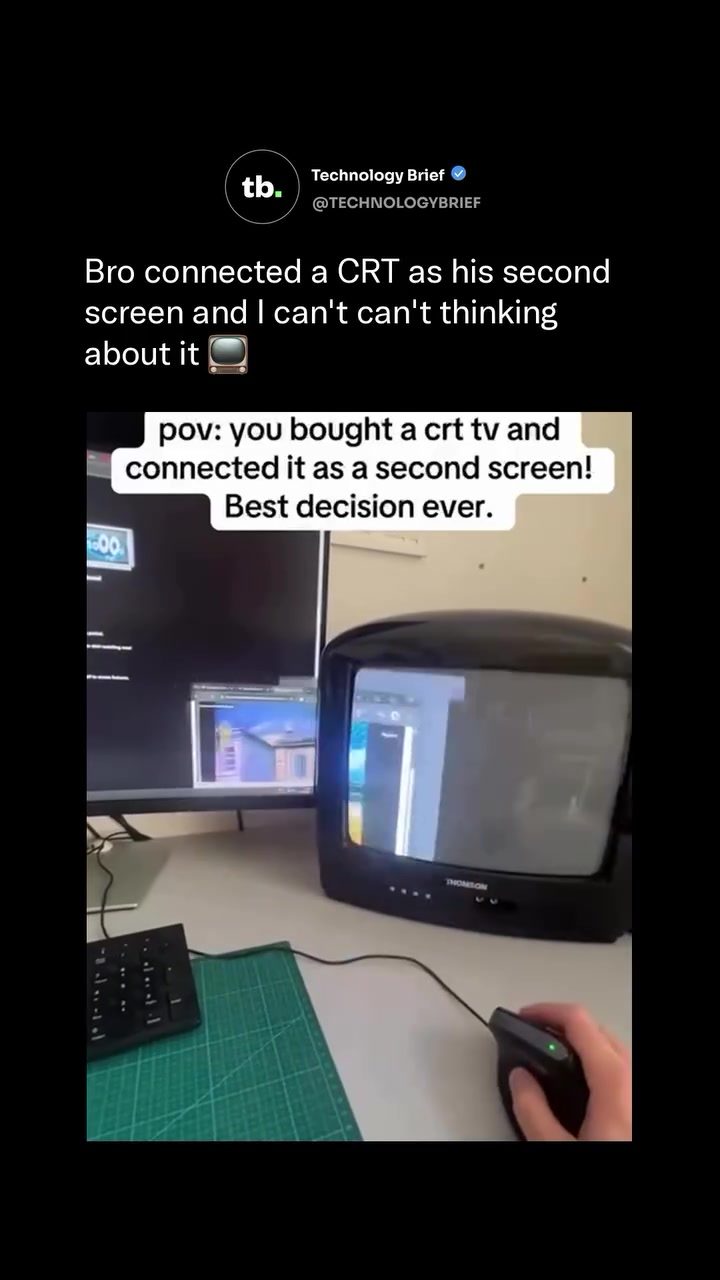
Retro Gaming with a CRT TV
Connecting an old CRT TV to a modern computer as a second monitor is more than just a nostalgic endeavor—it's a practical solution that enhances the retro gaming experience. This setup, as showcased with a Thomson CRT TV, allows gamers to relive the classic glory of the 80s and 90s with a level of authenticity that modern screens can't replicate.
Why This Matters
Retro gaming is more than just a hobby; it's a community of enthusiasts who value the unique aesthetics and responsiveness of classic gaming hardware. CRT TVs, with their distinctive warm, glowing look, offer an immersive experience that modern LCD monitors simply can't match. The near-zero input lag of CRT displays ensures that games feel exactly as they did when they were first released, providing a sense of authenticity that many retro gamers crave.
The CRT TV Advantage
CRT TVs use electron guns to fire beams at phosphor dots, creating a visual experience that is fundamentally different from flat screens. This method of display produces a warm, glowing effect that gives older games a nostalgic charm. The classic Teenage Mutant Ninja Turtles game, for instance, looks and feels like it did on the original hardware, complete with scanlines and all.
Near-Zero Input Lag
One of the most significant advantages of using a CRT TV as a second monitor is the near-zero input lag. Modern LCD monitors typically have an input lag of one to two milliseconds, which might seem negligible but can affect the responsiveness of retro games. CRT displays, on the other hand, have almost instantaneous response times, making the gameplay experience feel authentic and immediate. This is particularly important for games from the late 1980s and early 1990s, where every millisecond counts.
Hardware Considerations
Connecting a CRT TV as a second screen requires some additional hardware. Typically, an adapter is needed to convert the modern video signal down to a composite or S-Video input that older TVs can read. This setup might seem daunting, but the rewards are well worth the effort. Once everything is connected, retro games like Teenage Mutant Ninja Turtles, Street Fighter, or any other classic titles will look and feel like they are running on the original hardware.
Practical Tips
Choosing the Right CRT TV
When selecting a CRT TV for your retro gaming setup, there are a few key considerations to keep in mind. Firstly, look for a TV with a good scanline appearance. The scanlines are a distinctive feature of CRT displays and contribute to the retro aesthetic. Secondly, ensure that the TV has composite or S-Video inputs, as these are necessary for connecting to modern computers.
Connecting Your CRT TV
-
Adapter Selection: Choose an adapter that can convert your modern video signal to a format compatible with your CRT TV. This usually means finding an adapter that can handle composite or S-Video outputs.
-
Cable Management: Keep your cables organized to avoid any clutter. Use cable ties or a cable management system to keep everything neat and tidy.
-
Positioning: Place the CRT TV at a comfortable viewing angle and distance. This will not only enhance your gaming experience but also reduce eye strain.
Optimizing the Display
-
Resolution Settings: Adjust the resolution settings on your computer to match the capabilities of your CRT TV. This will ensure that the image quality is optimal.
-
Color Calibration: Calibrate the colors on your CRT TV to get the best visual experience. This might involve tweaking the brightness, contrast, and color settings to achieve the perfect retro look.
-
Scanline Emulation: If your CRT TV doesn't have the perfect scanline appearance, you can use software to emulate the effect. This will give your games that classic look and feel.
Important Takeaways
- Authentic Retro Experience: CRT TVs provide a unique, authentic retro gaming experience that modern LCD monitors can't replicate.
- Near-Zero Input Lag: The near-instantaneous response time of CRT displays makes games feel exactly as they did when they were first released.
- Hardware Requirements: Connecting a CRT TV as a second monitor requires additional hardware, such as adapters to convert modern video signals.
Conclusion
Using a CRT TV as a second monitor for retro gaming is a rewarding endeavor that combines nostalgia with practical benefits. The warm, glowing look and near-zero input lag of CRT displays make for an immersive and authentic gaming experience. Whether you're a seasoned retro gamer or just getting started, connecting a CRT TV to your modern computer can enhance your gaming setup in ways that modern technology simply can't. So, if you're looking to elevate your retro gaming experience, consider plugging in that old CRT TV and reliving the classics with all their original charm.
Watch the Reel
Questions readers ask
Why do CRT TVs provide a more authentic retro gaming experience compared to modern monitors?
CRT TVs offer a more authentic retro gaming experience due to their distinctive warm, glowing visuals and near-zero input lag. These factors recreate the original feel of classic games, which modern LCD monitors often struggle to replicate. Additionally, CRT screens provide a more responsive gaming experience, making them ideal for retro gaming enthusiasts.
What are the benefits of using a CRT TV for gaming?
CRT TVs offer several benefits for gaming, including a warm, nostalgic visual experience, near-zero input lag, and a high level of responsiveness. These aspects combined make games feel as they did when first released, enhancing the retro gaming experience.
Can I connect a CRT TV to a modern gaming computer as a second monitor?
Yes, you can connect a CRT TV to a modern gaming computer as a second monitor. This setup allows you to enjoy retro games with a level of authenticity that modern monitors can't match. You may need an appropriate adapter or converter depending on your computer's outputs.
What is the advantage of using a CRT TV over an LED for retro gaming?
CRT TVs provide a warmer, more immersive visual experience compared to LED monitors. They also offer near-zero input lag, which is crucial for the responsiveness of retro games. This combination of visual and responsive qualities makes CRT TVs ideal for retro gaming.
How do I set up a retro gaming CRT TV?
Setting up a retro gaming CRT TV involves connecting it to your gaming console or computer. For older consoles, this is usually straightforward with the appropriate cables. For modern computers, you may need adapters or converters to match the TV's inputs. Once connected, you can adjust the settings to optimize the retro gaming experience.
Why is input lag important when using a CRT TV for gaming?
Input lag is important because it affects the responsiveness of your controls. CRT TVs have near-zero input lag, which means the time between pressing a button and seeing the action on the screen is minimal. This makes games feel more authentic and responsive, just like they did during the golden age of gaming.
Related deep dives
Similar reads based on topic and creator.

Recent articles
Fresh deep dives from the latest Reels we unpacked.




Comments
Be the first to comment.