Mounting a TV: Common Pitfalls and Solutions
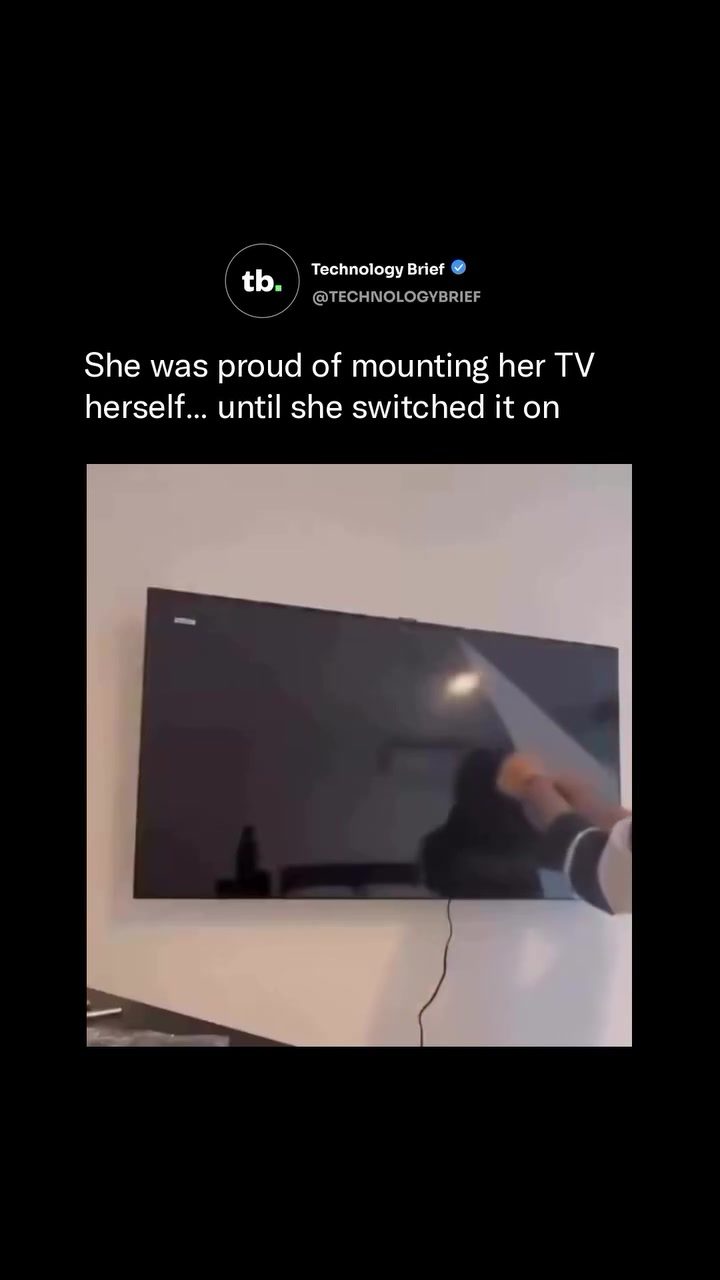
Mounting a TV on the wall can be a satisfying home improvement project, but it's not without its potential pitfalls. A common and easily avoidable issue is hanging the TV upside down. This might seem like an obvious mistake, but it's surprisingly easy to make, especially for first-timers. Both sides of a flat-screen TV can look nearly identical before it is powered on, and the protective film covering the screen can obscure any orientation clues. Here, we'll delve into why this happens, how to prevent it, and what to do if it does occur.
Why This Matters
Properly mounting a TV is crucial for both safety and functionality. An incorrectly mounted TV can lead to instability, potential falls, and even damage to the wall or TV itself. Additionally, an upside-down TV can be frustrating to use and may require technical adjustments to correct.
Main Discussion
The Upside-Down Dilemma
When mounting a TV, it's essential to ensure the correct orientation. Both sides of a flat-screen TV often look similar, which can lead to confusion. The protective film on the screen can further obscure any distinguishing features. It's only after powering on the TV that the mistake becomes apparent, as the logo and interface elements are displayed upside down.
Preventing the Mistake
The safest way to avoid mounting a TV upside down is to check for key indicators before drilling any holes. Typically, the power indicator light and speaker grille are located on the bottom of the screen. By identifying these features, you can ensure the TV is oriented correctly. Additionally, having a second person to help can make it easier to spot orientation errors before the bracket is locked in place.
Correcting an Upside-Down TV
If you find yourself with an upside-down TV, don't panic. In many cases, the issue can be corrected through the TV’s service menu. For Samsung Smart TVs running Tizen, for example, there is a hidden image-rotation setting that allows the picture to be flipped 180 degrees back to normal. This setting can usually be accessed through the service menu, though the exact steps may vary depending on the model.
In some instances, correcting the display orientation may require adjusting the tuner settings or performing a full factory reset. If you're unsure how to access these settings, consulting the TV's user manual or contacting customer support can provide the necessary guidance.
Safety First
Wall-mounting a large TV alone can be challenging and potentially dangerous. It's always best to have a second person to help with the installation. This not only makes the process easier but also ensures that any orientation errors are spotted before the bracket is locked in place. Additionally, using the correct mounting hardware and following the manufacturer's instructions can prevent potential accidents and ensure a secure installation.
Common Misconceptions
One common misconception is that TVs are designed to be mounted upside down. While some TVs may have settings to correct an upside-down display, this is not the intended orientation. Always aim to mount the TV in the correct position to avoid complications and ensure optimal functionality.
Practical Tips
-
Identify Key Features: Before mounting, identify the power indicator light and speaker grille. These are almost always on the bottom of the screen and can serve as a reliable reference for orientation.
-
Use a Helper: Having a second person assist with the installation can make it easier to spot orientation errors and ensure a secure and correct mounting.
-
Consult the Manual: If you encounter issues with the display orientation, consult the TV's user manual or contact customer support for guidance on accessing the service menu and adjusting settings.
-
Safety First: Always prioritize safety when mounting a TV. Use the correct hardware, follow the manufacturer's instructions, and ensure the TV is securely fastened to the wall.
Important Takeaways
Mounting a TV upside down is a common but easily avoidable mistake. By identifying key features on the TV and using a helper, you can prevent this issue from occurring. If the TV is already mounted upside down, accessing the service menu to adjust the display orientation can correct the problem. Always prioritize safety and follow the manufacturer's instructions for a secure and correct installation.
Conclusion
Mounting a TV on the wall can enhance your viewing experience and add a polished look to your home. However, it's crucial to ensure the correct orientation to avoid potential issues. By identifying key features, using a helper, and consulting the user manual, you can prevent and correct an upside-down TV. Always prioritize safety and follow the manufacturer's instructions for a secure and functional installation.
Watch the Reel
Questions readers ask
What are the signs that I might have mounted my Samsung TV upside down?
If your TV's power light is at the bottom or the speaker grille is facing upwards, your TV is likely hung upside down. These indicators are crucial to check before finalizing the installation. Additionally, if you've updated your smart TV and the interface appears inverted, this could also signal an upside-down orientation.
Can mounting a TV upside down cause damage to the TV?
Yes, mounting a TV upside down can potentially put unnecessary strain on the internal components and the mount itself. The TV might also become unstable and prone to falling, which can cause further damage. It's best to prevent this by carefully checking the orientation before securing it to the wall.
What should I do if I realize my TV is mounted upside down after the installation?
If you've already mounted your TV and realize it's upside down, you'll need to carefully remove it from the wall, flip it, and then remount it. Make sure to follow the correct steps to ensure the TV is secure and stable.
How can I ensure I mount the TV in the correct orientation before installation?
Before mounting, look for key indicators such as the power light and speaker grille. These are usually at the bottom of the TV. Additionally, check the user manual for any specific orientation markings or guidelines. Removing the protective film from the screen can also provide better visual cues.
Are there any tools that can help with wall mounting a TV?
Yes, several tools can assist with mounting a TV. A stud finder will help you locate secure spots to attach the mount. A level will ensure the TV is straight, and a drill with appropriate bits will be necessary for securing the mount to the wall. Additionally, having a second person to help hold the TV can make the process safer and more manageable.
Where should I place the TV mount on the wall?
The optimal height for a wall-mounted TV is typically at eye level when seated. This is usually around 42 inches from the floor to the center of the screen. However, this can vary based on personal preference and room layout. Ensure the mount is securely attached to wall studs for stability and safety.
Related deep dives
Similar reads based on topic and creator.




Recent articles
Fresh deep dives from the latest Reels we unpacked.




Comments
Be the first to comment.