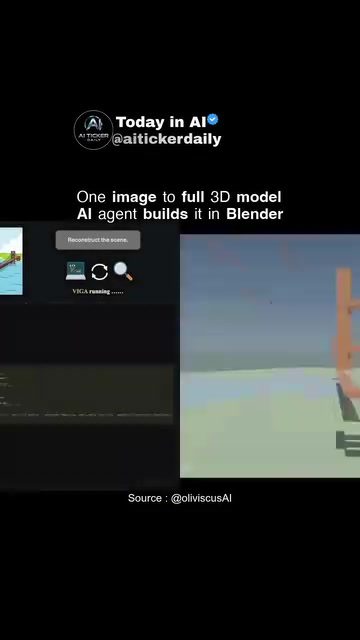
AI 3D Model Generation from a Single Image
AI 3D model generation from a single image is a cutting-edge application of artificial intelligence. This process leverages advanced algorithms to transform a 2D image into a detailed 3D model, opening up new possibilities for various fields, including architecture, gaming, and design.
Why This Matters
The ability to generate 3D models from single images has significant implications. It streamlines the design process, reduces the time and cost associated with traditional 3D modeling, and enables more accessible and efficient digital content creation. This technology is particularly useful for applications that require rapid prototyping, detailed visualizations, and interactive experiences.
Main Discussion
The Role of AI in 3D Model Generation
AI can generate 3D models from a single image through a process called Vision-as-Inverse-Graphics (VIGA). This method involves an analysis-by-synthesis approach, where the AI iteratively refines a 3D model to match the input image. The AI generates code that runs in a 3D modeling software like Blender, creating a scene that closely matches the original image.
How VIGA Works
The VIGA process involves two main components: the generator and the verifier. The generator writes and runs scene code, while the verifier compares the rendered output to the target image. This feedback loop allows the AI to continuously improve the 3D model without the need for fine-tuning.
Applications in Blender
Blender, a popular open-source 3D modeling software, is often used in this process. The AI agent builds the 3D model within Blender, utilizing its powerful rendering capabilities to create highly detailed and accurate models. This integration makes it possible to leverage Blender's extensive toolset for further editing and refinement.
Benefits of VIGA
VIGA has several advantages over traditional 3D modeling methods. It supports reconstruction, allowing for the creation of detailed 3D models from existing 2D images. It also enables physics-style interactions, making it possible to simulate real-world behaviors within the 3D model. Additionally, VIGA can be benchmarked using tools like BlenderBench, ensuring high-quality and reliable results.
Tools and Resources
The VIGA project is MIT-licensed, meaning it is freely available for use and modification. The project page and repository can be accessed at https://fugtemypt123.github.io/VIGA-website/ and https://github.com/Fugtemypt123/VIGA, respectively. The accompanying paper on arXiv (cs.CV) provides a detailed explanation of the underlying technology and its applications.
Practical Tips
Setting Up VIGA
To get started with VIGA, you'll need to install Blender and the necessary Python libraries. The project repository includes detailed instructions for setting up the environment and running the code. Additionally, you can join the newsletter for regular updates and tips on using VIGA effectively.
Generating 3D Models
Once you have the setup complete, you can start generating 3D models from single images. The process involves loading the image into the VIGA system, which then iterates in Blender to create a matching 3D model. The generator writes and runs the scene code, while the verifier provides feedback to refine the model.
Enhancing the Model
After the initial 3D model is generated, you can use Blender's extensive toolset to enhance and refine the model. This includes adjusting lighting, adding textures, and applying various effects to achieve the desired outcome. The flexibility of Blender allows for a high degree of customization and creativity.
Important Takeaways
Speed and Efficiency
One of the key benefits of using AI for 3D model generation is the speed and efficiency it offers. Traditional 3D modeling can be time-consuming and labor-intensive, requiring manual adjustments and fine-tuning. VIGA, on the other hand, automates much of this process, significantly reducing the time and effort required to create high-quality 3D models.
Versatility and Flexibility
The versatility of VIGA makes it suitable for a wide range of applications. Whether you're working in architecture, gaming, or design, this technology can help you create detailed and accurate 3D models quickly and efficiently. The ability to support reconstruction and physics-style interactions adds to its flexibility, making it a valuable tool for various industries.
Community and Support
The availability of the VIGA project on GitHub and the accompanying resources provide a strong support system for users. The community of developers and enthusiasts can offer valuable insights, tips, and assistance, making it easier to get started and troubleshoot any issues that may arise.
Conclusion
AI 3D model generation from a single image represents a significant advancement in the field of digital content creation. With tools like VIGA and software like Blender, it is now possible to generate highly detailed and accurate 3D models in a fraction of the time and effort required by traditional methods. Whether you're a professional designer, a hobbyist, or someone exploring the possibilities of AI, this technology offers exciting opportunities for innovation and creativity.
Watch the Reel
Questions readers ask
How does AI convert a single 2D image into a 3D model?
AI uses advanced algorithms, often involving machine learning and computer vision, to analyse a 2D image and infer its 3D structure. These algorithms predict depth, shape, and textures, transforming a flat image into a detailed 3D model.
Which industries benefit most from AI 3D modeling from a single image?
Fields like architecture, gaming, and design greatly benefit from this technology. It enables architects to create detailed building models quickly, game designers to develop immersive environments, and designers to prototype products rapidly.
What are the cost and time savings of using AI for 3D model generation?
AI 3D model generation from a single image significantly reduces the time and cost typically associated with traditional 3D modeling. It eliminates the need for manual modeling and complex software, making the process more efficient and affordable.
Can AI-generated 3D models be used for rapid prototyping?
Yes, AI-generated 3D models are ideal for rapid prototyping. The technology allows for quick creation of detailed models, enabling designers and engineers to test and iterate prototypes more efficiently.
What software can I use to create 3D models from single images with AI assistance?
Several software tools integrate AI for 3D modeling from single images. Some popular options include Blender with AI plugins, MIT's open-source tools, and specialized software like Deep3D and Pixel2Mesh, which leverage AI to generate 3D models from 2D images.
What is the process for creating an AI 3D modeling tutorial?
Creating an AI 3D modeling tutorial involves selecting a user-friendly software or platform, breaking down the process into clear, step-by-step instructions, and providing practical examples. A useful tutorial should cover importing a 2D image, configuring AI settings, and refining the generated 3D model.
Related deep dives
Similar reads based on topic and creator.




Recent articles
Fresh deep dives from the latest Reels we unpacked.




Comments
Be the first to comment.