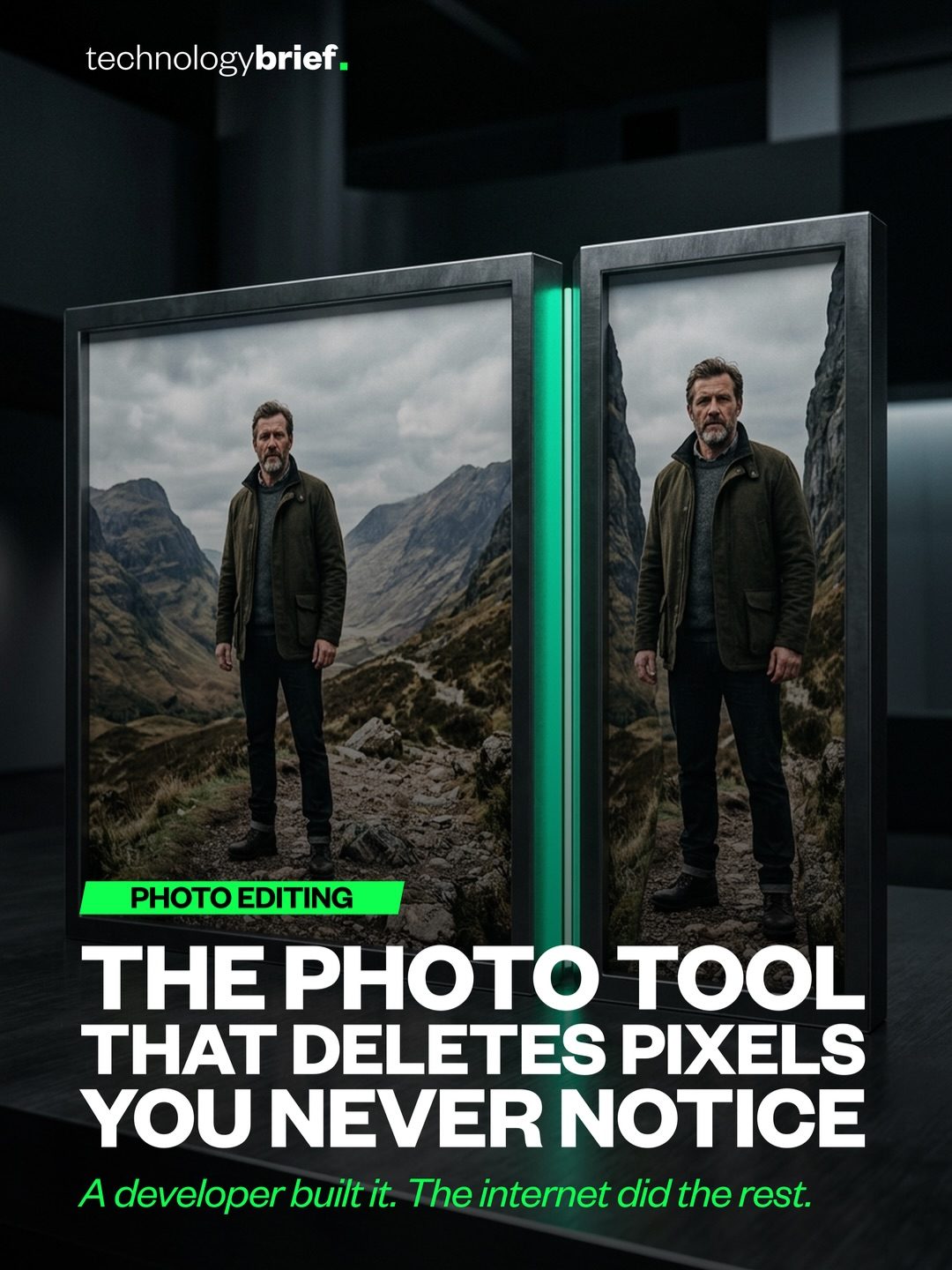
AI Photo Editing: Pixel Deletion for Unique Image Resizing
Photo editing software has long been a staple in the digital toolkit, but a new approach to resizing images has taken the internet by storm. This innovative tool doesn't simply squeeze everything closer together; it actually deletes parts of the image. This unique method, known as seam carving, identifies and removes pixels that are least likely to be missed, resulting in a smaller image with a distinctive aesthetic.
Context / Why this matters
In an era where visual content is king, the ability to resize images efficiently and effectively is crucial. Traditional methods of resizing can often distort important elements of an image, such as faces and edges. The new AI-powered photo editing tool addresses this issue by selectively removing pixels, ensuring that the image retains its essential features while achieving the desired size.
How Seam Carving Works
Step 1: Pixel Scoring
The process begins with the tool scoring every pixel in the image based on its characteristics. Flat backgrounds, such as skies, tend to score low because they contain less information. In contrast, edges and faces, which are rich in detail, receive high scores. This scoring system ensures that the tool prioritizes the preservation of important elements.
Step 2: Seam Removal
Once the pixels are scored, the tool identifies the least important paths, or seams, through the image. These seams are then removed, effectively reducing the size of the image. The tool uses face detection to ensure that important features, like faces, remain intact while everything around them gradually disappears. This iterative process continues until the image reaches the desired size.
The Unique Aesthetic
As the tool removes more seams, the image begins to take on a unique and somewhat surreal appearance. This distinctive look is a significant factor in why the tool has gone viral. The resulting images often have a mesmerizing, almost artistic quality, making them stand out in a crowded digital landscape.
Practical Application
This AI-powered photo editing tool runs directly on the iPhone, eliminating the need to upload photos to a server. This on-device processing not only enhances privacy but also ensures faster and more efficient editing. The tool's ability to handle complex tasks directly on the device makes it a powerful addition to any photo editor's toolkit.
Practical Tips
- Experiment with Different Images: Try using the tool on a variety of images to see how it handles different types of content. From landscapes to portraits, the results can be surprisingly diverse.
- Adjust Settings: Play around with the tool's settings to control the level of pixel removal. This can help you achieve the desired balance between image size and aesthetic quality.
- Use for Creative Projects: Consider using the tool for creative projects where a unique, surreal aesthetic is desired. The distinctive look can add an interesting twist to digital art and graphic design.
Important Takeaways
- Selective Pixel Removal: The tool's ability to selectively remove pixels based on their importance ensures that key elements of the image are preserved.
- Unique Aesthetic: The resulting images have a distinctive, almost artistic quality that sets them apart from traditionally resized photos.
- Efficient Processing: Running directly on the iPhone, the tool offers fast and efficient editing without the need for server uploads.
Conclusion
The new AI-powered photo editing tool represents a significant advancement in image resizing technology. By selectively removing pixels and preserving important features, it offers a unique and efficient way to reduce image size. Whether you're a professional photographer, a graphic designer, or simply someone who enjoys experimenting with photo editing, this tool is sure to provide hours of creative exploration.
Watch the Reel
Questions readers ask
What is seam carving and how does it work in AI photo editing?
Seam carving is a technique used in AI photo editing to resize images by selectively deleting pixels. It works by identifying and removing the least important parts of an image, such as less significant background details, while preserving essential features like faces and edges. This process helps maintain the overall quality and integrity of the image.
How does AI photo editing preserve important image features during resizing?
AI photo editing tools use advanced algorithms to detect and preserve important image features, such as faces and edges. By identifying these critical elements, the software can selectively delete less important pixels, ensuring that the resized image retains its key characteristics and quality.
Can AI photo editing tools reduce image size without compromising quality?
Yes, AI photo editing tools can significantly reduce image size without sacrificing quality. These tools use techniques like seam carving to remove pixels that are less noticeable, resulting in a smaller file size while maintaining the image's important features and overall aesthetic.
What makes AI image processing different from traditional resizing methods?
AI image processing, particularly with techniques like seam carving, differs from traditional resizing methods by selectively deleting pixels rather than uniformly compressing the image. This approach helps to preserve important features and reduces the risk of distortion, leading to more visually appealing and coherent resized images.
How does face and edge detection contribute to AI photo editing?
Face and edge detection are crucial in AI photo editing as they help the software identify and preserve the most important aspects of an image. By focusing on these key elements, the AI can ensure that essential details are maintained while less significant pixels are selectively removed, enhancing the overall quality of the resized image.
What are the benefits of using AI for image resizing?
Using AI for image resizing offers several benefits, including the ability to maintain image quality, preserve important features, and reduce file size. AI-powered tools can handle complex resizing tasks more effectively, ensuring that the final image looks natural and retains its visual appeal.
Are there any specific scenarios where AI photo editing excels in image resizing?
AI photo editing excels in scenarios where preserving specific details, such as faces and text, is crucial. For instance, resizing portraits, infographics, or any content where maintaining clarity and detail is important. The selective pixel deletion ensures that the resized image remains visually coherent and retains its key elements.
Related deep dives
Similar reads based on topic and creator.




Recent articles
Fresh deep dives from the latest Reels we unpacked.



Comments
Be the first to comment.