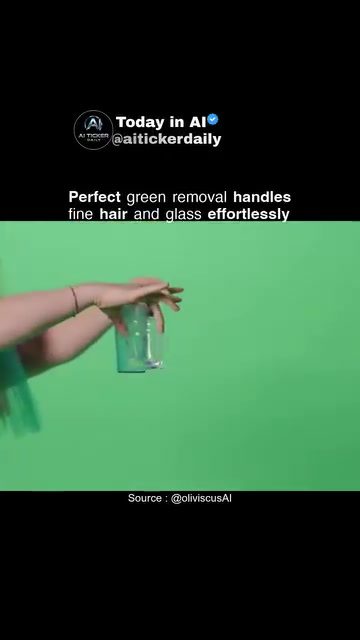
AI Green Screen Removal
AI-powered green screen removal tools are revolutionizing the way video editors handle complex subjects like fine hair, motion blur, and transparent glass. These tools promote clean edges and production-grade matting without the common issues of halos or fringes around tricky transparencies.
Context / Why This Matters
Green screen technology has long been a staple in video production, allowing filmmakers to replace a solid background color with any desired image or footage. However, removing the green screen without leaving artifacts has always been a challenge, especially with difficult subjects like fine hair or transparent glass. Traditional methods often result in halos, fringes, or uneven edges, requiring extensive manual touch-ups. AI-powered green screen removal tools address these issues by automating the process and delivering cleaner, more professional results.
Main Discussion
How AI Enhances Green Screen Removal
AI software leverages advanced algorithms to analyze and remove green screens more accurately. These tools can handle fine details like individual strands of hair and transparent objects, which are notoriously difficult to manage with traditional methods.
Handling Fine Hair and Glass
One of the standout features of AI green screen removal is its ability to manage fine hair and transparent glass. Traditional methods often result in a halo effect around these elements, making them appear unnatural. AI software, on the other hand, can detect and preserve these fine details, ensuring a seamless blend between the subject and the new background.
Production-Grade Matting
The primary advantage of using AI for green screen removal is the production-grade matting it provides. This means that the edges around the subject are clean and precise, eliminating the need for extensive manual adjustments. This feature is particularly beneficial for professionals who require high-quality outputs, such as filmmakers, video editors, and graphic designers.
Efficient Workflow
AI tools significantly speed up the post-production process by automating the green screen removal. This allows video editors to focus on more creative aspects of their work, rather than spending hours on manual touch-ups. The efficiency gained from using AI can be a game-changer, especially for projects with tight deadlines.
Open-Source Solutions
Many AI-powered green screen removal tools are open-source, making them accessible to a wide range of users. Open-source solutions allow for community-driven improvements, meaning that the tools continually evolve and enhance their capabilities. This democratizes advanced video editing techniques, enabling even beginners to achieve professional results.
The Role of Open-Source Green Screen Removal
The open-source nature of some AI green screen removal tools is a significant advantage. These tools are often free to use and can be customized to meet specific needs. By fostering a community of developers and users, open-source projects can quickly address issues, add new features, and improve overall performance. This collaborative environment ensures that the tools remain relevant and effective in a rapidly changing technological landscape.
Practical Tips
Choosing the Right Tool
Selecting the right AI green screen removal tool depends on your specific needs and budget. Look for tools that offer a balance between ease of use and advanced features. Some tools are more user-friendly, while others provide more customization options. Consider your level of expertise and the complexity of your projects when making a decision.
Fine-Tuning Settings
Even with AI tools, some manual adjustments might be necessary to achieve the perfect result. Explore the settings and parameters available in the tool to fine-tune the green screen removal process. Pay special attention to settings related to edge detection, transparency, and color correction.
Testing with Different Scenarios
AI tools may perform differently with various subjects and backgrounds. Test the tool with different scenarios, including fine hair, transparent objects, and complex backgrounds, to see how it handles each situation. This will help you understand the tool's strengths and limitations.
Utilizing Community Resources
If you're using an open-source AI tool, take advantage of the community resources. Participate in forums, join user groups, and explore online tutorials to learn from others' experiences. Community-driven projects often have a wealth of knowledge and support available, which can be invaluable for troubleshooting and optimization.
Regular Updates and Improvements
Keep an eye on updates and improvements for the AI tool you are using. Open-source projects often receive regular updates that enhance performance, fix bugs, and add new features. Staying up-to-date ensures that you are using the most effective and efficient version of the tool.
Important Takeaways
- AI green screen removal tools offer significant advantages over traditional methods, especially for challenging subjects like fine hair and transparent glass.
- Open-source solutions provide accessibility and community-driven improvements, making advanced video editing techniques available to a broader audience.
- These tools enhance production efficiency by automating the green screen removal process, allowing video editors to focus on more creative aspects.
- Regular updates and community support are crucial for maintaining the effectiveness of AI green screen removal tools.
Conclusion
AI green screen removal tools are transforming the way video editors handle complex subjects. By providing clean, production-grade matting and automating the process, these tools save time and ensure high-quality results. Whether you are a professional filmmaker or a hobbyist, investing in an AI green screen removal tool can significantly enhance your video editing capabilities.
Watch the Reel
Questions readers ask
What makes AI green screen removal tools better for handling fine hair and transparent glass?
AI green screen removal tools excel at preserving fine details, eliminating common issues like halos and fringes. These tools use intelligent algorithms to understand the complex edges of hair and the transparency of glass, ensuring a clean and precise removal process. This results in a more polished end product with much less need for manual adjustments.
Why is green screen removal a challenge, particularly with fine hair and transparent glass?
Green screen removal can be difficult because it involves separating the subject from a uniform background. Particularly tricky are fine details like hair and transparent objects like glass. These elements often result in halos, fringes, or uneven edges. AI tools address these challenges by accurately detecting and preserving these complex details.
How does AI green screen removal handle motion in videos?
AI-powered tools are designed to track and maintain the integrity of the subject throughout the video, even with rapid movements. These tools analyze each frame individually, ensuring that the removal process remains consistent and clean across the entire video. This is especially useful for subjects with complex motion or background variations.
Why are traditional green screen removal methods less effective with transparent glass?
Traditional methods often struggle with transparent glass because they can’t accurately differentiate between the glass and the background. This leads to issues like halos around the glass or uneven edges. AI tools, on the other hand, can better distinguish between the glass and the background, delivering a cleaner, more precise result.
Can AI-powered green screen removal tools be used by beginners, or are they only for professionals?
AI-powered green screen removal tools are designed to be user-friendly, making them accessible for both beginners and professionals. These tools automate the removal process, reducing the need for extensive manual adjustments. Even those new to video editing can achieve professional-quality results with minimal effort.
What are halos and fringes in the context of green screen removal, and why are they problematic?
Halos and fringes are common issues in green screen removal where the subject appears to have an unwanted glow or an uneven, jagged edge, especially around fine details like hair or transparent objects. These artifacts can be distracting and unprofessional, detracting from the overall quality of the video. AI removal tools are particularly effective at minimizing these issues, ensuring a smoother, more natural-looking result.
How do AI green screen tools ensure clean edges around complex subjects like hair or glass?
AI green screen tools use sophisticated algorithms to detect and preserve the fine details around complex subjects. By analyzing the visual data frame-by-frame, these tools can accurately differentiate between the subject and the background, ensuring clean and precise edges. This results in a professional-grade matt, free from common artifacts like halos or fringes.
Related deep dives
Similar reads based on topic and creator.




Recent articles
Fresh deep dives from the latest Reels we unpacked.




Comments
Be the first to comment.