Cybersecurity Mistakes
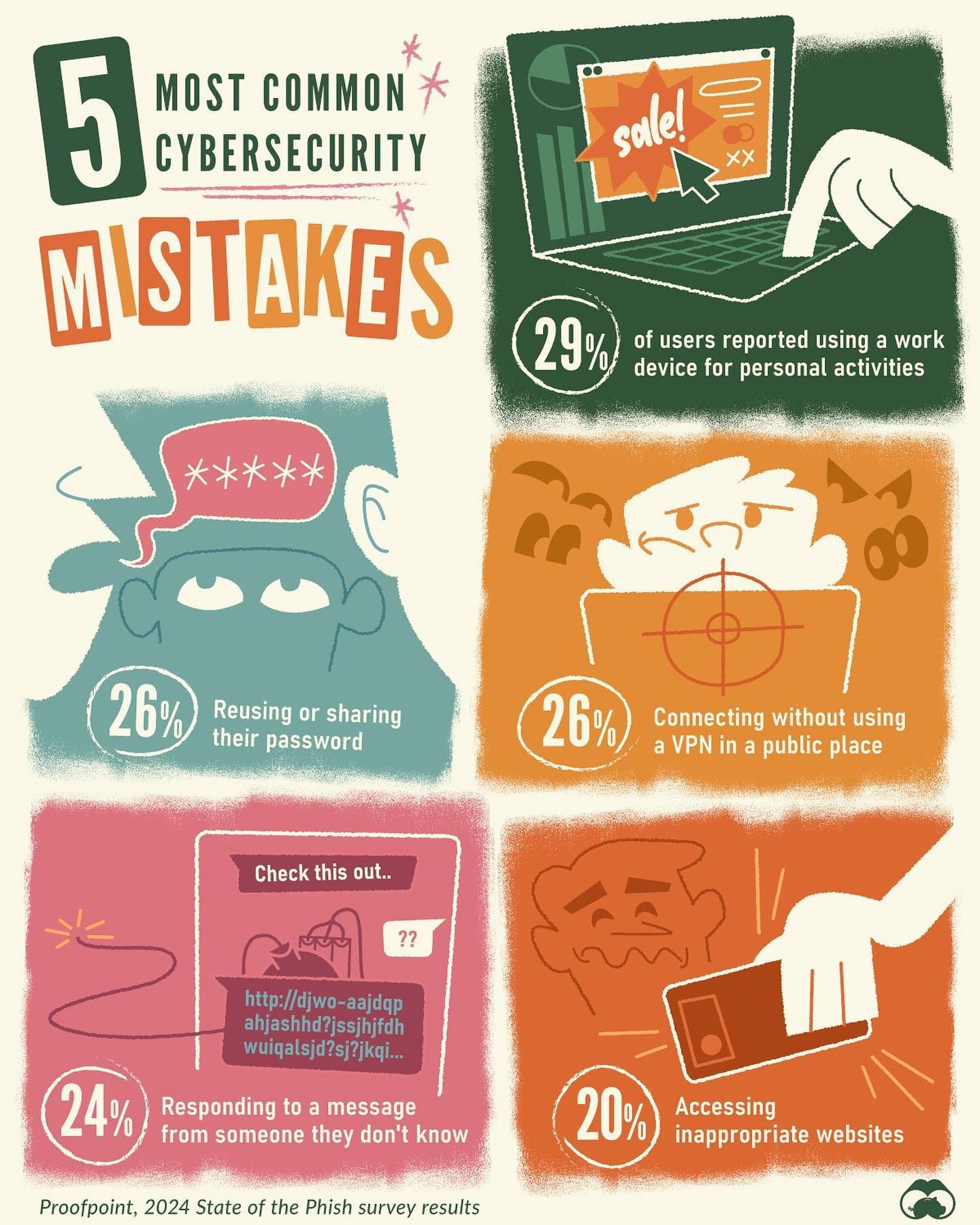
In the rapidly evolving digital world, cybersecurity remains a critical concern. With 71% of surveyed internet users knowingly putting their cybersecurity at risk, it's clear that many individuals are making mistakes online. These errors often stem from convenience or urgency, highlighting the need for greater awareness and proactive measures. Here, we delve into the top five cybersecurity mistakes, as identified by the 2024 State of the Phish survey results from Proofpoint.
Why This Matters
Given the increasing complexity and sophistication of cyber threats, understanding and mitigating these common mistakes is crucial. Whether it's reusing passwords or connecting to public Wi-Fi without a Virtual Private Network (VPN), each mistake presents a unique security risk. Recognizing these behaviors can help users protect themselves and their data more effectively.
Main Discussion
Reusing or Sharing Passwords
One of the most prevalent cybersecurity mistakes is reusing or sharing passwords. According to Proofpoint, 26% of users engage in this risky behavior. This practice can be incredibly dangerous because it allows a single compromised password to give attackers access to multiple accounts. For instance, if a hacker gains access to your email password, they can often use that information to reset passwords for other accounts, including banking and social media.
To protect against this, users should employ strong, unique passwords for each account. Password managers can help generate and store complex passwords, making it easier to maintain a unique password for every site and service.
Connecting to Public Wi-Fi Without a VPN
Another significant mistake is connecting to public Wi-Fi without using a VPN. This behavior, reported by 26% of users, leaves personal data vulnerable to interception. Public Wi-Fi networks, often found in coffee shops, airports, and hotels, are notorious for lacking robust security measures. This makes them prime targets for cybercriminals who can potentially steal sensitive information, such as login credentials and financial data.
Using a VPN encrypts your internet connection, creating a secure tunnel that shields your data from prying eyes. VPNs are especially useful when conducting sensitive activities like online banking or accessing work-related documents while on public Wi-Fi.
Responding to Unknown Messages
Responding to messages from unknown senders is another common mistake. A quarter of users (24%) admit to falling into this trap. Cybercriminals frequently use phishing attacks to trick users into divulging personal information. These messages can appear legitimate, urging users to click malicious links or download harmful attachments. Once clicked, these links can lead to malware or ransomware infections, or they can steal personal data such as usernames, passwords, or banking details.
It’s essential to verify the identity of the sender before responding to or clicking any links in unknown messages. Be cautious with unexpected emails and messages, especially those asking for personal information or urgent action.
Using Work Devices for Personal Activities
Using work devices for personal activities exposes both the user and their employer to significant risks. Nearly 30% of users engage in this practice. Work devices often contain sensitive business information, and mixing personal and professional activities can lead to data breaches and unauthorized access to confidential information. This behavior can compromise corporate security and lead to severe consequences, such as data breaches or financial losses.
Employers should enforce strict policies regarding the use of work devices for personal activities to mitigate these risks. Users should also be aware of the potential risks and avoid using work devices for personal activities unless absolutely necessary.
Accessing Inappropriate Websites
Finally, accessing inappropriate websites is a mistake made by 20% of users. While the specific definition of "inappropriate" can vary, these sites often harbor malicious software, phishing schemes, or other online threats. Visiting these sites can lead to unwanted software installations, data theft, or even identity theft.
Avoiding such websites is crucial for maintaining online security. Using reliable antivirus software and keeping it updated can help detect and block malicious sites. Additionally, employing safe browsing practices, such as avoiding suspicious links and ads, can enhance protection.
Practical Tips
-
Password Management: Use a password manager to generate and store unique passwords for each account. This practice ensures that a compromised password in one account doesn’t affect others.
-
VPN Usage: Always use a VPN when connecting to public Wi-Fi networks. This encrypts your data, making it difficult for hackers to intercept.
-
Phishing Awareness: Be cautious of unknown messages and emails. Verify the sender’s identity before clicking any links or downloading attachments.
-
Work Device Policy: Follow your organization’s guidelines for using work devices. Avoid personal activities on work devices, and separate your personal and professional digital environments.
-
Safe Browsing: Install reliable antivirus software and practice safe browsing habits. Avoid clicking on suspicious links or visiting unsolicited websites.
Important Takeaways
Understanding the top cybersecurity mistakes is the first step toward protecting yourself online. Awareness of these common pitfalls can help you make informed decisions and take proactive measures to safeguard your data. By adopting good cyber hygiene, such as using unique passwords, employing a VPN, and being cautious with unknown messages, you can significantly reduce your risk of falling victim to cyber threats.
Conclusion
Cybersecurity is a shared responsibility that requires constant vigilance and proactive measures. By avoiding common mistakes like reusing passwords, connecting to public Wi-Fi without a VPN, and responding to unknown messages, you can enhance your online security. Stay informed, adapt to evolving threats, and prioritize your cybersecurity to protect your personal and professional data.
Watch the Reel
Questions readers ask
What are the top five cybersecurity mistakes identified in 2024?
The top five cybersecurity mistakes in 2024, as highlighted by the Proofpoint survey, include reusing passwords, failing to use a VPN when connecting to public Wi-Fi, ignoring software updates, oversharing personal information online, and not using multi-factor authentication.
Why is reusing passwords a significant cybersecurity risk?
Reusing passwords increases the risk of a security breach as it allows hackers to access multiple accounts if they crack just one password. It's crucial to use unique passwords for each account to minimize this risk.
What are the risks of connecting to public Wi-Fi without a VPN?
Connecting to public Wi-Fi without a VPN exposes your data to potential eavesdropping and man-in-the-middle attacks. A VPN encrypts your data, making it much more difficult for cybercriminals to intercept and misuse.
What steps can I take to improve my cybersecurity practices in 2024?
To enhance your cybersecurity, start by using unique, strong passwords for each account, always use a VPN when on public Wi-Fi, regularly update your software, be cautious about sharing personal information online, and enable multi-factor authentication where possible.
How can I report a cybersecurity breach?
If you suspect a cybersecurity breach, immediately change your passwords and notify the relevant institutions or platforms. Additionally, report the incident to your local cybercrime reporting center or relevant authorities to help mitigate potential damage.
What is the significance of the 2024 Proofpoint Cybersecurity Report?
The 2024 Proofpoint Cybersecurity Report provides valuable insights into the most common cybersecurity mistakes made by online users. By understanding these mistakes, individuals and organizations can take proactive steps to enhance their security measures and protect against potential threats.
Why is it important to use multi-factor authentication?
Multi-factor authentication adds an extra layer of security by requiring additional verification beyond just a password. This makes it significantly harder for cybercriminals to gain unauthorized access to your accounts, even if they obtain your password.
Related deep dives
Similar reads based on topic and creator.




Recent articles
Fresh deep dives from the latest Reels we unpacked.




Comments
Be the first to comment.