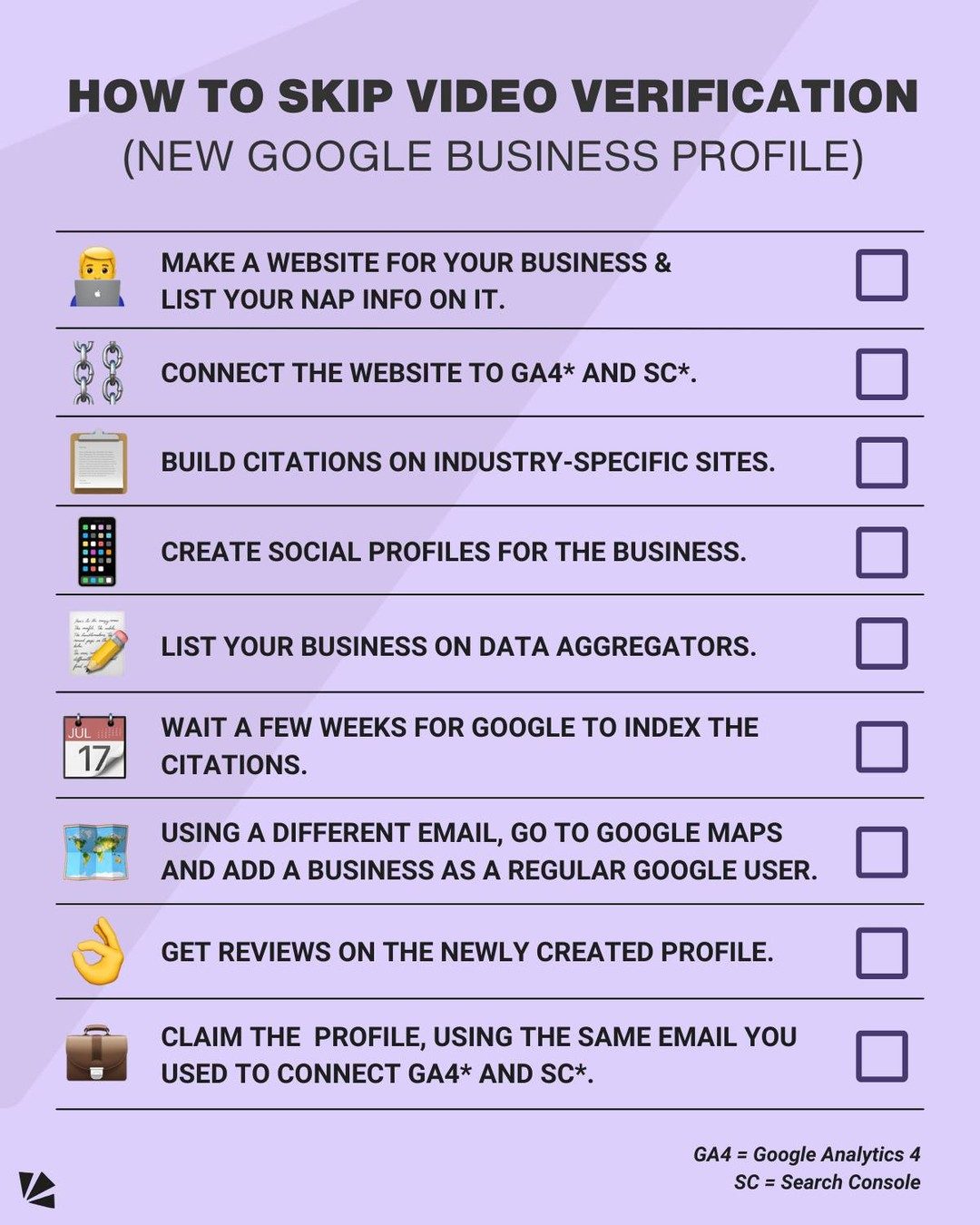
Google Business Profile Verification
Google Business Profile (GBP) is an important component of a business's online presence, providing a platform for managing how your business appears on Google Search and Maps. One of the challenges businesses often face is the video verification process. Here's a step-by-step guide to help you skip the dreaded video verification process and streamline your Google Business Profile setup.
Why This Matters
A fully verified Google Business Profile can significantly enhance your business's visibility and credibility. By avoiding video verification, you can save time and effort, allowing you to focus on other critical aspects of your business. This process ensures that your business information is accurate and consistent across various platforms, making it easier for customers to find and engage with your business.
The Process
Step 1: Create a Website and List Your NAP Information
The first step in setting up your Google Business Profile is to create a website for your business. If you already have a website, ensure it includes a new location page with your business's NAP (Name, Address, Phone Number) information. This information should be accurate and up-to-date, as it helps Google and potential customers verify your business details.
Step 2: Connect Your Website to Google Analytics 4 (GA4) and Search Console
Next, connect your website to Google Analytics 4 (GA4) and Search Console. This step is crucial as it helps Google understand and verify the legitimacy of your business. GA4 provides insights into your website's performance and user behavior, while Search Console helps monitor and maintain your site's presence in Google Search results.
Step 3: Build Citations on Industry-Specific Websites
Building citations involves listing your business on relevant industry-specific websites. These citations should include your NAP information and be consistent across all platforms. Key sites to consider include Facebook, the Better Business Bureau (BBB), and data aggregators. By building citations, you provide Google with additional references to verify your business information.
Step 4: Create Social Media Profiles
Create social media profiles for your business on platforms like Facebook, Twitter, and Instagram. Ensure that these profiles are complete and include your NAP information. Social media profiles help build your business's online presence and provide additional data points for Google to validate your business.
Step 5: List Your Business on Data Aggregators
Data aggregators are services that collect and distribute business information to various directories and search engines. Listing your business on data aggregators ensures that your NAP information is consistent and widely available. This step helps Google verify your business information by cross-referencing data from multiple sources.
Step 6: Wait for Google to Index the Citations
After listing your business on various platforms and directories, wait a few weeks for Google to index these citations. Indexing is the process by which Google adds your business information to its search engine results. During this waiting period, ensure that your NAP information remains consistent and accurate.
Step 7: Add Your Business to Google Maps
Using a Google account that will not be a manager of the Google Business Profile, go to Google Maps and add your business as a regular Google user. This step should be done through the regular Google Maps interface, not the GBP interface. Alternatively, you can ask a friend to do this for you. Adding your business to Google Maps helps establish its existence and location, making it easier for Google to verify.
Step 8: Get Reviews on the Newly Created Profile
Once your business has been added to Google Maps, encourage customers to leave reviews on your newly created Google Business Profile. A few reviews over the course of a couple of weeks can significantly boost your business's credibility and visibility. Positive reviews also provide social proof, making your business more appealing to potential customers.
Step 9: Claim the Profile
Finally, you can go claim the Google Business Profile using the same email you used to connect GA4 and Search Console. Claiming the profile gives you full control over your business information and allows you to make updates and changes as needed.
Practical Tips
Ensure Consistency
Consistency is key when it comes to your business information. Ensure that your NAP information is consistent across all platforms, including your website, social media profiles, and data aggregators. Inconsistent information can confuse Google and potential customers, making it harder for them to verify your business.
Monitor and Update
Regularly monitor and update your Google Business Profile to ensure that your information remains accurate and up-to-date. This includes updating your business hours, responding to customer reviews, and adding new photos and posts.
Leverage Google Tools
Make use of Google's tools, such as GA4 and Search Console, to gain insights into your website's performance and user behavior. These tools provide valuable data that can help you make informed decisions about your business.
Important Takeaways
- Website and NAP Information: Creating a website with accurate NAP information is the foundation of your Google Business Profile.
- Connect to Google Tools: Connecting your website to GA4 and Search Console helps Google verify your business.
- Build Citations: Listing your business on industry-specific websites and data aggregators provides additional references for Google to validate your business.
- Social Media Profiles: Creating social media profiles for your business helps build your online presence and provides more data points for verification.
- Indexing: Waiting for Google to index your citations ensures that your business information is widely available.
- Google Maps: Adding your business to Google Maps helps establish its existence and location.
- Reviews: Encouraging customers to leave reviews on your Google Business Profile boosts your credibility and visibility.
Conclusion
By following these steps, you can effectively skip the video verification process and streamline your Google Business Profile setup. This process ensures that your business information is accurate, consistent, and widely available, making it easier for customers to find and engage with your business.
Watch the Reel
Questions readers ask
What is Google Business Profile and why is verification important?
Google Business Profile, formerly known as Google My Business, is a tool that allows businesses to manage their online presence across Google Search and Maps. Verification is crucial because it confirms your business's legitimacy, enhancing visibility, and credibility, and ensuring that customers can easily find accurate, consistent information about your business.
Can I skip the video verification process for my Google Business Profile?
Yes, you can skip the video verification process by following alternative methods. Google offers various verification methods, such as postal card, phone, email, and instant verification. These methods can help you verify your Google Business Profile without the need for a video call.
What are the alternative methods to verify my Google Business Profile?
Alternative methods to video verification include postal card, phone, email, and instant verification. Postal card verification involves receiving a postcard with a verification code at your business address. Phone and email verification methods send a code to your business phone number or email address. Instant verification is available for businesses that have already verified their website with Google Search Console.
Can I optimize my Google Business Profile for SEO?
Yes, optimizing your Google Business Profile can significantly improve your local SEO. Ensure your profile is complete and accurate, including your business name, address, phone number, and hours of operation. Encourage and respond to customer reviews. You can also post updates, photos, and videos regularly to keep your audience engaged and updated.
How can I connect my social media accounts to my Google Business Profile?
Connecting social media accounts to your Google Business Profile can enhance your online presence and drive more traffic to your business. While Google doesn't directly support linking social media accounts, you can mention your social media handles in your business description and post links to your social media profiles in your Google Business posts.
How can I ensure my business citations are consistent across platforms?
Consistent business citations are crucial for maintaining accurate information across various platforms. Regularly review and update your business information on directories, review sites, and social media platforms. Utilize tools and services that specialize in citation management to monitor and correct any inconsistencies.
How can I set up my Google Business Profile with email verification?
To set up your Google Business Profile with email verification, follow these steps: log in to Google, go to Google Business Profile, and enter your business information. When prompted to verify your business, choose the email verification method. Google will send a verification code to your business email address. Enter the code to complete the verification process.
Related deep dives
Similar reads based on topic and creator.



Recent articles
Fresh deep dives from the latest Reels we unpacked.




Comments
Be the first to comment.