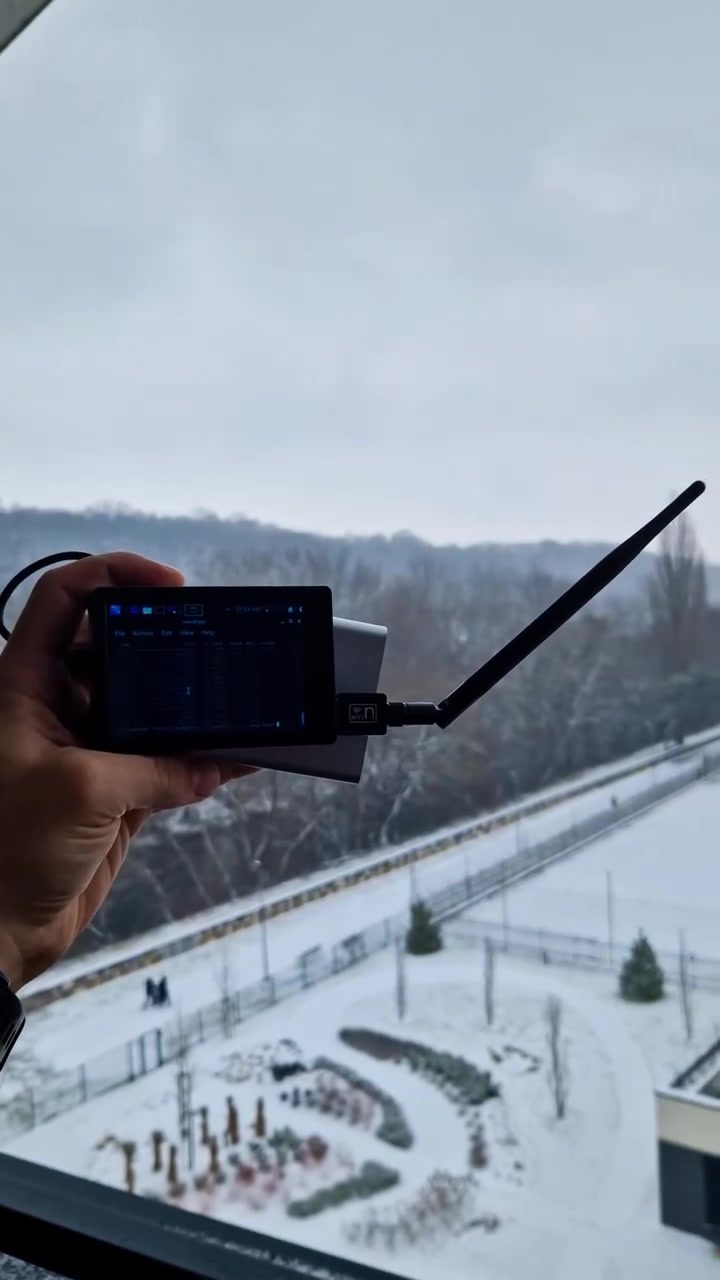
Wireless Network Scanning with Kali Linux
Setting up a mobile penetration testing environment with a USB WiFi adapter and Kali Linux is a powerful way to assess wireless network security. This setup is particularly useful for ethical hackers and cybersecurity professionals who need to perform on-the-go network scans and audits.
Why This Matters
Securing wireless networks is a critical aspect of modern cybersecurity. Unsecured or poorly configured networks can provide attackers with easy access to sensitive data. Conducting regular wireless network scans helps identify vulnerabilities and potential points of entry. Network administrators can then take proactive measures to enhance security and protect against cyber threats.
Setting Up the Environment
Components
Using Kali Linux and a high-performance USB WiFi adapter like the Alfa is a solid foundation for this setup. Kali Linux is a Linux distribution specifically designed for penetration testing and digital forensics. It includes a suite of tools for network analysis, vulnerability assessment, and exploitation. The Alfa USB WiFi adapter is known for its strong signal and compatibility with various Linux distributions, making it an ideal choice for wireless network scanning.
Kali Linux
Kali Linux is equipped with a variety of tools for network scanning. The system’s default terminal interface, running under a user like root@kali:~, allows direct access to powerful network scanning tools. Kali Linux's user-friendly interface and extensive range of pre-installed tools make it a go-to choice for cybersecurity professionals.
USB WiFi Adapter
The Alfa USB WiFi adapter enhances the scanning capabilities of laptops and other devices. Its strong signal reception helps identify even the weakest wireless networks from a distance. This is particularly useful in outdoor environments, as shown in the snowy landscape behind the setup.
Key Tools for Network Scanning
Wifite
Wifite is an automated tool for auditing wireless networks. It simplifies the process of scanning and cracking wireless networks, making it a popular choice among penetration testers. Wifite can be run directly from the Kali Linux terminal and offers a range of options for customizing the scan.
Other Essential Tools
In addition to Wifite, Kali Linux includes other essential tools for network scanning, such as:
- Aircrack-ng: A comprehensive suite of tools for assessing WiFi network security.
- Reaver: A brute-force attack tool for WPA/WPA2-PSK keys.
- Airodump-ng: A packet capture tool that works with wireless adapters to capture network traffic.
Practical Tips for Effective Network Scanning
Choosing the Right Adapter
When selecting a USB WiFi adapter, consider the following factors:
- Compatibility: Ensure the adapter is compatible with Linux and supports monitor mode.
- Signal Strength: A strong signal is crucial for capturing data from distant networks.
- Antenna Options: Look for adapters with external antennas for better range and flexibility.
Running Wifite
To run Wifite, follow these steps:
- Open the terminal in Kali Linux.
- Type
wifiteand press Enter. The tool will automatically detect available WiFi networks. - Use the available options to customize your scan, such as selecting specific networks to target.
- Once the scan is complete, analyze the results to identify vulnerabilities and potential threats.
Safeguarding Your Scan
Always ensure that your scanning activities are legal and ethical. Obtain proper authorization before conducting a network scan, and avoid scanning networks that you do not have permission to test. Always respect the privacy and security of others.
Important Takeaways
Understanding the tools and techniques for wireless network scanning is essential for cybersecurity professionals. Using a setup with a USB WiFi adapter and Kali Linux, you can effectively scan and secure wireless networks. Always follow ethical guidelines and seek proper authorization before conducting any network scans.
Conclusion
Wireless network scanning with a portable setup that includes a laptop, USB WiFi adapter, and Kali Linux provides a powerful method for identifying and addressing network vulnerabilities. By using tools like Wifite, Aircrack-ng, and Reaver, you can perform comprehensive network scans and take proactive measures to enhance security. Always remember to conduct scans ethically and within legal boundaries to ensure the security of your networks and those around you.
Watch the Reel
Questions readers ask
Why is a USB WiFi adapter necessary for mobile network scanning with Kali Linux?
A USB WiFi adapter allows Kali Linux to connect to and interact with wireless networks, making it an essential tool for mobile network scanning. Many built-in laptop WiFi cards have limitations or are not supported for this type of work, so an external adapter is often required. Additionally, USB adapters can provide better compatibility and more advanced features for penetration testing.
What types of vulnerabilities can be identified through mobile network scanning with Kali Linux?
Mobile network scanning with Kali Linux can help identify a range of vulnerabilities, including weak or default passwords, outdated firmware, open or unsecured networks, and improperly configured wireless settings. By detecting these issues, professionals can take steps to secure networks and protect against potential attacks.
Can any USB WiFi adapter be used for network scanning with Kali Linux?
Not all USB WiFi adapters are suitable for network scanning with Kali Linux. It's crucial to choose an adapter that supports monitor mode and packet injection, as these features are necessary for in-depth network analysis. Some popular models known to work well with Kali Linux include the Alfa AWUS036NHA and the TP-Link TL-WN722N.
How does setting up a mobile Kali Linux network scanning environment benefit ethical hackers?
A mobile Kali Linux network scanning setup enables ethical hackers to perform on-the-go assessments, identifying vulnerabilities in various environments. This flexibility is invaluable for professionals who need to test networks in different locations, such as conferences, corporate offices, or public spaces, ensuring comprehensive security audits.
What are some key ethical hacking tools included in Kali Linux for wireless network security assessments?
Kali Linux comes pre-loaded with a suite of tools for wireless network security assessments, including Aircrack-ng for cracking WiFi passwords, Wireshark for packet analysis, and Reaver for brute-forcing WiFi Protected Setup (WPS) pins. These tools are specifically designed to help professionals identify and mitigate potential security risks in wireless networks.
Is it possible to run Kali Linux from a USB drive for mobile network scanning?
Yes, Kali Linux can be installed on a USB drive, making it a portable and convenient option for mobile network scanning. This setup allows professionals to carry their entire testing environment with them, ensuring they have all the necessary tools and configurations wherever they go. Simply boot from the USB drive on any compatible laptop to get started.
Recent articles
Fresh deep dives from the latest Reels we unpacked.




Comments
Be the first to comment.