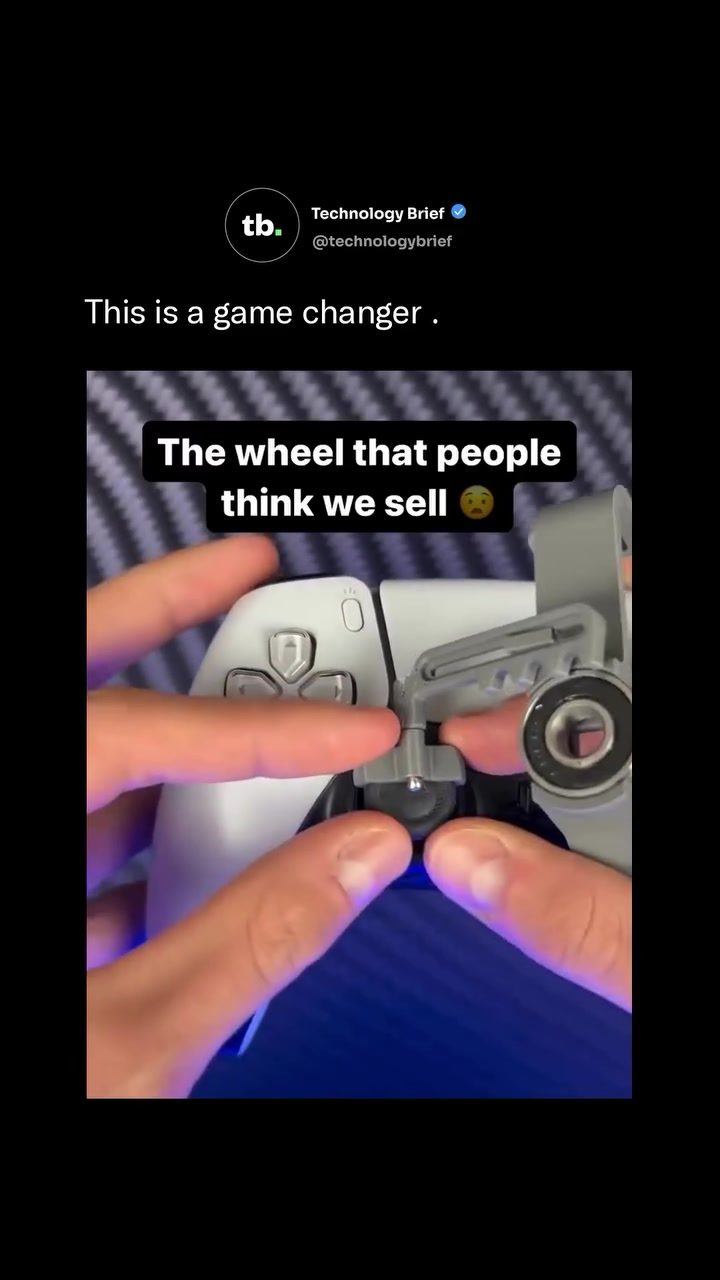
PXPLAY Steering Wheel Attachment: Enhance Your Racing Experience
The PXPLAY steering wheel attachment is revolutionizing the way players experience racing games. This innovative accessory transforms a standard PlayStation 5 controller into a mini racing wheel, providing a more immersive gaming experience without the need for a full-sized, expensive racing wheel setup.
Why This Matters
Racing games have long been a staple in the gaming world, offering thrilling simulations and competitive multiplayer experiences. Dedicated racing wheels enhance the immersion, but they often come at a high cost. Full racing wheel and pedal setups can range from $100 to over $700, making them inaccessible for many casual players. The PXPLAY attachment offers a budget-friendly alternative, enhancing the gaming experience without breaking the bank.
The PXPLAY Steering Wheel Attachment
Design and Compatibility
The PXPLAY steering wheel attachment is designed to clip directly onto a PlayStation 5 controller. This compact design is both convenient and functional, turning a standard gamepad into a mini racing wheel in seconds. The attachment snaps onto the controller, connecting to the left analog stick and translating the wheel's rotation into precise steering input.
Ease of Use
One of the standout features of the PXPLAY attachment is its ease of use. The clip-on design ensures that the standard controller remains fully intact and functional, with the wheel grip added around it. This means you can switch between regular gaming and racing modes effortlessly. The attachment is compatible with a variety of racing games, making it a versatile addition to your gaming setup.
Gaming Experience
The compact steering wheel attachment is aimed at players who want a more immersive racing experience. By adding a physical wheel to the controller, the attachment provides a more realistic and engaging way to control your vehicle in racing games. This is particularly useful for games like Gran Turismo 7, where precise steering can make a significant difference in performance.
Addressing Misconceptions
A common misconception addressed by PXPLAY is the assumption that they sell a full-sized racing wheel. In reality, PXPLAY offers a compact clip-on version that enhances the standard controller without the need for additional equipment. This makes the PXPLAY attachment an accessible and affordable option for casual players who want to upgrade their gaming experience without investing in a full racing wheel setup.
Practical Tips for Using the PXPLAY Attachment
Setup and Installation
Installing the PXPLAY steering wheel attachment is straightforward. Simply clip the attachment onto your PlayStation 5 controller, ensuring it's securely fastened. The attachment connects to the left analog stick, so make sure it's properly aligned for optimal performance.
Game Compatibility
The PXPLAY attachment is compatible with a wide range of racing games, including popular titles like Gran Turismo 7. While it may not be compatible with every game, it works well with most racing simulations and competitive titles. Be sure to check the compatibility list provided by PXPLAY to ensure it works with your favorite games.
Maintenance and Care
To ensure the longevity of your PXPLAY attachment, it's important to take good care of it. Regularly clean the attachment and the controller to prevent dirt and debris from affecting performance. Avoid exposing the attachment to extreme temperatures or humidity, and store it in a safe place when not in use.
Important Takeaways
- The PXPLAY steering wheel attachment offers a budget-friendly way to enhance your racing gaming experience.
- It clips directly onto a PlayStation 5 controller, turning it into a mini racing wheel.
- The attachment is designed for ease of use, allowing you to switch between regular gaming and racing modes effortlessly.
- It provides a more immersive and realistic racing experience, improving performance in games like Gran Turismo 7.
- Addressing common misconceptions, PXPLAY offers a compact clip-on version, not a full-sized racing wheel.
Conclusion
The PXPLAY steering wheel attachment is a game-changer for racing game enthusiasts. Its compact design, ease of use, and compatibility with a wide range of games make it an excellent choice for players looking to enhance their gaming experience without breaking the bank. Whether you're a casual player or a dedicated racing game enthusiast, the PXPLAY attachment offers a more immersive and engaging way to enjoy your favorite titles.
Watch the Reel
Questions readers ask
How does the PXPLAY clip-on steering wheel attachment work?
The PXPLAY clip-on steering wheel attachment transforms your standard PS5 controller into a mini racing wheel. It simply clips onto the controller, allowing you to experience a more immersive racing game experience without the need for a full-sized racing wheel setup.
Is the PXPLAY steering wheel attachment compatible with all PS5 controllers?
Yes, the PXPLAY steering wheel attachment is designed to be compatible with all standard PS5 controllers. It clips onto the controller securely, ensuring a seamless gaming experience.
What is the price range for the PXPLAY steering wheel attachment?
The PXPLAY steering wheel attachment is a budget-friendly option compared to full-sized racing wheel setups. It offers an affordable alternative, typically priced lower than $100, making it accessible for casual players who want to enhance their racing games without a significant investment.
Can I use the PXPLAY steering wheel attachment with any racing game on PS5?
The PXPLAY steering wheel attachment is designed to work with a wide range of racing games on PS5. However, compatibility may vary depending on the game's support for custom controller setups. It is recommended to check specific game compatibility before purchase.
Does the PXPLAY steering wheel attachment include pedals?
No, the PXPLAY steering wheel attachment does not include pedals. It is a compact steering wheel attachment that clips onto the PS5 controller, focusing on providing a more immersive steering experience. For a complete racing setup, you may need to purchase pedals separately.
How does the PXPLAY attachment compare to a full-sized racing wheel?
The PXPLAY attachment offers a more compact and affordable solution compared to full-sized racing wheels. While it may not provide the same level of realism as a high-end racing wheel, it enhances the gaming experience by offering a more immersive feel without the high cost and space requirements of a full setup.
Can the PXPLAY attachment be used for other types of games besides racing?
The PXPLAY attachment is specifically designed for racing games. While it can be used with other types of games, it may not offer the same benefits or advantages as it does for racing games. It is best suited for enhancing the racing experience on PS5.
Related deep dives
Similar reads based on topic and creator.

Recent articles
Fresh deep dives from the latest Reels we unpacked.




Comments
Be the first to comment.