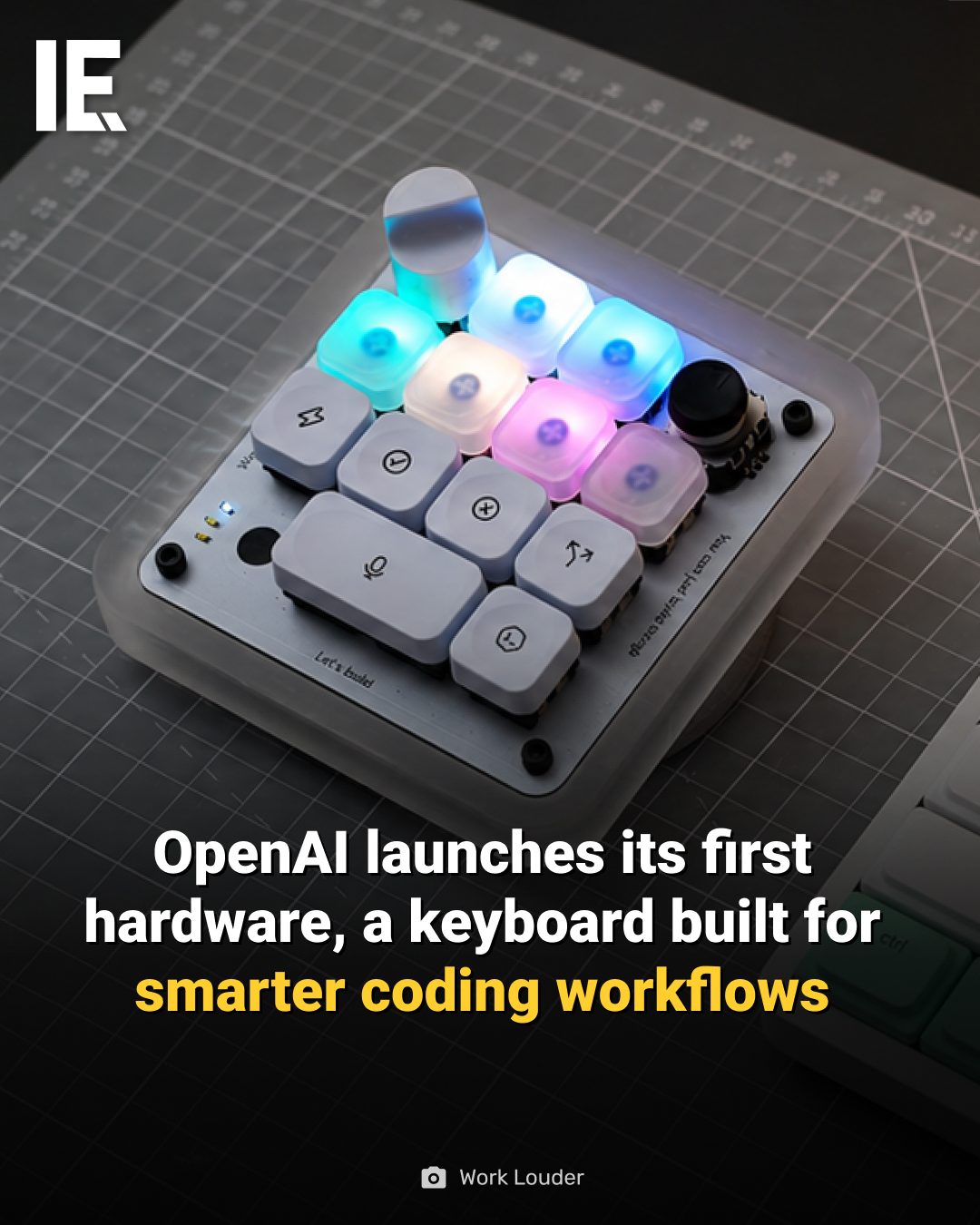
Custom Keyboards for Enhanced Coding Workflows
OpenAI has made a significant leap into the world of hardware with the release of its first product: a custom keyboard designed to enhance coding workflows. This isn't just any keyboard; it's a specialized tool crafted to meet the unique needs of developers and coders.
Why This Matters
For programmers, the keyboard is more than just an input device—it's a critical tool that can significantly impact productivity, comfort, and even creativity. A well-designed keyboard can reduce strain, improve typing speed, and streamline workflows. OpenAI's foray into this space signals a commitment to creating tools that can fundamentally change how developers work.
The Work Louder Keyboard: A Closer Look
The keyboard, a product of the brand Work Louder, features several standout elements that set it apart from standard keyboards.
Design and Aesthetics
The keyboard boasts a distinctive design with unique keycaps, giving it a professional and sleek appearance. This isn't just about looks; the design is also functional, with a layout that prioritizes ergonomics and ease of use.
RGB Lighting
One of the most visually striking features is the RGB lighting. This isn't just for show; it can be customized to suit different coding environments. Whether you're working in a dimly lit room or a brightly lit office, the lighting can be adjusted to reduce eye strain and improve visibility.
Enhanced Functionality
The keyboard is built with enhanced functionality in mind. It includes features like programmable keys, which can be customized to perform specific tasks or shortcuts, reducing the need to switch between different tools and windows.
Precision and Responsiveness
Coding often requires precise and quick inputs. This keyboard is designed to offer a high level of responsiveness, with keys that provide tactile feedback and a satisfying keystroke experience. This can help reduce errors and improve overall coding efficiency.
Practical Tips for Maximizing Your Coding Keyboard
There’s more to maximizing your coding workflow than just getting a high-quality keyboard. Here are some practical tips to make the most out of your keyboard:
Customize Your Keybindings
Take advantage of programmable keys to set up shortcuts for your most-used commands. This can save you a significant amount of time and reduce the need to navigate through menus.
Use Ergonomic Practices
Even with a well-designed keyboard, ergonomics are crucial. Ensure your keyboard is at the correct height and angle to avoid strain. Consider using a wrist rest and taking regular breaks to stretch your hands and wrists.
Optimize Lighting
Adjust the RGB lighting to suit your working environment. For example, use cooler colors in a bright room and warmer colors in a dimly lit space. Some keyboards even allow you to sync lighting with your monitor or other devices for a cohesive workspace.
Regular Maintenance
Keep your keyboard clean and well-maintained. Dust and debris can accumulate under the keys, affecting performance. Regular cleaning can help maintain responsiveness and extend the life of your keyboard.
Important Takeaways
Custom keyboards, particularly those designed with coding in mind, offer a range of benefits that can enhance productivity and comfort. The Work Louder keyboard from OpenAI is a notable example, combining distinctive design, customizable features, and ergonomic considerations to cater to the specific needs of developers.
Conclusion
OpenAI's entry into the world of hardware with the Work Louder keyboard marks a significant step in creating tools that can enhance the coding experience. Whether you're a seasoned developer or just starting out, investing in a well-designed keyboard can make a world of difference in your workflow. By leveraging customizable features, ergonomic design, and precision engineering, you can create a more efficient, comfortable, and enjoyable coding environment.
Watch the Reel
Questions readers ask
Why did OpenAI choose to develop a keyboard as its first hardware product?
OpenAI identified a pressing need for developers to have a high-quality, specialized keyboard that enhances productivity, comfort, and workflow. The keyboard is the primary tool for developers, making it an impactful choice for OpenAI's hardware debut.
What makes the OpenAI keyboard different from other coding keyboards?
The OpenAI keyboard, designed by Work Louder, stands out due to its ergonomic design, customizable RGB lighting, and enhanced functionality. These features are tailored to meet the specific needs of developers, offering both aesthetic appeal and practical benefits.
Who is the target audience for the OpenAI keyboard?
The primary audience for the OpenAI keyboard is developers and coders who spend extensive hours typing. The keyboard is designed to reduce strain, improve typing speed, and streamline workflows, making it an ideal tool for professionals in the coding field.
How does the ergonomic design of the OpenAI keyboard benefit users?
The ergonomic design of the OpenAI keyboard is aimed at reducing strain and discomfort associated with prolonged typing. By promoting a more natural typing position, it helps maintain productivity and comfort throughout long coding sessions.
What is the significance of the RGB lighting in the OpenAI keyboard?
The customizable RGB lighting in the OpenAI keyboard serves both functional and aesthetic purposes. It allows users to personalize their workspace, with customizable lighting effects that can enhance the visual experience. Additionally, it can help with distinguishing between different keys, which is particularly useful in low-light environments.
How can the OpenAI keyboard improve a developer’s workflow?
The OpenAI keyboard enhances a developer's workflow through features like customizable keys, RGB lighting, and ergonomic design. These elements contribute to a more efficient and comfortable coding experience, allowing developers to focus on their tasks without unnecessary distractions or discomfort.
Related deep dives
Similar reads based on topic and creator.

Recent articles
Fresh deep dives from the latest Reels we unpacked.




Comments
Be the first to comment.