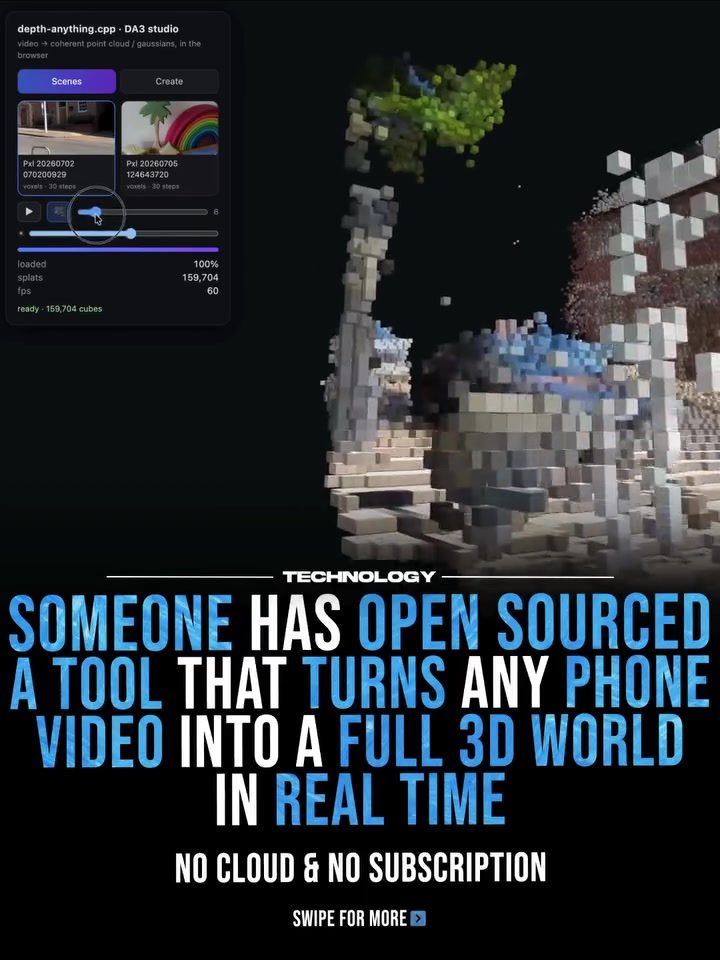
Depth-anything.cpp: Transforming Phone Videos into Interactive 3D Worlds
The depth-anything.cpp software empowers users to convert ordinary phone videos into immersive 3D worlds using local AI processing. This innovative tool leverages ByteDance’s Depth Anything 3, depth-anything.cpp, and SLAM (Simultaneous Localization and Mapping) techniques to estimate depth from every video frame, track camera movement, and reconstruct a navigable 3D point cloud. The best part? It runs entirely on a home GPU, eliminating the need for cloud services or subscriptions.
Why This Matters
The ability to create 3D worlds from phone videos can revolutionize various fields, from gaming and virtual reality (VR) to robotics and augmented reality (AR). Traditionally, generating realistic 3D models required expensive hardware like LiDAR and high-end software, often involving significant costs and technical expertise. Depth-anything.cpp democratizes this process, making it accessible to anyone with a smartphone and a basic understanding of software tools. This opens up new possibilities for developers, creators, and hobbyists to explore 3D modeling and virtual environments.
Main Discussion
Technical Overview
Depth-anything.cpp combines several sophisticated technologies to achieve its remarkable results. Here’s a closer look at the key components:
- Depth Anything 3: This technology from ByteDance estimates the depth of each frame in a video, creating a 3D representation of the scene.
- depth-anything.cpp: This open-source software integrates Depth Anything 3 and SLAM techniques to track camera movement and reconstruct a 3D point cloud.
- SLAM Techniques: SLAM helps the software understand the spatial relationships between frames, allowing it to create a seamless 3D environment.
How It Works
The process starts with a video captured on a smartphone. The software analyzes each frame to estimate the depth, creating a 3D point cloud. As the camera moves, SLAM techniques track its position and orientation, ensuring that the 3D world remains coherent and navigable. The result is a voxel-based 3D model that, while not fully realistic, offers a rough yet interactive representation of the original video.
Applications and Use Cases
The potential applications of depth-anything.cpp are vast and varied:
- Gaming: Developers can create immersive environments and levels directly from video footage, enhancing the realism and depth of gaming experiences.
- Virtual Reality (VR): VR developers can use the software to generate 3D environments for virtual tours, simulations, and more.
- Augmented Reality (AR): AR applications can benefit from realistic 3D models created from video footage, enhancing the user’s experience.
- Robotics: Robots can use the 3D models generated by depth-anything.cpp to navigate and interact with their environments more effectively.
- Content Creation: Creators can turn their video footage into interactive 3D worlds, adding a new dimension to storytelling and multimedia projects.
Practical Tips
Getting Started
To get started with depth-anything.cpp, follow these steps:
- Download the Software: The tool is available on GitHub, making it easy to access and modify as needed.
- Install Dependencies: Ensure you have the necessary dependencies installed, such as a compatible GPU and the required software libraries.
- Capture Video: Use your smartphone to capture high-quality video footage of the environment you want to convert into a 3D world.
- Run the Software: Load the video into depth-anything.cpp and let the software analyze and reconstruct the 3D point cloud.
- Explore and Modify: Once the 3D world is generated, you can explore it interactively and make modifications to suit your needs.
Optimizing Results
- High-Quality Footage: Use a high-quality smartphone camera to capture detailed and clear video footage. The better the input, the better the output.
- Stable Camera Movement: Ensure that the camera movement is smooth and stable. Jerky or erratic movements can affect the accuracy of the 3D reconstruction.
- Lighting Conditions: Capture footage in well-lit environments to enhance the depth estimation process. Poor lighting can lead to less accurate 3D models.
Troubleshooting
- Hardware Limitations: Depth-anything.cpp requires a powerful GPU. If you encounter performance issues, consider upgrading your hardware.
- Software Configuration: Ensure that all software dependencies are correctly installed and configured. Check the documentation for any troubleshooting tips.
- Community Support: Join online communities and forums to get help from other users and developers. GitHub, Hugging Face, and other platforms can be valuable resources.
Important Takeaways
Depth-anything.cpp represents a significant leap forward in making 3D world creation more accessible and affordable. By leveraging local AI processing and eliminating the need for cloud services or expensive hardware, it opens up new possibilities for developers, creators, and enthusiasts. While the current results may be voxel-based and somewhat rough, the potential for future improvements is immense. As the software evolves, we can expect cleaner, more detailed, and fully realistic 3D reconstructions, further expanding its applications and uses.
Conclusion
Depth-anything.cpp is a game-changer in the world of 3D modeling and virtual environments. Its ability to transform ordinary phone videos into interactive 3D worlds using local AI processing makes it a powerful and accessible tool for a wide range of applications. From gaming and VR to robotics and AR, the possibilities are endless. As the technology continues to evolve, we can look forward to even more innovative and realistic 3D creations, transforming the way we interact with digital environments.
Watch the Reel
Questions readers ask
What is depth-anything.cpp and how does it work?
Depth-anything.cpp is an open-source tool designed to transform smartphone videos into 3D worlds. It utilizes local AI processing along with ByteDance’s Depth Anything 3 and SLAM technology. This tool estimates depth from video frames, tracks camera movement, and reconstructs a point cloud that users can navigate.
What are the benefits of using depth-anything.cpp for 3D modeling?
With depth-anything.cpp, you can convert phone videos into immersive 3D worlds. One of the major benefits is that it runs entirely on a local GPU, eliminating the need for expensive hardware or cloud services. This makes 3D modeling more accessible and cost-effective.
Which technologies does depth-anything.cpp rely on for depth estimation and camera tracking?
Depth-anything.cpp combines ByteDance’s Depth Anything 3 for depth estimation and SLAM (Simultaneous Localization and Mapping) for tracking camera movement. These technologies work together to create a detailed and navigable 3D point cloud from video footage.
Can you create 3D worlds from any type of video using depth-anything.cpp?
Depth-anything.cpp is designed to work with videos captured on smartphones. While it can handle a variety of video content, the quality and detail of the resulting 3D world may depend on factors such as video resolution, lighting conditions, and the complexity of the scene.
What are the potential applications of 3D worlds generated from phone videos?
The 3D worlds created with depth-anything.cpp can be used in numerous fields. These include gaming, virtual reality (VR), augmented reality (AR), and robotics. The navigable 3D models can enhance user experiences and facilitate new ways of interacting with digital content.
Does using depth-anything.cpp require any special hardware or subscriptions?
One of the key advantages of depth-anything.cpp is that it runs on a local GPU, so you don’t need any special hardware or cloud services. This makes it a convenient and cost-effective solution for users who want to create 3D worlds from their phone videos.
How does depth-anything.cpp ensure accurate depth estimation in 3D world creation?
Depth-anything.cpp leverages ByteDance’s Depth Anything 3, a technology known for its ability to estimate depth from 2D images and video frames. This ensures that the 3D models generated from phone videos are accurate and detailed, providing a realistic and immersive experience.
Related deep dives
Similar reads based on topic and creator.

Recent articles
Fresh deep dives from the latest Reels we unpacked.




Comments
Be the first to comment.