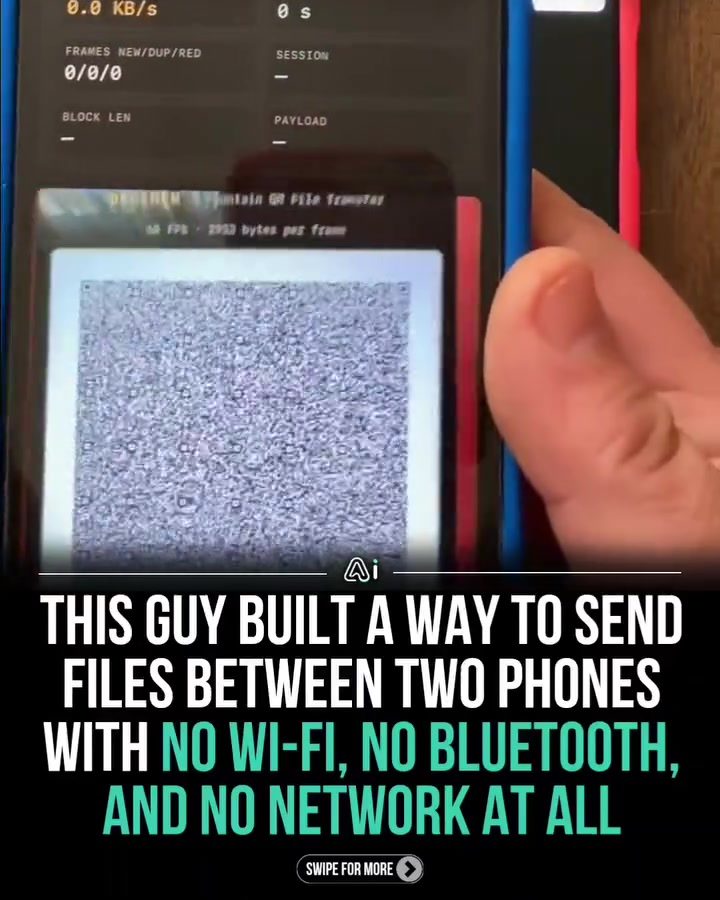
File Transfer Between Smartphones Without Connectivity
Transferring files between smartphones typically requires Wi-Fi, Bluetooth, or some form of network connection. However, a unique method has been developed that eliminates the need for these traditional methods. This system uses a clever combination of animated QR codes and a smartphone camera to transfer files directly between two devices without any pairing or shared connection.
Context / Why This Matters
In today's interconnected world, the ability to transfer files quickly and efficiently is crucial. Whether you're sharing photos, documents, or other media, having a reliable method of file transfer can save time and enhance productivity. Traditional methods, however, often require a stable network connection, which can be a limitation in many situations. This new approach bypasses these limitations, offering a novel solution for file transfer.
Main Discussion
How It Works
The process involves two smartphones. One phone rapidly flashes a series of animated QR codes on its screen. The other phone simply points its camera at the screen of the first phone. The camera captures the QR codes, which contain scrambled fragments of the file being transferred. Using a technique called fountain coding, the receiving phone can rebuild the file from these fragments, even if some frames are missed or captured out of order. This method ensures that the file is accurately transferred without the need for a network connection.
Key Components
Animated QR Codes
The core of this system is the use of animated QR codes. Unlike traditional QR codes, which encode a fixed amount of data, animated QR codes can continuously update, allowing for the transmission of large amounts of data over time. Each QR code contains a small segment of the file, which is then combined with other segments to form the complete file on the receiving device.
Fountain Coding
Fountain coding is a powerful data transmission technique that allows for the reconstruction of a file from a set of overlapping, scrambled fragments. This method is particularly useful in situations where data transmission is unreliable or intermittent, as it ensures that the complete file can be reconstructed even if some fragments are missing. In this case, the receiving phone uses fountain coding to piece together the file from the QR codes captured by its camera.
Performance
The system showcased here achieves a transfer speed of around 129 KB/s. This means that a 2 MB image can be transferred in just a few seconds. The transfer confirmation message on the screen indicates the file size and time taken, demonstrating the efficiency and reliability of this method. For instance, a 365 KB file was transferred in 2.6 seconds, achieving a speed of 140.42 KB/s.
Benefits
No Pairing or Shared Connection
One of the standout features of this method is that it does not require any pairing or shared connection between the devices. This simplifies the process and makes it more user-friendly, as there is no need for complex setup procedures or additional apps running in the background.
Open-Source and Customizable
The system is built using an open-source prototype, allowing for customization and further development. The prototype was developed in one night using Claude Code, showcasing the rapid development potential of this technology. This open-source nature encourages innovation and collaboration, making it accessible to developers and enthusiasts alike.
Practical Tips
Setting Up the Transfer
To initiate a file transfer, follow these steps:
- Prepare the File: Ensure the file you want to transfer is ready on the sending device.
- Activate the QR Code Display: Launch the app or software that generates the animated QR codes on the sending device.
- Point the Camera: On the receiving device, open the camera app and point it at the screen of the sending device.
- Capture the Frames: The receiving device's camera will capture the frames containing the QR codes.
- Rebuild the File: The receiving device will use fountain coding to rebuild the file from the captured frames.
Optimizing the Transfer
- Stability: Ensure that the devices are stable and the camera is properly focused on the screen displaying the QR codes.
- Lighting: Good lighting conditions can enhance the clarity of the QR codes, leading to more accurate and faster transfers.
- Device Compatibility: Verify that both devices are compatible with the software or app used for generating and capturing the QR codes.
Important Takeaways
These are the key points to remember about this unique file transfer method:
- No Need for Connectivity: This method eliminates the need for Wi-Fi, Bluetooth, or any network connection, making it ideal for situations where connectivity is limited or unavailable.
- Efficient and Reliable: The use of fountain coding ensures that the file can be accurately reconstructed even if some frames are missed or captured out of order.
- User-Friendly: The process is simple and does not require complex setup procedures or additional apps running in the background.
- Open-Source and Customizable: The prototype is open-source, allowing for further development and customization.
Conclusion
This innovative method of file transfer between smartphones offers a reliable and efficient solution for situations where traditional connectivity options are not available. By using animated QR codes and fountain coding, this system ensures that files can be transferred quickly and accurately without the need for pairing or shared connections. As technology continues to evolve, such innovations pave the way for more flexible and efficient file-sharing methods, making our digital lives more convenient and seamless.
Watch the Reel
Questions readers ask
How does the method of file transfer with animated QR codes work?
Animated QR codes work by encoding data into a dynamic image that can be scanned by a smartphone camera. When one smartphone generates an animated QR code containing the file data, the other smartphone can scan this code with its camera's QR code reader, pulling the data in real-time and saving the file locally.
Can any smartphone use this file transfer method?
Yes, as long as both smartphones have a camera and a QR code reader app, which are standard on most modern smartphones. This method does not require any special hardware or additional software purchases.
Is the file transfer secure when using animated QR codes?
The security of file transfer using animated QR codes depends on the context. The files are transferred directly from one device to another, without passing through an intermediary server or network. However, since the QR code can be viewed and scanned by anyone, it is important to ensure the transfer is done in a secure, private environment.
What types of files can be transferred using this method?
This method can be used to transfer a wide range of files, including photos, documents, videos, and other media. The only limitation is the amount of data that can be encoded into a single QR code, which is typically around 7,000 characters or 4,296 alphanumeric characters. For larger files, the data can be split and transferred in parts.
What are the benefits of using animated QR codes for file transfer over traditional methods?
The primary benefit is the ability to transfer files without needing a Wi-Fi, Bluetooth, or internet connection. This makes it ideal for situations where connectivity is limited, such as in remote areas, during power outages, or when traveling internationally. Additionally, it's a fast and direct method, making it convenient for quick, on-the-go transfers.
Can multiple files be transferred simultaneously using animated QR codes?
The transfer of multiple files simultaneously can be a bit tricky with animated QR codes, as each QR code can only encode a limited amount of data. However, you can generate multiple QR codes, each containing a different file, and scan them sequentially to transfer multiple files. There are also apps available that can bundle multiple files into a single QR code, but the file size may need to be adjusted.
How fast is the file transfer process using animated QR codes compared to other methods?
The speed of file transfer using animated QR codes depends on the size of the file and the processing power of the smartphones. For small to medium-sized files, it can be quite fast, often taking just a few seconds. However, for larger files, it may take longer, as the data needs to be encoded and decoded in real-time. In general, it is faster than traditional methods for smaller files.
Related deep dives
Similar reads based on topic and creator.

Recent articles
Fresh deep dives from the latest Reels we unpacked.




Comments
Be the first to comment.