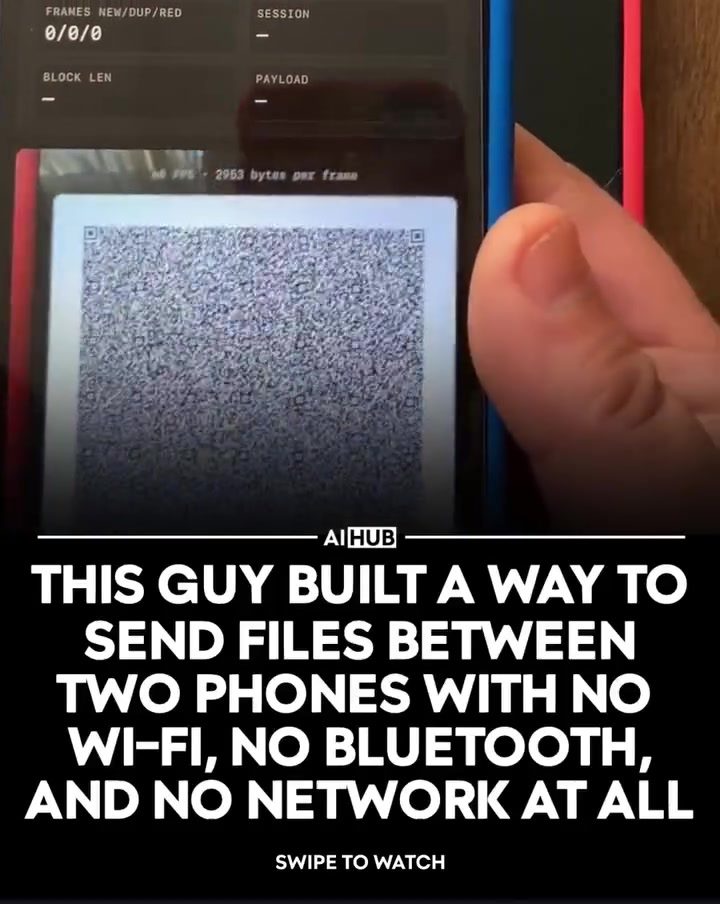
File Transfer Using QR Codes: A Novel Approach
File transfer between smartphones typically relies on Wi-Fi, Bluetooth, or a network connection. However, a developer has introduced an innovative method that uses only a screen and a camera to send data between two phones. This system, built using Claude Code, eliminates the need for traditional connectivity methods and opens up new possibilities for data exchange.
Why This Matters
In an era where data sharing is ubiquitous, the ability to transfer files without relying on conventional networks can be a game-changer. Whether you're in an area with poor connectivity or need to share files in a secure, offline environment, this method offers a practical solution. Additionally, it showcases the potential of using everyday phone hardware for creative and efficient file transfer.
Main Discussion
The Technology Behind the Transfer
The file transfer system leverages animated QR codes to send data between two smartphones. One phone displays these QR codes, while the other scans them to rebuild the file. This process is made possible through the use of fountain codes, which ensure that each QR frame contains a random mix of file data. This redundancy means that even if some frames are missed, the transfer can still be completed successfully.
How It Works
-
Displaying QR Codes: The sending phone generates and displays animated QR codes that represent the file data. These codes are dynamically updated to include different parts of the file.
-
Scanning QR Codes: The receiving phone uses its camera to scan the QR codes displayed on the sending phone. It decodes each frame to extract the file data.
-
Rebuilding the File: The received data is then reassembled to reconstruct the original file. The use of fountain codes ensures that the file can be accurately rebuilt even if some QR frames are not captured.
Transfer Speeds and Efficiency
The system demonstrates impressive transfer speeds, achieving around 129 KB/s for a 2 MB image. In a live demonstration, a 365 KB file was transferred in just 2.6 seconds, resulting in an effective speed of 140.42 KB/s. This efficiency makes it a viable option for transferring small to moderately sized files.
Open Source and Community Contributions
The entire project was built in a single night and released as open source on GitHub. This allows other developers to explore, improve, and build upon the technology. The open-source nature of the project fosters a collaborative environment, encouraging innovation and further development in the field of file transfer technologies.
Inspiration and Applications
The idea for this file transfer system originated from a music project where the developer needed to share MP3 files without streaming or using the same network. This creative approach to file sharing highlights the versatility of QR codes and the potential for innovative solutions in various applications.
Practical Tips
-
Ensure Proper Alignment: For the best results, ensure that the receiving phone's camera is properly aligned with the QR codes displayed on the sending phone. This helps in capturing the codes accurately and speeds up the transfer process.
-
Optimize Lighting Conditions: Good lighting can significantly improve the scanning process. Ensure that both phones are in a well-lit environment to enhance the clarity of the QR codes.
-
Use High-Resolution Screens: Phones with high-resolution screens will display clearer and more detailed QR codes, making it easier for the receiving phone to scan them accurately.
-
Test with Different File Sizes: Experiment with transferring files of varying sizes to understand the system's capabilities and limitations. This will help you determine the best use cases for this technology.
-
Community Support: Engage with the open-source community on GitHub to contribute to the project, report issues, or suggest improvements. Collaborative efforts can lead to enhanced functionality and broader applications.
Important Takeaways
- QR Codes for File Transfer: Animated QR codes can be used to transfer files between smartphones without the need for Wi-Fi, Bluetooth, or a network connection.
- Fountain Codes for Redundancy: The use of fountain codes ensures that the file transfer can continue even if some QR frames are missed, making the process more reliable.
- Efficient Transfer Speeds: The system demonstrates impressive transfer speeds, making it suitable for transferring small to moderately sized files.
- Open Source Innovation: The project's open-source nature encourages community contributions, fostering further development and innovation.
Conclusion
This innovative file transfer system showcases the potential of using everyday smartphone hardware for creative and efficient data exchange. By leveraging animated QR codes and fountain codes, the system offers a reliable and fast method for transferring files between two phones. Whether you're a developer interested in contributing to the project or a user looking for a new way to share files, this technology opens up exciting possibilities for the future of data transfer. Explore the open-source project on GitHub to learn more and get involved.
Watch the Reel
Questions readers ask
How does file transfer using QR codes work between phones?
This method uses animated QR codes displayed on one phone's screen and scanned by the other phone's camera. Instead of static QR codes, animated QR codes provide a continuous stream of data, allowing for efficient and secure file transfer without the need for Wi-Fi or Bluetooth.
What is fountain coding and how does it enhance QR code file transfer?
Fountain coding is a technique that breaks down the data into small pieces and adds redundancy, allowing the receiving device to reconstruct the file even if some pieces are missing. This makes the file transfer process more robust and efficient, especially in scenarios with potential interruptions.
Can I transfer any type of file using this QR code method?
Yes, this method supports the transfer of various file types, including documents, images, videos, and more. The file size may be limited by the capabilities of the phone's camera and screen, but it offers a versatile solution for sharing different types of data.
Is the file transfer process secure when using QR codes?
The use of fountain coding enhances the security of the file transfer process. By adding redundancy and ensuring data integrity, it minimizes the risk of data loss or corruption. Additionally, since the transfer occurs offline, there is no exposure to network-based security threats.
What are the benefits of using QR codes for file transfer compared to traditional methods?
The primary benefit is the ability to transfer files without relying on Wi-Fi, Bluetooth, or any other network connection. This is particularly useful in areas with poor connectivity or for users who prioritize offline, secure file sharing. Additionally, it leverages existing phone hardware, making it an accessible solution for most users.
Are there any limitations to transferring files between phones using QR codes?
The main limitations include potential file size constraints and the need for both devices to have functional cameras and screens. The transfer speed may also be slower compared to traditional methods due to the limitations of scanning animated QR codes. However, this method excels in scenarios where connectivity is not an option.
How can I initiate a file transfer using QR codes between two smartphones?
To initiate a file transfer, one user generates an animated QR code on their phone, which encodes the file to be shared. The other user then opens the QR code scanning app, points their camera at the animated QR code displayed on the first phone, and the data transfer begins instantly.
Related deep dives
Similar reads based on topic and creator.

Recent articles
Fresh deep dives from the latest Reels we unpacked.




Comments
Be the first to comment.