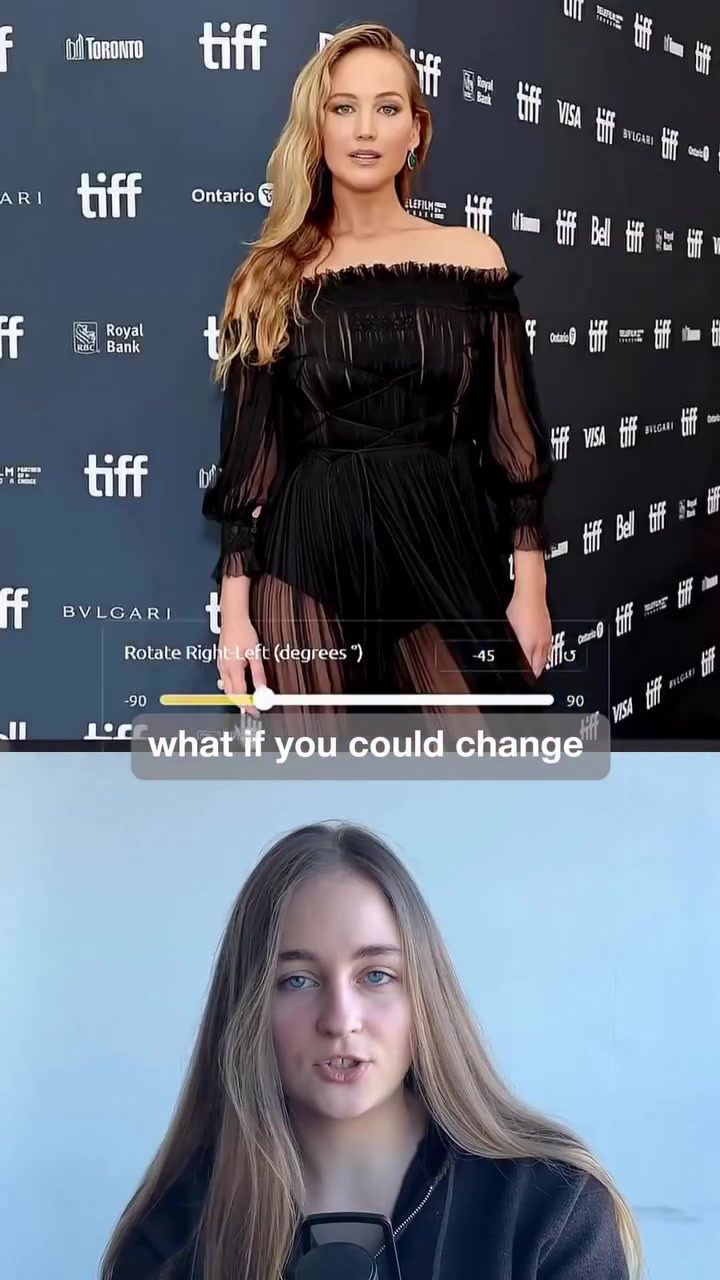
Camera Angle Control with Qwen Image Edit
Imagine being able to change the camera angle of a photo after it's already been taken. This is no longer a distant dream, thanks to the advent of powerful AI tools. One such tool, Qwen Image Edit, allows users to regenerate images from completely new perspectives. This means you can change the angle, lighting, and composition without the hassle of reshooting.
Why This Matters
For photographers and content creators, the ability to change camera angles post-capture opens up a world of possibilities. Instead of setting up multiple shoots to capture different angles, you can now generate multiple views from a single image. This is particularly useful for product shots, portraits, thumbnails, and brand visuals. Such flexibility can streamline workflows, save time, and reduce production costs.
Main Discussion
How Qwen Image Edit Works
Qwen Image Edit utilizes advanced AI algorithms to reconstruct depth from a single photo. Here’s a breakdown of the process:
-
Upload Your Image: The first step is to upload the image you want to manipulate. The software supports a variety of image formats, making it versatile for different types of photography.
-
Choose a New Camera Angle: Once your image is uploaded, you can choose from a range of camera angles. Options include top views, side angles, low angles, and even back perspectives. This feature is particularly useful for showing different views of a product or capturing unique angles in portraits.
-
AI Rebuilds the Scene: The AI then rebuilds the scene, adjusting lighting, proportions, and background consistency. This ensures that the new perspective looks natural and seamless, as if it were captured from that angle originally.
Key Features of Qwen Image Edit
-
Depth Reconstruction: By reconstructing depth from a single photo, the software can accurately generate new perspectives. This is crucial for maintaining the integrity of the image and ensuring that the new angle looks realistic.
-
Lighting Adjustments: The AI adjusts lighting to match the new perspective, ensuring that shadows and highlights are consistent with the original image.
-
Proportions and Consistency: The software maintains the proportions and background consistency, making the new angle look natural and seamless.
Applications and Use Cases
Product Photography: For e-commerce businesses, the ability to generate multiple angles from a single image can significantly enhance product visuals. Customers can see a product from various angles, providing a more comprehensive view without the need for multiple shoots.
Portraits: In portrait photography, capturing different angles can add depth and variety to a shoot. Whether it’s a headshot, a fashion portrait, or a family photo, the ability to change the angle post-capture can create a more dynamic and engaging final product.
Brand Visuals and Thumbnails: For content creators and marketers, thumbnails and brand visuals are crucial for grabbing attention. The flexibility to generate multiple angles from a single image can help create more compelling and eye-catching visuals.
Practical Tips
Get Started with Qwen Image Edit
-
Upload Your Image: Start by uploading the image you want to edit. Ensure the image is of high quality for the best results.
-
Experiment with Angles: Try out different camera angles to see how they affect the overall composition. This can help you decide which angles work best for your specific needs.
-
Adjust Settings: Fine-tune the settings to achieve the desired lighting and proportions. The software offers various controls, such as rotation, zoom, and wide-angle lens effects, to help you get the perfect shot.
-
Save and Export: Once you’re satisfied with the results, save and export your image. You can then use it for your projects or share it with your audience.
Important Takeaways
- Efficiency: Qwen Image Edit streamlines the process of capturing multiple angles, saving time and resources.
- Versatility: The tool is versatile and can be used for a variety of photography needs, from product shots to portraits and brand visuals.
- Consistency: The AI ensures that the new perspectives look natural and consistent, maintaining the integrity of the original image.
Conclusion
The ability to change the camera angle of a photo after it's been taken is a game-changer for photographers and content creators. Qwen Image Edit makes this possible with its advanced AI algorithms, offering a flexible and efficient way to generate multiple angles from a single image. Whether you're working on product photography, portraits, or brand visuals, this tool can help you achieve stunning results with less effort and more creative freedom.
Watch the Reel
Questions readers ask
How does Qwen Image Edit allow users to change the camera angle of an image?
Qwen Image Edit uses advanced AI algorithms to analyze and regenerate images from new perspectives. This means you can input a single photo and the software will generate different camera angles, offering a range of views without needing to retake the photo.
Can Qwen Image Edit adjust lighting in addition to changing the camera angle?
Yes, Qwen Image Edit not only allows you to change the camera angle but also enables adjustments to lighting. This feature is particularly useful for enhancing the mood and contrast of your images, making them more visually appealing.
What types of images benefit most from using Qwen Image Edit?
Qwen Image Edit is highly beneficial for product shots, portraits, and thumbnails. It's also great for brand visuals, allowing you to create versatile and engaging content while saving time and resources.
How does Qwen Image Edit streamline the photography workflow?
By allowing you to generate multiple views from a single image, Qwen Image Edit eliminates the need for multiple shoots to capture different angles. This can significantly reduce the time and effort required for photography sessions, making the process more efficient.
What are the key features of Qwen Image Edit?
The key features of Qwen Image Edit include the ability to change the camera angle, adjust lighting, and modify composition. These tools allow users to transform their photos into new perspectives, offering a wide range of creative possibilities.
Is Qwen Image Edit suitable for beginners in photography?
Yes, Qwen Image Edit is user-friendly and accessible for beginners. The tool's intuitive interface and powerful AI capabilities make it easy to edit photos and achieve professional results, even for those with limited photography experience.
How does Qwen Image Edit compare to traditional photo editing software?
Unlike traditional photo editing software, Qwen Image Edit focuses on transforming the perspective and angle of an image using AI. This allows for unique edits that traditional software may not offer, making it a valuable addition to the toolkit of modern photographers and content creators.
Related deep dives
Similar reads based on topic and creator.




Recent articles
Fresh deep dives from the latest Reels we unpacked.




Comments
Be the first to comment.