MouthPad: Revolutionizing Hands-Free Navigation
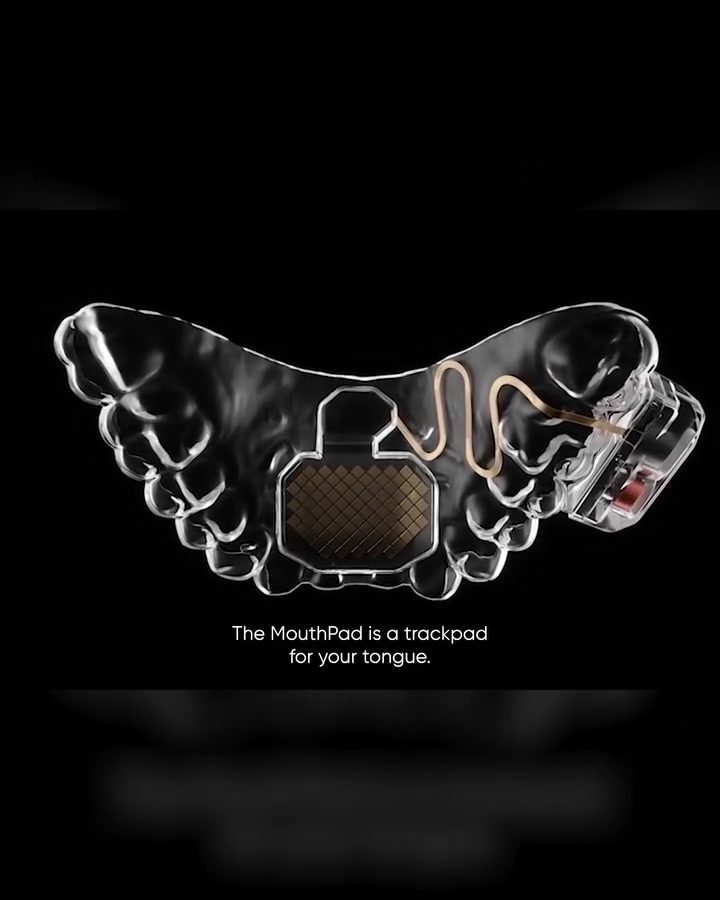
MouthPad is a groundbreaking innovation in hands-free navigation, turning tongue movements into precise cursor controls. Designed to fit over the upper teeth, MouthPad utilizes a pressure-sensitive trackpad that translates subtle movements of the tongue into dynamic cursor actions on a computer screen. This technology opens up new possibilities for individuals seeking alternative methods of computer interaction, particularly those with limited mobility in their hands or arms.
Why This Matters
The advent of MouthPad represents a significant leap forward in assistive technology. Traditional methods of computer interaction, such as using a mouse or keyboard, can be challenging or impossible for individuals with certain disabilities. MouthPad aims to bridge this gap by offering an intuitive and reliable hands-free navigation system. This innovation has the potential to enhance productivity, accessibility, and convenience for a wide range of users, from professionals seeking ergonomic solutions to individuals with physical limitations.
The Science Behind MouthPad
MouthPad is the result of a collaboration between Augmental and the Max Planck Society, leveraging cutting-edge research in neuroscience and biotechnology. The device is designed to be placed over the upper teeth and employs a pressure-sensitive trackpad to detect and interpret tongue movements. This sophisticated tracking system enables users to move the cursor, click, and navigate with precision, providing a seamless and natural user experience.
Pressure-Sensitive Trackpad Technology
The core of MouthPad's functionality lies in its pressure-sensitive trackpad, which is engineered to respond to the delicate movements of the tongue. This trackpad is designed to be highly sensitive, allowing for precise control and minimal effort. The device's internal components are meticulously crafted to ensure that even the subtlest adjustments in tongue position are accurately translated into cursor actions on the screen.
User-Friendly Design
One of the standout features of MouthPad is its user-friendly design. The device is ergonomically shaped to fit comfortably over the upper teeth, ensuring that users can wear it for extended periods without discomfort. The intuitive nature of the trackpad allows users to quickly adapt to its operation, making it accessible even for those without prior experience with assistive technology.
Real-World Applications
MouthPad's versatility makes it suitable for a variety of real-world applications, from professional settings to everyday use.
Enhancing Productivity
For professionals who spend long hours in front of a computer, MouthPad offers a more ergonomic and comfortable way to navigate software and perform tasks. By reducing the need for repetitive hand and wrist movements, MouthPad can help prevent conditions such as carpal tunnel syndrome. This innovation can enhance productivity and reduce the risk of work-related injuries.
Assisting Individuals with Disabilities
MouthPad's primary benefit is its potential to assist individuals with disabilities, particularly those with limited mobility in their hands or arms. The device provides an alternative method of computer interaction, allowing users to access digital content, communicate, and perform tasks independently. This level of autonomy can significantly improve quality of life and open up new opportunities for personal and professional growth.
Natural User Experience
The intuitive design of MouthPad ensures that the user experience feels natural and seamless. The device's ability to translate tongue movements into precise cursor actions means that users can navigate their computer with ease, without the need for extensive training or adaptation. This natural interaction can make MouthPad an appealing option for a wide range of users, regardless of their prior experience with assistive technology.
Practical Tips for Using MouthPad
Getting started with MouthPad is straightforward, thanks to its intuitive design. Here are some practical tips to help you make the most of this innovative device.
Initial Setup
-
Positioning the Device: Place MouthPad over your upper teeth, ensuring a comfortable and secure fit. The device is designed to be worn for extended periods, so take the time to adjust it correctly.
-
Calibration: Most MouthPad devices come with a setup guide that includes calibration instructions. Follow these steps to ensure that the trackpad is properly calibrated to your tongue movements.
-
Practice: Spend some time practicing basic movements, such as moving the cursor, clicking, and navigating menus. The more you practice, the more intuitive the device will feel.
Advanced Techniques
-
Precision Movements: For tasks that require high precision, such as graphic design or data entry, consider practicing slower, more deliberate tongue movements. This can help you achieve greater accuracy in your cursor control.
-
Customizing Settings: Explore the customization options available in the MouthPad software. Adjusting settings like sensitivity and response time can help you tailor the device to your specific needs and preferences.
-
Integration with Software: MouthPad is compatible with a wide range of software applications. Experiment with different programs to see how the device can enhance your workflow and productivity.
Important Takeaways
MouthPad is a revolutionary device that offers hands-free navigation through innovative pressure-sensitive trackpad technology. Its intuitive design and natural user experience make it an accessible and practical tool for a wide range of users, from professionals seeking ergonomic solutions to individuals with disabilities.
Key Features
- Pressure-Sensitive Trackpad: Translates tongue movements into precise cursor controls.
- Ergonomic Design: Fits comfortably over the upper teeth for extended use.
- User-Friendly: Intuitive and easy to learn, requiring minimal training.
- Versatile Applications: Suitable for professional settings, assisting individuals with disabilities, and everyday use.
Benefits
- Enhanced Productivity: Reduces the need for repetitive hand and wrist movements, preventing conditions like carpal tunnel syndrome.
- Assistive Technology: Provides an alternative method of computer interaction for individuals with limited mobility.
- Natural Interaction: Offers a seamless and intuitive user experience, making it accessible to a wide range of users.
Conclusion
MouthPad represents a significant advancement in hands-free navigation technology, offering a reliable and intuitive solution for those seeking an alternative to traditional computer interaction methods. Its innovative design, combined with its versatility and user-friendly features, makes it a valuable tool for enhancing productivity, accessibility, and convenience. As assistive technology continues to evolve, devices like MouthPad pave the way for a more inclusive digital future.
Watch the Reel
Questions readers ask
How does the MouthPad trackpad translate tongue movements into cursor actions?
MouthPad uses a pressure-sensitive trackpad that detects and interprets subtle movements of the tongue. When the tongue presses or moves across the trackpad, it translates these actions into precise cursor movements on the computer screen, allowing for dynamic and accurate screen navigation. It is a complex technology that aims to provide seamless computer interaction.
What are the benefits of using MouthPad for individuals with limited mobility?
MouthPad offers a new method of computer interaction for individuals who have restricted use of their hands or arms. By using tongue movements to control the cursor, it provides an alternative to traditional input devices like mice and keyboards. This can significantly enhance productivity and accessibility, making technology more inclusive and user-friendly.
How does MouthPad compare to using a traditional mouse for navigation?
MouthPad and a traditional mouse serve the same purpose, which is to control the cursor on a computer screen. However, the MouthPad offers a unique advantage for individuals who cannot use a mouse due to mobility limitations. The MouthPad allows users to navigate the screen with precise movements through their tongue, which is a more intuitive method for those with limited hand or arm function. It is ultimately up to the user to decide which method is more comfortable and effective.
Can MouthPad be used for tasks that require precise cursor control, like graphic design?
Yes, MouthPad is designed to provide precise cursor control, making it suitable for tasks that require accuracy, such as graphic design. The pressure-sensitive trackpad is sensitive enough to detect and respond to subtle tongue movements, allowing users to perform detailed tasks with a high degree of precision. However, like any new device, it may require a period of adjustment and practice to master.
What is the MouthPad Max Planck, and how does it differ from other MouthPad models?
The MouthPad Max Planck is a specific model of the MouthPad device, named after the renowned physicist. It is designed to offer enhanced features and performance compared to other MouthPad models. While the specific differences may vary, the Max Planck model typically includes improvements in sensor technology, ergonomics, and overall user experience, providing a more refined and efficient hands-free navigation experience. It is best to consult a product description or user reviews for details.
Related deep dives
Similar reads based on topic and creator.

Recent articles
Fresh deep dives from the latest Reels we unpacked.




Comments
Be the first to comment.