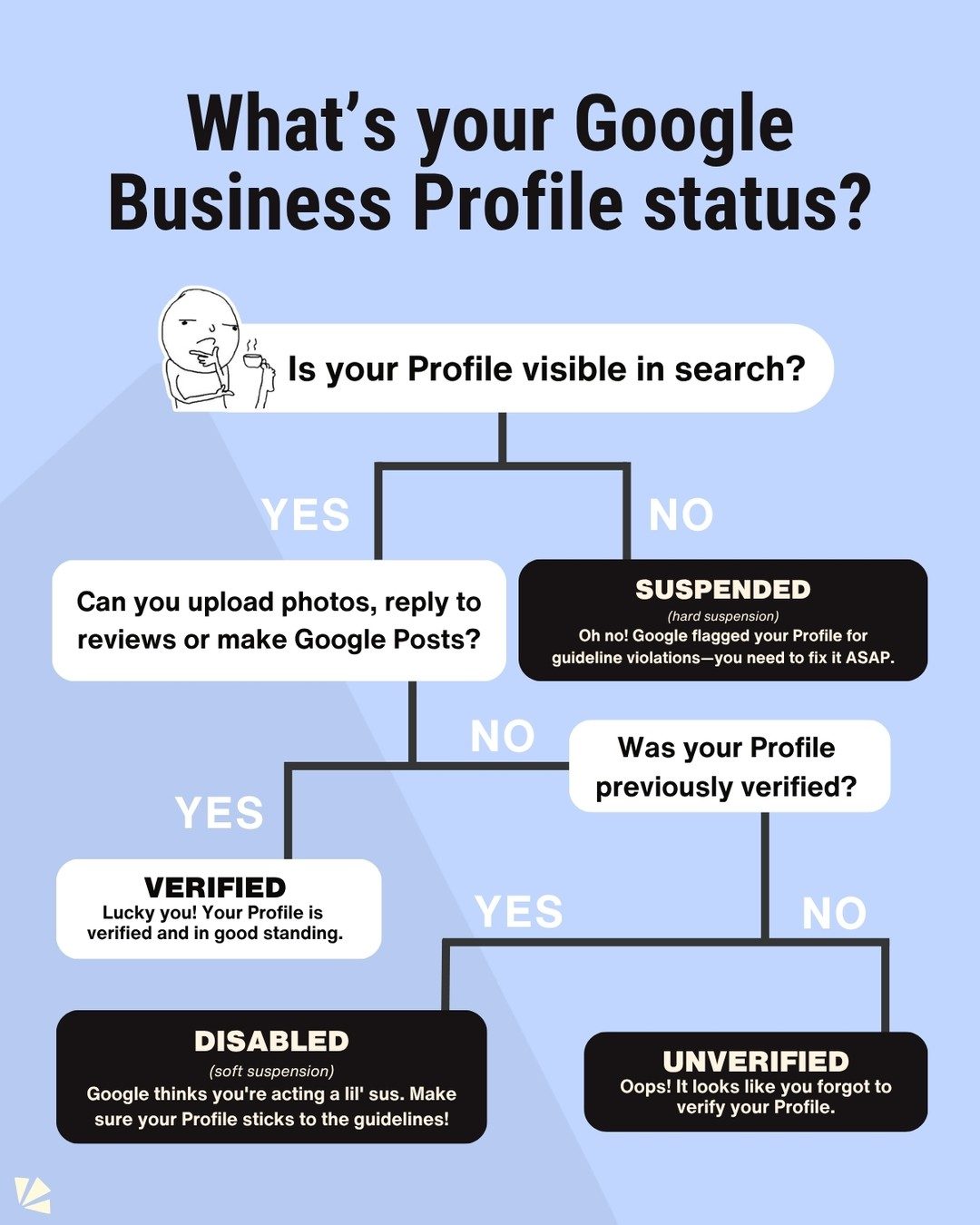
Google Business Profile Status: Understanding and Managing Your Profile
Google Business Profile is a powerful tool for businesses to manage their online presence. Understanding the different statuses of your Google Business Profile is crucial for maintaining visibility and functionality on Google. This guide will walk you through the various statuses—verified, suspended, disabled, and unverified—and provide practical steps to address each.
Why This Matters
Your Google Business Profile status directly impacts how your business appears in search results, maps, and other Google services. A well-managed profile can drive more traffic to your business, enhance your online reputation, and provide valuable insights into customer interactions. Conversely, a profile in poor standing can hinder your business's visibility and credibility.
Understanding Google Business Profile Statuses
Let's break down the different statuses and what they mean for your business.
Verified
A verified profile is in good standing and has been confirmed by Google. This status indicates that your business information is accurate and up-to-date, and you have the ability to manage your profile fully. Verified profiles are visible in search results and allow you to upload photos, reply to reviews, and make Google Posts.
Suspended
A suspended profile has been removed from search results due to violations of Google's guidelines. This is a hard suspension, meaning your profile is no longer visible to users. To resolve this, you need to identify and fix the guideline violations. Common issues include incorrect business information, spammy content, or multiple listings for the same business. Once you've addressed the issues, you can request a review from Google to reinstate your profile.
Disabled
A disabled profile is a soft suspension, where Google suspects your profile may be violating guidelines or is not in compliance. This status often requires re-verification. To resolve a disabled profile, review Google's guidelines and make necessary updates. Once your profile is compliant, you can re-verify it to regain full functionality.
Unverified
An unverified profile has been added to your account but has not yet been verified by Google. This status means your business information is not yet visible in search results. To verify your profile, follow Google's verification process, which typically involves receiving a postcard with a verification code at your business address. Once verified, your profile will be visible in search results and you can fully utilize its features.
Managing Your Google Business Profile
Understanding the status of your Google Business Profile is just the first step. Here are some practical tips to manage and optimize your profile effectively.
Check Your Profile Status
Regularly check the status of your Google Business Profile to ensure it remains in good standing. You can do this by:
- Searching for your business on Google to see if your profile appears.
- Logging into your Google Business account and looking for any notifications or alerts.
- Visiting the Google Business Profile settings to review your profile status and make necessary updates.
Addressing Suspensions and Disabled Profiles
If your profile is suspended or disabled, follow these steps to resolve the issue:
- Update Your Profile: Ensure all business information is accurate and compliant with Google's guidelines.
- Review Guidelines: Familiarize yourself with Google's guidelines to identify any potential violations.
- Gather Documents: Collect any necessary verification documents to support your profile.
- Request a Review: Once you've made the necessary updates, request a review from Google to reinstate your profile.
Verifying Your Profile
If your profile is unverified, follow these steps to verify it:
- Update Your Profile: Make sure all business information is accurate and up-to-date.
- Gather Verification Documents: Collect any necessary documents to support your verification.
- Request Verification: Follow Google's verification process, which may involve receiving a postcard with a verification code at your business address.
Important Takeaways
- Regularly monitor your profile status to ensure it remains in good standing.
- Address suspensions and disabled profiles promptly to minimize downtime and maintain visibility.
- Follow Google's guidelines to avoid violations and potential suspensions.
- Verify your profile to fully utilize its features and enhance your online presence.
Conclusion
Managing your Google Business Profile status is essential for maintaining a strong online presence. By understanding the different statuses and taking proactive steps, you can ensure your profile remains visible, credible, and functional. Regular monitoring, compliance with guidelines, and prompt action on suspensions or disabled profiles will help you maximize the benefits of your Google Business Profile.
Watch the Reel
Questions readers ask
What does it mean if my Google Business Profile is 'Verified'?
A 'Verified' status means that Google has confirmed your business's existence and eligibility. Verified profiles enjoy full functionality, appearing in search results, and providing customers with important information such as hours, contact details, and reviews.
Why is my Google Business Profile 'Suspended' and how can I resolve it?
A 'Suspended' status indicates a temporary restriction, often due to policy violations. To resolve it, review Google's guidelines, address any issues, and submit an appeal if necessary. Google will typically notify you of the reason for suspension, so the key steps are understanding what went wrong and taking corrective actions.
What should I do if my Google Business Profile is 'Disabled'?
A 'Disabled' status means your profile has been removed from Google due to serious violations. First, investigate the cause by checking your email inbox for any notifications from Google. If you believe the disablement was in error, you can appeal the decision, providing any necessary documentation to support your case.
How can I verify my Google Business Profile?
To verify your Google Business Profile, you'll need to go through a verification process. This typically involves receiving a postcard at your business address with a verification code, which you then enter into your Google Business Profile account. Alternatively, Google may offer phone, email, or instant verification methods depending on your business type and region.
What are the common reasons for Google Business Profile suspension?
There are several reasons for Google Business Profile suspension, including but not limited to: multiple profiles for the same business, incorrect business information, spammy or misleading content, and violating Google's policies on user-generated content. Reviewing and adhering to Google's guidelines can help prevent such issues.
How does an 'Unverified' Google Business Profile affect my business?
An 'Unverified' status means your business is not yet confirmed by Google, limiting your profile's functionality. You may not have full control over your listing, and it may not appear in search results or maps. Verifying your profile is essential to unlock all features and improve your online presence. It also ensures potential customers can find accurate information about your business.
Related deep dives
Similar reads based on topic and creator.



Recent articles
Fresh deep dives from the latest Reels we unpacked.




Comments
Be the first to comment.