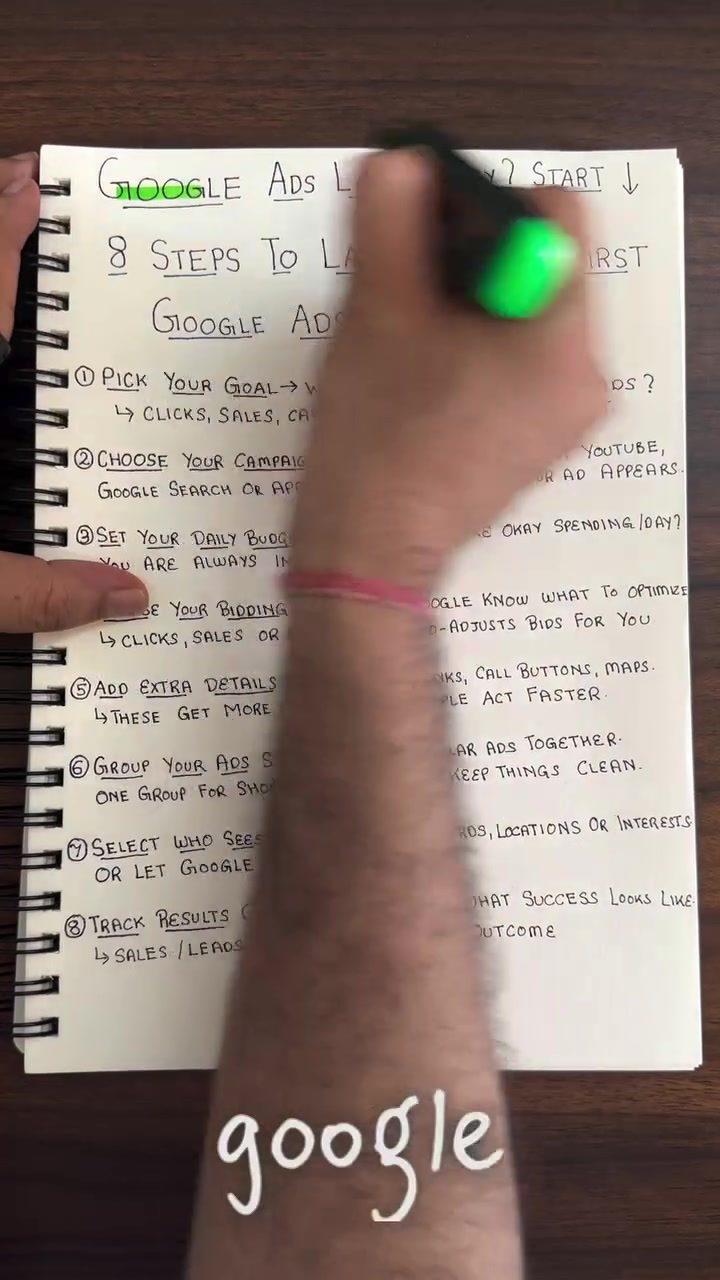
Launching Your First Google Ads Campaign: A Step-by-Step Guide
Diving into the world of online advertising can be daunting, especially when it comes to platforms like Google Ads. However, with a structured approach, launching your first campaign can be a straightforward process. This guide will walk you through the eight essential steps to get your Google Ads campaign up and running.
Why This Matters
Google Ads is a powerful tool for driving traffic, generating leads, and increasing sales. Whether you're a small business owner, a marketer, or an e-commerce entrepreneur, understanding how to launch a successful Google Ads campaign can significantly impact your business growth.
The 8-Step Guide to Launching Your First Google Ads Campaign
1. Pick Your Goal
The first step in launching a Google Ads campaign is to define your goal. What do you want to achieve with your ads? Common goals include driving more website clicks, increasing sales, or generating phone calls. Google Ads can help you drive these outcomes by tailoring your campaign to your specific objectives.
2. Choose Your Campaign Type
Next, decide where you want your ads to appear. Google Ads offers several campaign types, including:
- Search Network: Ads appear on Google Search results pages.
- Display Network: Ads appear on websites, apps, and videos across the Google Display Network.
- YouTube: Ads appear on YouTube videos and channels.
- Apps: Ads appear on mobile apps.
The type you choose will determine where your ads are shown and how they are displayed.
3. Set Your Daily Budget
Setting a daily budget is crucial for managing your ad spend. Determine how much you are willing to spend per day, and rest assured that Google Ads gives you full control over your spending. You can adjust your budget at any time to ensure you stay within your financial limits.
4. Choose Your Bidding Style
Bidding is how you tell Google what you’re willing to pay for an ad click or conversion. Google Ads offers various bidding strategies, including:
- Maximize Clicks: Focuses on getting the most clicks within your budget.
- Target CPA (Cost Per Acquisition): Automatically sets bids to get as many conversions as possible at your target cost-per-acquisition.
- Maximize Conversions: Automatically optimizes bids to get the most conversions within your budget.
- Target ROAS (Return on Ad Spend): Automatically sets bids to help get the most conversions within your target return on ad spend.
5. Add Extra Details or Assets
Enhancing your ads with extra details or assets can make them more appealing and effective. Consider adding:
- Links: Direct users to specific pages on your website.
- Call Buttons: Allow users to call your business directly from the ad.
- Maps: Help users find your physical location.
These additions can increase click-through rates and encourage faster user actions.
6. Group Your Ads Smartly
Organizing your ads into logical groups can improve their performance. For example, if you sell both shoes and bags, create separate ad groups for each product category. This approach keeps your ad structure clean and makes it easier to manage and optimize your campaign.
7. Select Who Sees Your Ad
Targeting the right audience is key to the success of your campaign. You can use various targeting options, including:
- Keywords: Show your ads to users searching for specific terms.
- Locations: Target users in specific geographic areas.
- Interests: Reach users based on their interests and behaviors.
Google Ads also offers the option to let the platform explore and optimize targeting on its own, which can be beneficial if you're unsure about your target audience.
8. Track Results
Finally, set up conversion tracking to measure the success of your campaign. Define what constitutes a successful outcome, such as sales or leads, and use Google Ads' tracking tools to monitor your progress. Regularly review your results to make data-driven decisions and optimize your campaign for better performance.
Practical Tips
Use Negative Keywords
Negative keywords help exclude irrelevant searches from triggering your ads. For example, if you sell luxury shoes, you might add terms like "cheap" or "discount" as negative keywords to avoid attracting bargain hunters.
Test Different Ad Variations
A/B testing different ad variations can help you identify which elements resonate best with your audience. Experiment with different headlines, descriptions, and calls-to-action to see what drives the most engagement.
Regularly Review and Adjust Your Bids
Monitor your campaign performance regularly and adjust your bids based on the data. If certain keywords or ad groups are performing well, consider increasing your bids to capture more traffic. Conversely, reduce bids for underperforming areas to optimize your budget.
Important Takeaways
Launching your first Google Ads campaign involves setting clear goals, choosing the right campaign type, and carefully managing your budget and bids. By following these steps and continuously optimizing your campaign, you can achieve your advertising objectives and drive meaningful results for your business.
Building a Strong Foundation
These steps provide a solid foundation for launching your first Google Ads campaign. As you gain experience, you can explore more advanced features and strategies to further enhance your campaigns.
Continuous Improvement
Remember, successful advertising is an ongoing process. Regularly review your performance data, test new strategies, and make data-driven optimizations to continuously improve your campaign’s effectiveness.
Conclusion
Launching your first Google Ads campaign can seem overwhelming, but by following these eight steps, you can set up a well-structured and effective campaign. From defining your goals to tracking your results, each step plays a crucial role in driving the success of your advertising efforts. With a strategic approach and continuous optimization, you can leverage Google Ads to achieve your business objectives and grow your online presence.
Watch the Reel
Questions readers ask
What are the main types of Google Ads campaigns I can choose from?
Google Ads offers several campaign types, including Search, Display, Video, Shopping, and App campaigns. Each type serves a different purpose, such as driving website traffic, increasing brand awareness, or promoting products. Your choice should align with your specific business goals and target audience.
How do I determine the right budget for my Google Ads campaign?
Your campaign budget should be based on your business goals, industry standards, and the expected return on investment. Start with a small budget to test the waters, and adjust based on performance data. Google Ads also allows you to set daily budgets to control your spending.
What are the different bidding strategies in Google Ads?
Google Ads offers several bidding strategies, including Cost-Per-Click (CPC), Cost-Per-Impression (CPM), Cost-Per-Acquisition (CPA), and Enhanced Cost-Per-Click (ECPC). Each strategy has its own advantages depending on whether you prioritize clicks, impressions, or conversions.
How long does it take to launch a Google Ads campaign after setup?
The time it takes to launch a Google Ads campaign after setup can vary, but it typically takes a few hours to a couple of days. This timeframe includes setting up your campaign, getting it approved by Google, and ensuring all settings are optimized for your goals.
What should I do after launching my first Google Ads campaign?
After launching your campaign, it is crucial to monitor its performance closely. Use the data from your Google Ads dashboard to see how your ads are performing. Make adjustments to your keywords, ad copy, and bidding strategies as necessary to improve your campaign's effectiveness.
Recent articles
Fresh deep dives from the latest Reels we unpacked.




Comments
Be the first to comment.