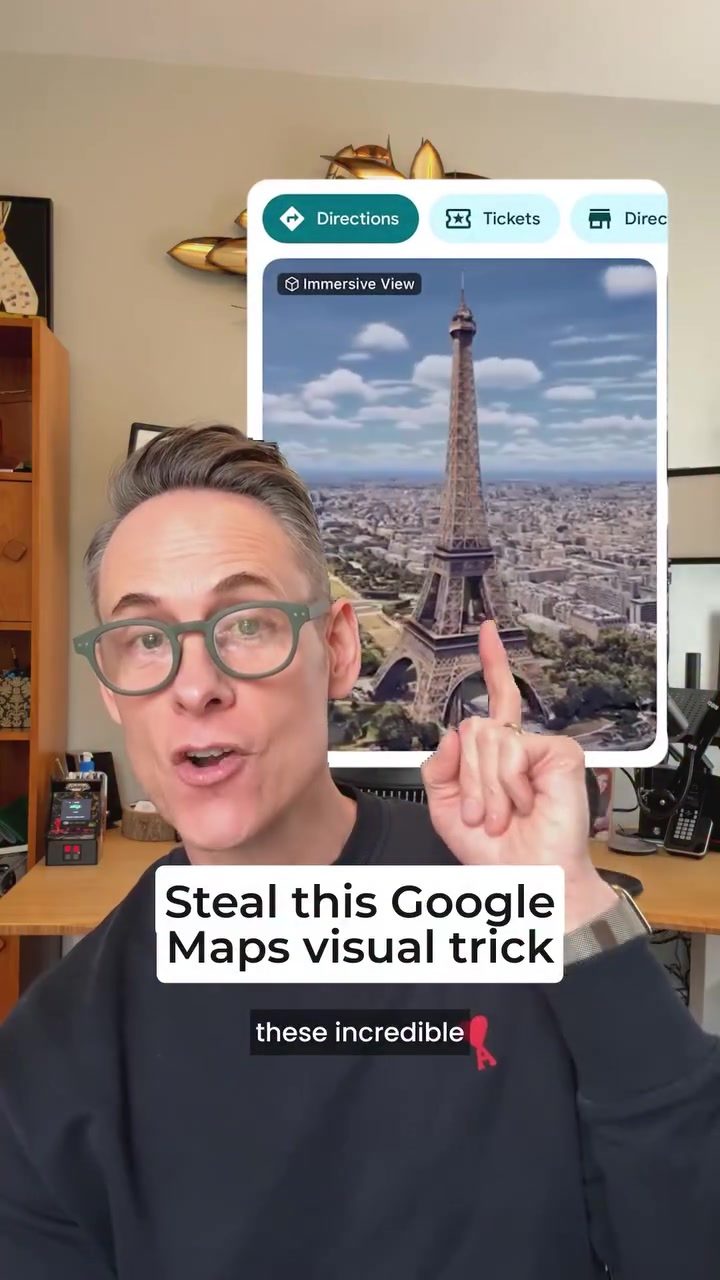
Google Maps' Immersive View is a standout feature that many businesses wish they could have on their profiles. Unfortunately, gaining access to this feature isn't straightforward. Google has to invite businesses to the program, and only a select few make the cut. However, there is a clever workaround to achieve a similar visual effect on your Google Business Profile.
Context / Why this matters
Google Maps' Immersive View offers a 360-degree, immersive experience that allows users to explore locations in a more engaging way. This feature can significantly enhance the visibility and appeal of a business. By leveraging this visual trick, you can make your Google Business Profile more attractive to potential customers, increasing engagement and potentially driving more foot traffic.
The Trick to Achieve a Similar Effect
What is Immersive View?
Before diving into the trick, it's important to understand what Immersive View is. This feature on Google Maps provides a detailed, 360-degree view of a location, allowing users to explore streets, landmarks, and businesses as if they were physically there. The immersive experience is created using advanced imagery and local data, making it a powerful tool for showcasing a business.
The Clever Workaround
While most businesses can't get the official Immersive View, there's a way to create a similar visual effect on your Google Business Profile. The trick involves using a drone to capture a video of your business and then uploading it to your Google Business Profile. Here's how you can do it:
-
Get a Drone Video: Find someone with a drone—it could be a neighbor's tech-savvy nephew—to film your business from various angles. The goal is to capture a comprehensive view that mimics the immersive experience.
-
Upload to Google Business Profile: Once you have the video, upload it to your Google Business Profile. This will give potential customers a similar immersive experience, making your profile stand out from the rest.
Practical Tips
Here are some additional tips to help you achieve the best results:
- Quality Matters: Ensure the drone video is of high quality. A shaky or low-resolution video can deter potential customers rather than attract them.
- Angle and Coverage: Make sure the video covers all essential parts of your business. A well-rounded view can give customers a better idea of what to expect.
- Optimize for Mobile: Since many users will view your video on mobile devices, ensure it's optimized for smaller screens. This includes clear visuals and a decent frame rate.
Examples and Success Stories
The trick has been used by various businesses to enhance their Google Business Profiles. For instance, a gas station on a highway in Michigan used this method to create a visual experience similar to the official Immersive View. The result was a more engaging profile that attracted more customers.
Important Takeaways
- Accessibility: While the official Immersive View is exclusive, this trick makes a similar effect accessible to all businesses.
- Engagement: An engaging visual experience can significantly boost customer interest and engagement.
- Ease of Use: The process is straightforward and doesn't require any special skills or equipment beyond a drone.
Conclusion
Enhancing your Google Business Profile with an immersive visual experience is now more achievable than ever. By using a drone to capture a video of your business and uploading it to your profile, you can create a similar effect to Google Maps' Immersive View. This trick can make your profile stand out, attract more customers, and ultimately drive more business. Don't miss out on this opportunity to elevate your online presence and engage with your audience in a more meaningful way.
Watch the Reel
Questions readers ask
What is the benefit of adding a 360-degree drone video to my Google Business Profile?
Adding a 360-degree drone video to your Google Business Profile can provide potential customers with an immersive view of your business, making it more appealing and engaging. This can draw more visitors to your profile and potentially increase foot traffic to your physical location. It also helps to differentiate your business from competitors who may not have this feature.
How does a drone video on my Google Business Profile mimic Google Maps' Immersive View?
By capturing a 360-degree perspective of your business using a drone, you create a panoramic video that users can explore, similar to the immersive experience offered by Google Maps. While it doesn't replace the full functionality of Google Maps' Immersive View, it provides a comparable level of engagement and visualization for users exploring your business profile.
Can I upload any video to my Google Business Profile to achieve this immersive effect?
To achieve the best results, use a 360-degree video captured with a drone. This type of video provides a comprehensive view of your business and its surroundings, enhancing the visual appeal. Regular videos may not offer the same immersive experience and may not be as effective in attracting and engaging potential customers.
What are the steps to upload a drone video to my Google Business Profile?
First, capture a high-quality 360-degree video of your business using a drone. Ensure the video is well-lit and shows off the best features of your location. Then, log in to your Google Business Profile, navigate to the 'Photos' section, and select 'Add Photo/Video.' Choose the drone video from your files and upload it. Make sure to include relevant descriptions to help users understand what they are viewing.
Is there a specific time of day that is best for filming a drone video of my business?
The best time to film a drone video of your business is typically during daylight hours when the lighting is optimal. This ensures that the video is well-lit and visually appealing. Avoid filming during peak hours when there might be too much foot or vehicle traffic, as this can obscure the view of your business. Additionally, consider the times when your business looks most attractive, such as when it is bustling with activity or showcasing its unique features.
How can an immersive drone video improve my business's appeal on Google Maps?
An immersive drone video can greatly enhance your business's appeal by providing a more engaging and dynamic way for potential customers to explore your location. This can increase the likelihood of them visiting your business in person. Additionally, a well-made video can make your Google Business Profile stand out from competitors, leading to higher engagement and better visibility in search results.
Related deep dives
Similar reads based on topic and creator.



Recent articles
Fresh deep dives from the latest Reels we unpacked.


Comments
Be the first to comment.